

ByteGuard - Password Manager
ByteGuard - Password Manager is made and published by 可文 麦. AppBrain is an independent app data site and isn't affiliated with 可文 麦. The app name, icon, screenshots and description belong to 可文 麦 and are shown as published on the App Store.
AppBrain's verdict
- Rating on App Store
- 5.00
- 1 ratings
- Last updated
- June 17, 2026
- Size
- 24.1 MB
It doesn't have enough ratings yet to judge what users think.
User feedback
Ratings and reviews on the App StoreComments on ByteGuard - Password Manager for iOS
We don't have enough comments to show example comments. Please check back later.
Store listing
By 可文 麦, from the App Store





Description by 可文 麦 Written by the developer, not by AppBrain. Click to read.
KEY FEATURES
◆ MILITARY-GRADE SECURITY
• Zero-knowledge architecture: all encryption happens locally
• AES-256-GCM encryption with Argon2id key derivation
• Dual protection: Master Password + Secret Key
• Biometric unlock (Face ID / Touch ID / Optic ID)
• Auto-lock when you leave the app
• Privacy screen protection in app switcher
• Compatible with Apple Lockdown Mode
◆ SMART PASSWORD MANAGEMENT
• Store unlimited passwords, cards, notes & identities — free
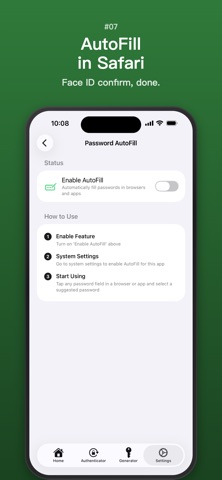
• One-tap AutoFill in Safari and apps
• Smart matching of associated domains for the same service
• Auto-prompt to save new passwords from browsers (iOS 26.2+)
• Powerful password generator with random characters or memorable passphrases
• Password history tracking
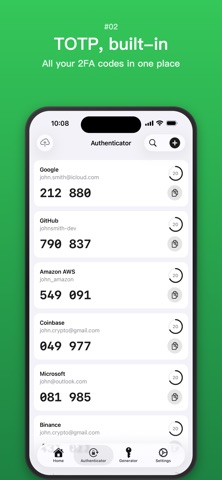
◆ BUILT-IN AUTHENTICATOR
• 2FA/TOTP & HOTP code generator
• Works as your standalone authenticator app
• Auto-copy codes + system-level one-tap AutoFill (iOS 18.0+)
• SHA-1, SHA-256 & SHA-512 support
◆ PASSKEY SUPPORT
• Create, store and use passkeys for passwordless sign-in
• Works across browsers and apps
• Syncs via iCloud to all your devices
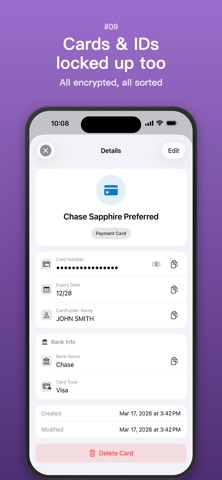
◆ STORE MORE THAN PASSWORDS
• Bank cards, identity documents & secure notes
• API keys, software licenses & OAuth tokens
• Organize with custom tags
• Recover deleted items for 30 days
◆ MULTIPLE VAULTS
• Separate vaults for personal, work & family
• Each vault has independent encryption & Secret Key
• Quick switch between vaults
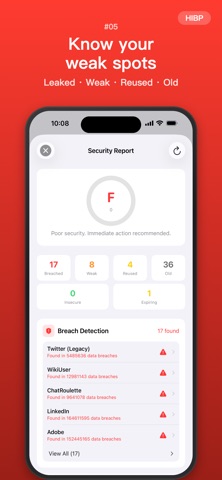
◆ SECURITY REPORT
• Password strength analysis, duplicate detection & expiration alerts
• HTTP-only site detection
• Data breach monitoring via Have I Been Pwned
• 2FA coverage check
• At-a-glance security summary on home screen
• Overall security score (0–100)
◆ SYNC & BACKUP
• Optional iCloud sync across all your Apple devices
• End-to-end encrypted cloud backup
• Import from 1Password, Bitwarden, LastPass, Dashlane, KeePass & Apple Keychain
• Export to CSV, JSON or encrypted .bytegx
◆ PRIVACY FIRST
• No account required to start
• No tracking, no analytics, no ads
• Your data never leaves your device unencrypted
• Works fully offline
◆ WIDGETS & SPOTLIGHT
• Quick-access widget with vault stats / color-coded digits & symbols
• Password generator widget with one-tap copy
• Spotlight search for instant access
WHY BYTEGUARD?
ByteGuard uses a zero-knowledge architecture. Your master password never leaves your device, and all encryption happens locally. Only you can access your data.
FREE PLAN
• Unlimited passwords, cards, notes & identities
• Unlimited 2FA codes
• Biometric unlock & AutoFill
• Password generator & auto-lock
PREMIUM (upgrade anytime)
• iCloud sync & cloud backup
• Unlimited vaults (free: up to 3)
• Batch import & export
• Data breach detection
• Full security report
• Custom themes
Start with a 30-day free trial of all premium features. No credit card required. Monthly ($0.99), Yearly ($5.99), or Lifetime ($9.99) — pay once, use forever.
---
Terms of Service: https://bytelink.online/en/terms
Privacy Policy: https://bytelink.online/en/privacy
Support: hellobyteguard@gmail.com
Safety and technology
Found in the app by AppBrain- Price
- Free
- App size
- 24.1 MB
- Content rating
- Everyone
Technologies used by ByteGuard - Password Manager
Releases
Updates seen on the App Store- Version
- 2.5.0
- Launched
- January 2026
No changelog data
Alternatives
Similar apps and more from 可文 麦Alternatives to ByteGuard - Password Manager


More from 可文 麦


Rankings
App Store top chartsApp Store Rankings for ByteGuard - Password Manager
About the app and developer
About ByteGuard - Password Manager
ByteGuard - Password Manager is a productivity app developed by 可文 麦.
User Ratings
ByteGuard - Password Manager is rated 5.00 out of 5 stars. The rating is based on one rating ratings.
App Information
ByteGuard - Password Manager is freely available from the App Store. The app size is 24.12 MB. The latest version available is 2.5.0. The last update was on June 17, 2026.
Technical Requirements
The app has a content rating of Everyone. The app has been available on the App Store since January 2026.
Developer information for 可文 麦
Address:
Frequently asked questions about ByteGuard - Password Manager
Is ByteGuard - Password Manager free?
Yes. ByteGuard - Password Manager is free on the App Store.
Is ByteGuard - Password Manager still available?
Yes. ByteGuard - Password Manager is on the App Store, and the last update we saw was on June 17, 2026.
How large is ByteGuard - Password Manager?
ByteGuard - Password Manager is 24.12 MB.
Is ByteGuard - Password Manager suitable for children?
App Store rates the content of ByteGuard - Password Manager as suitable for everyone.
How do people rate ByteGuard - Password Manager?
ByteGuard - Password Manager has one rating of 5.00 stars on the App Store.
Who made ByteGuard - Password Manager?
ByteGuard - Password Manager was developed by 可文 麦. It is listed in the productivity category on the App Store.
What are the best alternatives to ByteGuard - Password Manager?
People looking at ByteGuard - Password Manager also look at these productivity apps: Authenticator 2FA & OTP – Ring, FastKey - Password Manager, Inventory tracker smart, Epiphany: Voice Memos & Tasks, 深港+.