AppBrain
AppBrain
  • Apps
  • Apps being viewed right now Trending apps today Most popular apps All-time most installed apps Top rated apps iPhone and iPad apps
  • Intelligence ▾
    Intelligence overview → Track any Android app or your whole market
    Track & analyze
    Keyword Tracker & OptimizerTrack & improve Play rankings App Performance ReportOne-off PDF for any app StatisticsFree Android & Play market stats
    Promote your app
    Featured Apps App Links
  • Intelligence
  • Pricing
  • Dashboard
  • Sign up
  • Log in
App Store Apps > Photo & Video > C (shutter) Camera
App profile & analytics · Photo & Video · Data updated 2026-10-08
C (shutter) Camera icon

C (shutter) Camera

by Satomi Nakaoka · Free · Version 1.5
Availability On the App Store since February 2026 ↗
Rating on App Store
–
Rating
–
0 reviews
Best rank
–
not in the top lists
Last updated
October 7, 2026
1.5

C (shutter) Camera is made and published by Satomi Nakaoka. AppBrain is an independent app data site and isn't affiliated with Satomi Nakaoka. The app name, icon, screenshots and description belong to Satomi Nakaoka and are shown as published on the App Store.

About C (shutter) Camera

C (shutter) Camera is a photo & video app developed by Satomi Nakaoka.

User Ratings

The app has no ratings yet.

App Information

C (shutter) Camera is freely available from the App Store. The app size is 3.66 MB. The latest version available is 1.5. The last update was on October 7, 2026.

Technical Requirements

The app has a content rating of Everyone. The app has been available on the App Store since February 2026.

Description by Satomi Nakaoka (from the App Store)
Give your shutter a sound of its own.
C Camera lets you choose the sound you hear when taking photos, with simple photo and video controls for iPhone and iPad.

MAKE YOUR SHUTTER SOUND YOUR OWN
Record a voice or sound with the microphone, or import an audio file from your device. Audio is trimmed to a maximum of three seconds. You can also choose built-in sounds or the standard iOS shutter sound.
Take up to five photos per day with a custom sound for free. Upgrade to Pro to remove the daily limit.

AUTOMATIC LOW-LIGHT EXPOSURE
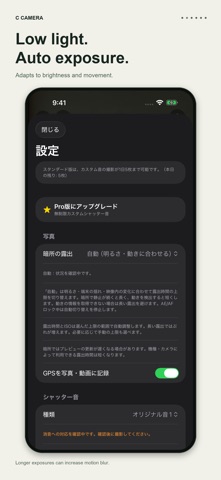
Automatic mode changes the maximum exposure time based on brightness, device movement, and changes in the preview. It allows longer exposures when a dark scene stays still and shorter exposures when movement is detected. It avoids long exposures when movement information is unavailable.
You can also choose Motion, Handheld, or Low Light / Still limits manually. Longer exposures can blur camera movement or moving subjects.

INTUITIVE ZOOM AND FOCUS
Tap a magnification button, or press and hold or slide sideways to open the arc-shaped zoom dial. Pinch zoom is also supported.
Tap the preview to focus and expose. Press and hold for AE/AF lock. Available zoom ranges and focus controls depend on the device and camera.

QUIET PHOTO CAPTURE WITH PRO
On supported devices, OS versions, and environments, this mode suppresses the system shutter sound while using the photo capture pipeline. App sounds, timer sounds, vibration, and flash are also disabled in this mode.
Quiet capture is not available on every device or in every region. Unsupported environments show a message and stop the capture.

UP TO 4K AT 60 FPS
Choose 4K or 1080p video at 30 or 60 fps. Supported configurations also offer 10-bit HDR video in HLG. Resolution, frame rate, and HDR availability depend on the device and camera configuration.

LOCATION AND PHOTO TIMER
Choose whether to record GPS location in photos and videos. Use a three- or ten-second timer for photos.

ABOUT PHOTO CAPTURE
Photos taken with custom or built-in sounds are saved from video frames. Their resolution and image quality may differ from standard-sound photos or supported quiet photos. Sound customization applies to photos; changing video start and stop sounds is not supported.

Requires iOS or iPadOS 18.6 or later. The current in-app controls are displayed in Japanese; these English descriptions explain their functions. Please respect people around you and the rules of the place where you take photos.
Show more Show less

Screenshots

C (shutter) Camera Screenshot 1 of 6
C (shutter) Camera Screenshot 2 of 6
C (shutter) Camera Screenshot 3 of 6
C (shutter) Camera Screenshot 4 of 6
C (shutter) Camera Screenshot 5 of 6
C (shutter) Camera Screenshot 6 of 6
Screenshots by Satomi Nakaoka, from the the App Store listing
Official page on the App Store

Alternatives to C (shutter) Camera

Lumio — Fast Camera icon Lumio — Fast Camera
永 张
0.0
Free
Custom Camera: Shutter Sounds icon Custom Camera: Shutter Sounds
Taisuke Hosokawa
0.0
Free
Photo Light(色味を選べる自撮りライト) icon Photo Light(色味を選べる自撮りライト)
Sota Fukuhara
0.0
Free
CafeGrid icon CafeGrid
Ryoga Oki
0.0
Free
推し活カメラ icon 推し活カメラ
Ryosuke Yoshioka
0.0
Free
roll of film icon roll of film
Pappy GmbH
0.0
Free
FredCam - Pro Film Looks icon FredCam - Pro Film Looks
Frederik Trojahn
0.0
Free
Fast Shutter icon Fast Shutter
Yi Liu
0.0
Free

More from Satomi Nakaoka

ReloadOne icon ReloadOne
Satomi Nakaoka
0.0
Free

Changelog of C (shutter) Camera

No changelog data

Developer information for Satomi Nakaoka

Satomi Nakaoka

Address:

Share C (shutter) Camera

Comments on C (shutter) Camera for iOS

We don't have enough comments to show example comments. Please check back later.

App Store Rankings for C (shutter) Camera

This app is not ranked

Technologies used by C (shutter) Camera

Popular Photo & Video Apps Apps other people are watching Top new apps Today's trending apps Price drops on Google Play
Lumio — Fast Camera icon Lumio — Fast Camera
Custom Camera: Shutter Sounds icon Custom Camera: Shutter Sounds
Photo Light(色味を選べる自撮りライト) icon Photo Light(色味を選べる自撮りライト)
CafeGrid icon CafeGrid
推し活カメラ icon 推し活カメラ
roll of film icon roll of film
FredCam - Pro Film Looks icon FredCam - Pro Film Looks
Fast Shutter icon Fast Shutter
Overview Alternatives Reviews Rankings Technology
AppBrain Intelligence premium content

Subscribe now to get full and unlimited access to AppBrain Intelligence. You'll have access to:

  • App Intelligence dashboard (performance timeline, competitor comparison, country rankings, insight cards)
  • Detailed ranking data per app
  • Full timeline per developer
  • Device market shares data per country
  • Unlimited keyword tracking
1 Month

$75/mo
(billed every month)

SAVE 0%
Subscribe
3 Months

$65/mo
($195 billed every 3 months)

SAVE 13%
Subscribe
1 Year

$57.50/mo
($690 billed every year)

SAVE 23%
Subscribe
Each subscription will automatically renew 3 days before the expiration date for the same time period. Subscriptions can be cancelled at any time before the renewal.

AppBrain is an app data site, we track rankings, ratings, installs for all apps and games on Google Play and the App Store. AppBrain doesn't host app files or APKs, all install links go directly to the official store. All trademarks are owned by their respective owners.

More apps

  • Top Android apps being viewed
  • Vox9 Audiobooks
  • View Wonder Skies
  • Spades Pro

App statistics

  • Android statistics
  • Google Play Developer stats
  • Trending Android Apps
  • Trending iOS apps
  • Top popular Apps
  • Buy the best Android phone
  • Buy & sell app businesses

About AppBrain

  • Contact
  • Privacy
  • Documentation
  • DMCA takedowns
  • Articles
  • Blog
  • Android Interstitial Ads: Best practices to optimize your app's earnings
© 2010-2026 - AppBrain