

CadnaR.scan
CadnaR.scan is made and published by DataKustik GmbH. AppBrain is an independent app data site and isn't affiliated with DataKustik GmbH. The app name, icon, screenshots and description belong to DataKustik GmbH and are shown as published on the App Store.
AppBrain's verdict
- Last updated
- March 12, 2024
Rankings
App Store top chartsApp Store Rankings for CadnaR.scan
Releases
Updates seen on the App Store- Version
- 1.0
- Launched
- March 2024
No changelog data
User feedback
Ratings and reviews on the App StoreComments on CadnaR.scan for iOS
We don't have enough comments to show example comments. Please check back later.
Technology
Found in the app by AppBrain- Price
- Free
- App size
- 1.99 MB
- Content rating
- Everyone
Technologies used by CadnaR.scan
About the app and developer
About CadnaR.scan
CadnaR.scan is a productivity app developed by DataKustik GmbH.
User Ratings
The app has no ratings yet.
App Information
CadnaR.scan is freely available from the App Store. The app size is 1.99 MB. The latest version available is 1.0. The last update was on March 12, 2024.
Technical Requirements
The app has a content rating of Everyone. The app has been available on the App Store since March 2024.
Developer information for DataKustik GmbH
Address:
Frequently asked questions about CadnaR.scan
Is CadnaR.scan free?
Yes. CadnaR.scan is free on the App Store.
Is CadnaR.scan still available?
Yes. CadnaR.scan is on the App Store, and the last update we saw was on March 12, 2024.
How large is CadnaR.scan?
CadnaR.scan is 1.99 MB.
Is CadnaR.scan suitable for children?
App Store rates the content of CadnaR.scan as suitable for everyone.
Who made CadnaR.scan?
CadnaR.scan was developed by DataKustik GmbH. It is listed in the productivity category on the App Store.
Store listing
By DataKustik GmbH, from the App Store
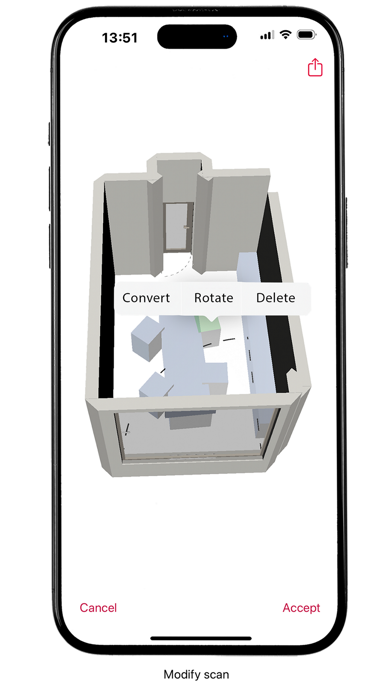


Description by DataKustik GmbH Written by the developer, not by AppBrain. Click to read.
Main functions at a glance:
ROOM CAPTURE (LiDAR sensor required)
- Augmented reality-based scanning of floor plans for iPhone and iPad*:
Quickly create simplified 3D scans of rooms and entire floors, including walls, built-in wall elements, and objects in the room.
- Real-time feedback: The intelligent dollhouse visualization at the bottom of the application shows the progress of the scan during room capture. This way, you can always keep track of captured objects.
*Scanning rooms requires a device with a LiDAR sensor and at least iOS 16. If these requirements are not met, features such as 3D editing and sharing of imported scans are available.
MANAGE SCANS
- Keep track of your room scans using the clear list view. Here you can share and edit files, as well as switch to the detailed view of the selected 3D scan with a simple tap of your finger.
3D VIEW
- Navigate through your room virtually in the 3D view, make changes as needed with basic editing tools, and share your planning directly from this view – without detours.
SHARE/EXPORT ROOM SCANS
- Share 3D scans selectively: Decide what should be exported – only the architecture or the entire scan?
- The export format (.EOX) enables direct further processing in our room acoustics software CadnaR.