




AppBrain's verdict
EstablishedLoved by users- Rating on App Store
- 4.76
- 840 ratings
- Last updated
- October 21, 2026
- Size
- 3.88 MB
Users love it: 4.8 stars from 840 ratings.
User feedback
Ratings and reviews on the App StoreComments on Cal Printer • Print Calendar for iOS
We don't have enough comments to show example comments. Please check back later.
Store listing
By Richard McKenna, from the App StoreDescription by Richard McKenna Written by the developer, not by AppBrain. Click to read.
Cal Printer works with the calendars and reminders already on your device — there's no new calendar to set up and no account required. Perfect for printing family calendars, work schedules, appointments, monthly planners, weekly schedules and reminders.
PRINT YOUR APPLE CALENDAR
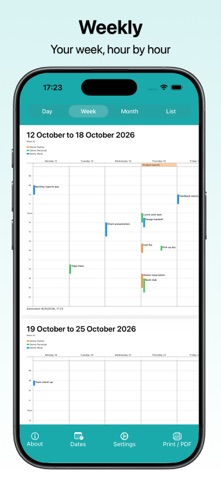
Need to print your calendar from your iPhone or iPad? Cal Printer makes it simple. Choose the calendars you want to include, select a date range and print a clear paper copy in Day, Week, Month or List format.
If you use Google Calendar, Exchange or other calendar accounts with the Calendar app on your device, those calendars can also be selected and printed.
PRINT YOUR REMINDERS
Cal Printer isn't just for calendars. Print your Apple Reminders and to-do lists too, giving you a convenient paper copy of your tasks.
PERFECT FOR FAMILY CALENDARS
Keep everyone organised with a printed family calendar. Print a weekly or monthly calendar for the fridge, kitchen or wall so everyone can see what's coming up at a glance.
GREAT FOR WORK, DIARIES & APPOINTMENTS
Need a physical copy of your work schedule, diary or appointments? Select the dates you need and create a clear printed record of your calendar events.
SAVE OR SHARE AS PDF
Don't have a printer nearby? Export your calendar or reminders as a PDF to save, email, share or print later.
USE THE CALENDARS YOU ALREADY HAVE
There's nothing new to set up. Cal Printer uses the calendars already available on your iPhone or iPad, so you don't need to copy your events into another calendar app.
SIMPLE CALENDAR PRINTING
• Day, Week, Month and List views
• Print calendars directly from your iPhone or iPad
• Print Reminders and to-do lists
• Choose which calendars to include
• Select the date range you want to print
• Print monthly and weekly schedules
• Print family calendars and work schedules
• Save and share as PDF
• Print using AirPrint
• No new calendar or account to set up
Whether you want to print an Apple Calendar from your iPhone, put a monthly family calendar on the fridge, print your weekly work schedule, keep a paper copy of upcoming appointments or print your Reminders, Cal Printer makes it quick and easy.
Safety and technology
Found in the app by AppBrain- Price
- Free
- App size
- 3.88 MB
- Content rating
- Everyone
Technologies used by Cal Printer • Print Calendar
Releases
Updates seen on the App Store- Version
- 2.7
- Launched
- March 2017
No changelog data
Alternatives
Similar apps and more from Richard McKennaAlternatives to Cal Printer • Print Calendar



Rankings
App Store top chartsApp Store Rankings for Cal Printer • Print Calendar
About the app and developer
About Cal Printer • Print Calendar
Cal Printer • Print Calendar is a productivity app developed by Richard McKenna.
User Ratings
Cal Printer • Print Calendar is rated 4.76 out of 5 stars. The rating is based on 840 ratings.
App Information
Cal Printer • Print Calendar is freely available from the App Store. The app size is 3.88 MB. The latest version available is 2.7. The last update was on October 21, 2026.
Technical Requirements
The app has a content rating of Everyone. The app has been available on the App Store since March 2017.
Cal Printer • Print Calendar is made and published by Richard McKenna. AppBrain is an independent app data site and isn't affiliated with Richard McKenna. The app name, icon, screenshots and description belong to Richard McKenna and are shown as published on the App Store.
Developer information for Richard McKenna
Address: