

calc.pw is made and published by Kevin Niehage. AppBrain is an independent app data site and isn't affiliated with Kevin Niehage. The app name, icon, screenshots and description belong to Kevin Niehage and are shown as published on the App Store.
AppBrain's verdict
- Last updated
- December 15, 2025
- Size
- 838.0 KB
User feedback
Ratings and reviews on the App StoreComments on calc.pw for iOS
We don't have enough comments to show example comments. Please check back later.
Store listing
By Kevin Niehage, from the App Store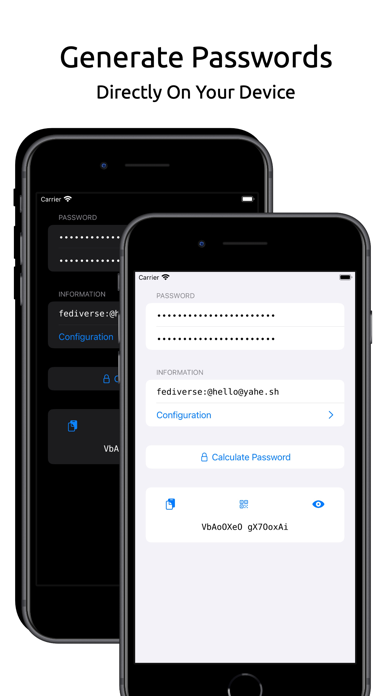


Screenshots by Kevin Niehage, from the the App Store listing
Description by Kevin Niehage Written by the developer, not by AppBrain. Click to read.
***** Introduction *****
calc.pw generates passwords based on a single strong password and a service-dependent information. Use individual strong passwords for all of your devices and online services without reusing the same password, having to remember random passwords or having to care for password database backups. With the same password and the same information you will always generate the same password again. Easy and secure, directly on your mobile device.
***** How to use *****
1.) Enter a strong password that you can remember.
2.) Repeat the same strong password to make sure that you entered it correctly.
3.) Enter a service-dependent information. This can be anything that you can easily remember, like the domain of an online service, your account name for that service, etc.
4.) Configure the strength of the generated password: Set the length of the calculated password. Set the character set of the calculated password. This way you can decide which characters can occur in the generated password. You can define single characters or whole ranges by connecting them with a minus sign (e.g. "0-9" or "A-Z" or "a-z"). Character sets consist of groups that are separated by spaces. Enforce that all defined character groups of the character set are contained within the calculated password. If you require a special character in the password, then add it as a new character group to the character set (e.g. "0-9 A-Z a-z !*#"). After a password has been generated, the default will be preset again or you can save your configuration as the new default.
5.) Generate the password by tapping the "Calculate Password" button.
6.) Copy the calculated password to the clipboard by tapping on the copy-to-clipboard button.
7.) Display the calculated password by tapping on the eye button.
8.) Generate a QR code by tapping on the QR code button to transfer the calculated password to another device.
***** Acknowledgements *****
This app uses the DejaVu fonts 2.37 (c) 2004-2016 DejaVu fonts team.
calc.pw generates passwords based on a single strong password and a service-dependent information. Use individual strong passwords for all of your devices and online services without reusing the same password, having to remember random passwords or having to care for password database backups. With the same password and the same information you will always generate the same password again. Easy and secure, directly on your mobile device.
***** How to use *****
1.) Enter a strong password that you can remember.
2.) Repeat the same strong password to make sure that you entered it correctly.
3.) Enter a service-dependent information. This can be anything that you can easily remember, like the domain of an online service, your account name for that service, etc.
4.) Configure the strength of the generated password: Set the length of the calculated password. Set the character set of the calculated password. This way you can decide which characters can occur in the generated password. You can define single characters or whole ranges by connecting them with a minus sign (e.g. "0-9" or "A-Z" or "a-z"). Character sets consist of groups that are separated by spaces. Enforce that all defined character groups of the character set are contained within the calculated password. If you require a special character in the password, then add it as a new character group to the character set (e.g. "0-9 A-Z a-z !*#"). After a password has been generated, the default will be preset again or you can save your configuration as the new default.
5.) Generate the password by tapping the "Calculate Password" button.
6.) Copy the calculated password to the clipboard by tapping on the copy-to-clipboard button.
7.) Display the calculated password by tapping on the eye button.
8.) Generate a QR code by tapping on the QR code button to transfer the calculated password to another device.
***** Acknowledgements *****
This app uses the DejaVu fonts 2.37 (c) 2004-2016 DejaVu fonts team.
Safety and technology
Found in the app by AppBrain- Price
- Free
- App size
- 838.0 KB
- Content rating
- Everyone
Technologies used by calc.pw
Releases
Updates seen on the App Store- Version
- 1.5.6
- Launched
- December 2025
No changelog data
Alternatives
Similar apps and more from Kevin NiehageMore from Kevin Niehage

Rankings
App Store top chartsApp Store Rankings for calc.pw
This app is not ranked
About the app and developer
About calc.pw
calc.pw is an utilities app developed by Kevin Niehage.
What is the rating of calc.pw?
calc.pw has no ratings yet.
Is calc.pw free?
calc.pw is free. The app size is 838.00 kB. The latest version available is 1.5.6. The last update was on December 15, 2025.
What are the requirements for calc.pw?
The app has a content rating of Everyone. The app has been available on the App Store since December 2025.
Developer information for Kevin Niehage
Address: