

Calclin is made and published by Azukid.com. AppBrain is an independent app data site and isn't affiliated with Azukid.com. The app name, icon, screenshots and description belong to Azukid.com and are shown as published on the App Store.
AppBrain's verdict
Established- Rating on App Store
- 2.00
- 1 ratings
- Last updated
- July 14, 2026
It doesn't have enough ratings yet to judge what users think.
Rankings
App Store top chartsApp Store Rankings for Calclin
Competitors
Similar apps and more from Azukid.comAlternatives to Calclin


More from Azukid.com



Releases
Updates seen on the App Store- Version
- 2.3.1
- Launched
- August 2010
No changelog data
User feedback
Ratings and reviews on the App StoreComments on Calclin for iOS
We don't have enough comments to show example comments. Please check back later.
Technology
Found in the app by AppBrain- Price
- Free
- App size
- 8.12 MB
- Content rating
- Everyone
Technologies used by Calclin
About the app and developer
About Calclin
Calclin is a productivity app developed by Azukid.com.
User Ratings
Calclin is rated 2.00 out of 5 stars. The rating is based on one rating ratings.
App Information
Calclin is freely available from the App Store. The app size is 8.12 MB. The latest version available is 2.3.1. The last update was on July 14, 2026.
Technical Requirements
The app has a content rating of Everyone. The app has been available on the App Store since August 2010.
Developer information for Azukid.com
Address:
Frequently asked questions about Calclin
Is Calclin free?
Yes. Calclin is free on the App Store.
Is Calclin still available?
Yes. Calclin is on the App Store, and the last update we saw was on July 14, 2026.
How large is Calclin?
Calclin is 8.12 MB.
Is Calclin suitable for children?
App Store rates the content of Calclin as suitable for everyone.
How do people rate Calclin?
Calclin has one rating of 2.00 stars on the App Store.
Who made Calclin?
Calclin was developed by Azukid.com. It is listed in the productivity category on the App Store.
What are the best alternatives to Calclin?
People looking at Calclin also look at these productivity apps: Latched - Did I Lock It?, ieRcalc, Lock In - Stop Procrastinating, Counter - One-Tap Counter, AI CelebVoicer - Voice Cloning.
Store listing
By Azukid.com, from the App Store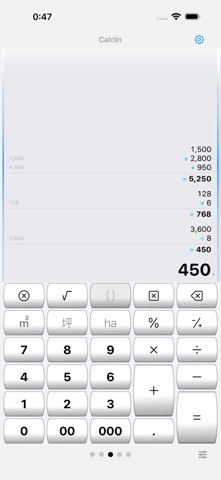

Description by Azukid.com Written by the developer, not by AppBrain. Click to read.
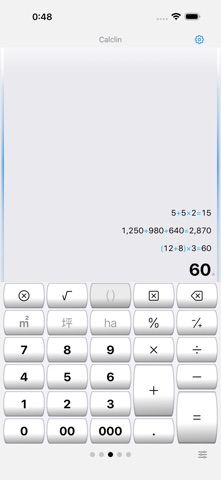
■ Calculator mode and Formula mode
Calculator mode evaluates left to right (5+5×2=20). Formula mode respects operator precedence (5+5×2=15) and supports parentheses and roots. Switch anytime from the input row, changing the calculation style without leaving the active input area.
■ Paper-roll style history
Expressions and answers stay on the roll from the top, so you can see the flow of your calculation at a glance. Subtle side lines and top shading keep each frame easy to distinguish, even with multiple rolls. In calculator mode, a running total can be shown while you type.
■ Edit rows and add notes
In calculator mode, tap any roll row to edit and recalculate. Add a note to any history entry. Swipe left to delete; swipe right to add a memo, copy the expression, or copy the answer.
■ PDF export
Export a calculation roll as a PDF whenever you want to keep it.
■ Use multiple calculators side by side
Up to a triple deck. Add or remove panels with the [+][−] header buttons, swipe or tap to switch, and double-tap to toggle between 1-panel and 2-panel views.
■ Unit-aware calculations
Calculate with units of length, area, volume, and weight.
■ Customizable keyboard
Long-press any key to define it, and merge keys vertically or horizontally to create larger keys. Switch between 5 layouts (30 keys each), and export or import your arrangement.
■ Flexible display settings
Choose the decimal point and grouping symbols, the grouping style (every 3 or 4 digits, Indian style), the number of decimal digits, and the rounding mode (including round half to even). Pick Auto, Light, or Dark appearance, and enlarge or reduce text size. Your settings are restored on next launch.
■ Beginner and Expert modes
Beginner mode shows labels and tips for each button. Once you are comfortable, Expert mode unlocks advanced operations such as long-press key editing.
The calculation engine uses C/C++ fixed-point decimal, stored internally in BCD arrays.
Note: Data is not encrypted. Please do not store personal or confidential information.