Calculate Comfort is an overall app developed by JUN KANAYAMA.
How many times has Calculate Comfort been downloaded?
What is the rating of Calculate Comfort?
Calculate Comfort is rated 3.86 out of 5 stars, based on 35 ratings.
Is Calculate Comfort free?
Calculate Comfort is free to download. The APK download size is 13.17 MB. The latest version available is 5.6. The last update was on July 26, 2026.
What are the requirements for Calculate Comfort?
The app has a content rating of Everyone. The app has been available on Google Play February 2013.
Description
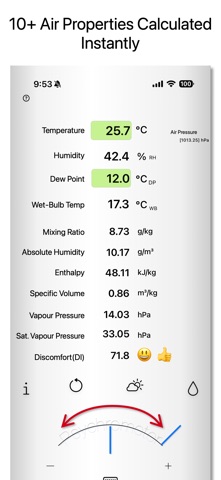
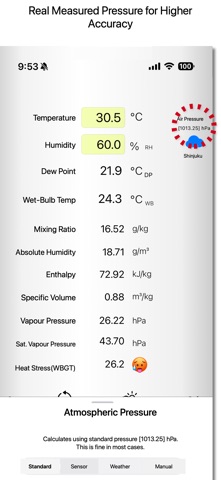
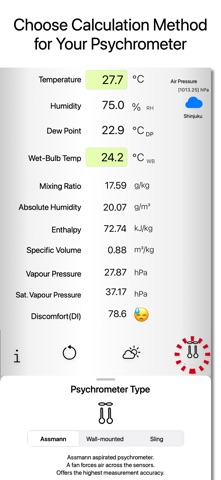
This app calculates comfort levels by evaluating heat, cold, dryness, and moisture. You can easily adjust values using a dial. Results are visually displayed using color and emoji indicators. By inputting temperature and humidity, dew point, or wet-bulb temperature, the app calculates the following air conditions: Relative Humidity (%RH) Dew Point / Frost Point Temperature (°C DP / °C FP) Wet-Bulb Temperature (°C WB) Mixing Ratio (g/kg) Absolute Humidity (g/m³) Enthalpy (kJ/kg) Specific Volume (m³/kg) Vapor Pressure (hPa) Saturated Vapor Pressure (hPa) Discomfort Index (DI) Wet-Bulb Globe Temperature (WBGT) Comfort Indicator (18–28°C, 40–70% humidity) When within the comfort range, a visual indicator using color or emoji will appear. ■ Main Features Index Toggle (DI / WBGT) Tap the DI section to switch between Discomfort Index and WBGT. Atmospheric Pressure Input Tap the pressure icon to select from: Standard (1013.25 hPa) Sensor (reads from internal barometer) Weather Data (auto-fetched) Manual Entry (800–1200 hPa, or 23–36 inHg with Pro) Input Switching (% Icon) Switch between relative humidity, dew point, or wet-bulb temperature. In dew point mode, long-press to choose between dew point (condensation) and frost point (ice). In wet-bulb mode, long-press to select psychrometer type: ・Assmann (ventilated, high accuracy) ・August (non-ventilated, simple) ・Sling (manual rotation) When below 0°C, a freeze switch appears (automatic freeze below -10°C for Sling type). You can toggle freezing manually to match actual conditions. Weather Auto-Fetch (Weather Icon) Uses location to retrieve temperature and humidity from weather data. Displays the comfort temperature screen. Shows the recommended indoor temperature based on the outside temperature. Long-press to choose the provider: OpenWeatherMap or Apple Weather.
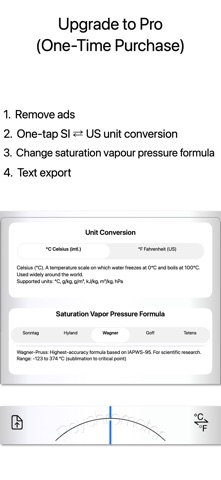
Reset (Circular Arrow Icon) Restores default values (set in settings). Psychrometer resets to Assmann. Long-press to set your own default temperature/humidity. Info (i Icon) Opens help and purchase screen. – Pro Version Features – Unlock the following: ・Ad Removal Removes all ads. ・Unit Conversion Switch between SI and US units: °C ↔ °F g/kg ↔ gr/lb g/m³ ↔ gr/ft³ kJ/kg ↔ BTU/lb m³/kg ↔ ft³/lb hPa ↔ inHg ・Export Function Export calculation results as text. Selectable saturation vapour pressure formulas (in normal use the results differ very little; they were built in for development verification) • Sonntag: high-accuracy formula adopted by the WMO. Range -65°C~100°C • Hyland-Wexler: high-accuracy formula recognised by ASHRAE. Range -100°C~100°C • Wagner-Pruss: highest-accuracy formula based on IAPWS-95, for scientific research. Range -123°C~374°C (sublimation zone – critical point) • Goff-Gratch: standard formula long used in meteorology. Range -100°C~100°C • Magnus-Tetens: approximation widely used in meteorology. Range -50°C~50°C ■ Calculation Specs Saturated Vapor Pressure: Sonntag formula Vapor Pressure: JIS Z 8806 Relative Humidity: WMO standard (denominator = vapor pressure of supercooled water) Enthalpy: ASHRAE ■ Notes Extreme inputs may cause errors. Values may slightly vary due to rounding and internal conversion. While accuracy is a priority, results are not guaranteed. The developer is not liable for any damage caused by app usage.
Each subscription will automatically renew 3 days before the expiration date for
the same time period. Subscriptions can be cancelled at any time before the renewal.