

CalculatorPro: Modes & Widgets
CalculatorPro: Modes & Widgets is made and published by Aylin Yahya-zada. AppBrain is an independent app data site and isn't affiliated with Aylin Yahya-zada. The app name, icon, screenshots and description belong to Aylin Yahya-zada and are shown as published on the App Store.
AppBrain's verdict
- Last updated
- July 15, 2026
Rankings
App Store top chartsApp Store Rankings for CalculatorPro: Modes & Widgets
Competitors
Similar apps and more from Aylin Yahya-zadaAlternatives to CalculatorPro: Modes & Widgets


More from Aylin Yahya-zada

Releases
Updates seen on the App Store- Version
- 1.0
- Launched
- July 2026
No changelog data
User feedback
Ratings and reviews on the App StoreComments on CalculatorPro: Modes & Widgets for iOS
We don't have enough comments to show example comments. Please check back later.
Technology
Found in the app by AppBrain- Price
- Free
- App size
- 36.0 MB
- Content rating
- Everyone
Technologies used by CalculatorPro: Modes & Widgets
About the app and developer
About CalculatorPro: Modes & Widgets
CalculatorPro: Modes & Widgets is an utilities app developed by Aylin Yahya-zada.
User Ratings
The app has no ratings yet.
App Information
CalculatorPro: Modes & Widgets is freely available from the App Store. The app size is 35.96 MB. The latest version available is 1.0. The last update was on July 15, 2026.
Technical Requirements
The app has a content rating of Everyone. The app has been available on the App Store since July 2026.
Developer information for Aylin Yahya-zada
Address:
Frequently asked questions about CalculatorPro: Modes & Widgets
Is CalculatorPro: Modes & Widgets free?
Yes. CalculatorPro: Modes & Widgets is free on the App Store.
Is CalculatorPro: Modes & Widgets still available?
Yes. CalculatorPro: Modes & Widgets is on the App Store, and the last update we saw was on July 15, 2026.
How large is CalculatorPro: Modes & Widgets?
CalculatorPro: Modes & Widgets is 35.96 MB.
Is CalculatorPro: Modes & Widgets suitable for children?
App Store rates the content of CalculatorPro: Modes & Widgets as suitable for everyone.
Who made CalculatorPro: Modes & Widgets?
CalculatorPro: Modes & Widgets was developed by Aylin Yahya-zada. It is listed in the utilities category on the App Store.
What are the best alternatives to CalculatorPro: Modes & Widgets?
People looking at CalculatorPro: Modes & Widgets also look at these utilities apps: WakeRiot, AlarmCrew: Wake Up Together, Gradation Calculator, Fast Online Calculator, LumiCalc.
Store listing
By Aylin Yahya-zada, from the App Store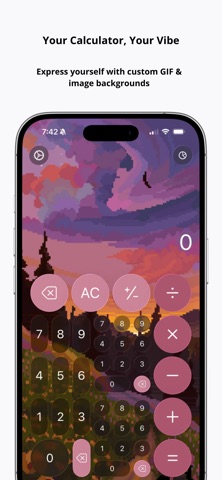




Description by Aylin Yahya-zada Written by the developer, not by AppBrain. Click to read.
Go beyond a basic calculator with advanced modes, smart history, Home Screen widgets, custom themes, animated backgrounds, and fast access from your device.
PERSONALIZE YOUR CALCULATOR
Make your calculator feel truly yours.
• Add animated looping GIF backgrounds
• Import your own photos and wallpapers
• Choose from beautiful accent colors
• Create custom color palettes
• Switch between 4 keypad button styles
• Match your calculator to your Home Screen
• Choose alternate app icons
• Enjoy a clean design optimized for both Light and Dark Modes
Whether you prefer a minimal black calculator, a colorful aesthetic setup, or a fun animated theme, you can design the calculator that fits your style.
SMART HISTORY
Never lose an important calculation again.
Your calculation history helps you keep track of previous results, organize important math, and quickly return to numbers you need later.
• View past calculations
• Name important calculations
• Pin useful results
• Search your history
• Organize calculations into folders
• Keep your workspace clean and easy to manage
• Sync your history and settings with iCloud
Perfect for budgeting, schoolwork, shopping, tax calculations, work tasks, and everyday math.
POWERFUL CALCULATOR MODES
Calculator - Modes & Widgets includes useful tools for more than simple arithmetic.
• Basic calculator
• Fraction calculator
• Percentage calculator
• Unit converter
• Currency, length, weight, volume, time, temperature, and more
Use it for studying, cooking, travel, shopping, personal finance, measurements, and quick daily calculations.
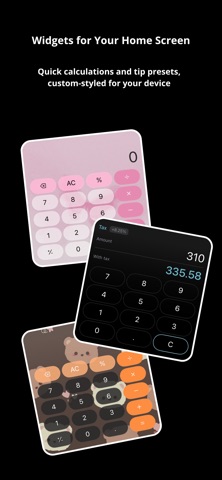
HOME SCREEN WIDGETS
Add beautiful calculator widgets to your Home Screen for faster access.
• Basic calculator widget
• Tip calculator widget
• Tax calculator widget
• Custom widget backgrounds
• Personalized widget colors
• Quick presets for common calculations
Your calculator can be useful before you even open the app.
FAST SYSTEM ACCESS
Launch your calculator quickly whenever you need it.
• Add calculator access to Control Center
• Use Lock Screen shortcuts
• Open useful tools faster
• Keep your calculator one swipe away
No more searching through folders when you need to calculate something quickly.
TIP & TAX TOOLS
Make everyday payments easier with quick presets for tips, taxes, and totals.
• Save custom tip presets
• Calculate tax faster
• Customize your setup for everyday spending
Great for restaurants, shopping, travel, and budgeting.
CLEAN, MODERN, AND EASY TO USE
Calculator - Modes & Widgets is designed to be simple when you need speed and powerful when you need more control.
It is ideal for:
• Students
• Designers
• Shoppers
• Travelers
• Budget planners
• Professionals
• Anyone who wants a smarter and more personal calculator
Download Calculator - Modes & Widgets and turn your calculator into a tool that is useful, fast, and beautifully yours.