

CalcuLight is made and published by Li Fan. AppBrain is an independent app data site and isn't affiliated with Li Fan. The app name, icon, screenshots and description belong to Li Fan and are shown as published on the App Store.
AppBrain's verdict
- Rating on App Store
- 5.00
- 2 ratings
- Last updated
- September 25, 2026
- Size
- 39.6 MB
It doesn't have enough ratings yet to judge what users think.
User feedback
Ratings and reviews on the App StoreComments on CalcuLight for iOS
We don't have enough comments to show example comments. Please check back later.
Store listing
By Li Fan, from the App Store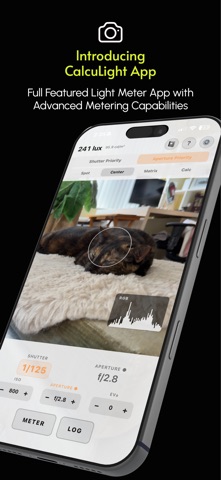

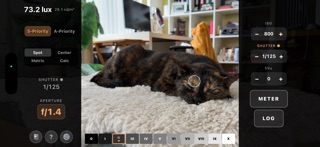
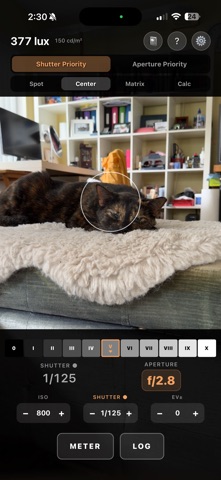
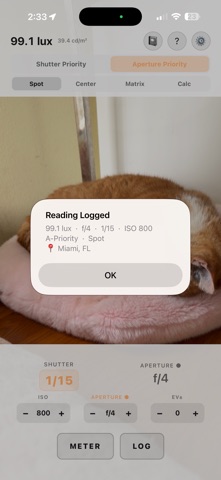

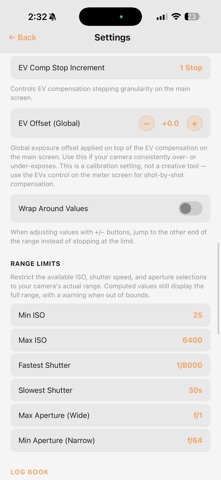
Description by Li Fan Written by the developer, not by AppBrain. Click to read.
METERING MODES
Center Weighted: Classic center focused metering (approximately 30 degree field of view), similar to vintage film cameras.
Matrix: Full frame averaging for tricky scenes. Uses your camera's EXIF data for the fastest possible readings.
Spot (Pro): Measure a precise 5% area of the frame. Tap anywhere to position the metering point.
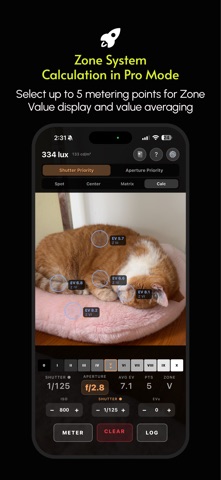
Calculated (Pro): Tap up to five areas and receive an averaged reading. Ideal for high contrast scenes and Zone System workflows.
EXPOSURE COMBINATION SCALE
Instead of a single pair of numbers, the readout shows a scale of equivalent exposures, so you can see at a glance that 1/125 at f/5.6 matches 1/250 at f/4. Swipe to scroll through combinations, or tap one to switch instantly. Combinations your camera cannot reach are flagged before you commit.
EXPOSURE CONTROLS
Shutter Priority: Set your shutter speed. CalcuLight calculates the aperture.
Aperture Priority (Pro): Set your aperture. CalcuLight calculates the shutter speed.
EV Compensation: Per shot adjustment in full, half, or third stops.
ISO, shutter, and aperture (Pro) values in full, half, or third stop increments.
Camera Range Limits (Pro): Restrict ISO, shutter and aperture to what your gear can actually do. Apertures reach f/0.7 for fast optics like the Noctilux.
SHOOTING PROFILES (Pro)
Save a named setup for how you are actually shooting: the film, how you are rating it, and the filter on your lens.
Push and pull in third stops, up to three either way. Push two stops on ISO 400 film and CalcuLight meters it as EI 1600.
Filter compensation up to ten stops, from a yellow filter to an ND10.
Switch setups from the viewfinder. The active profile is always shown on screen, so a reading is never quietly adjusted without you seeing why.
ZONE SYSTEM VALUE DISPLAY (Pro)
Displays the current zone from 0 to X beside your metering point. In Calculated mode, each point shows its own zone value.
LIVE HISTOGRAM (Pro)
Real time RGB histogram to catch clipped highlights and blocked shadows before you shoot. Toggle combined RGB, red, green, and blue channels.
LOG BOOK (Pro)
Save every reading with full exposure data, metering mode, GPS location (choose precise or general) and timestamp. Notes are pre-populated with captured values in Calculated mode. Export as CSV, JSON, or plain text.
MULTI-LANGUAGE SUPPORT
English, 简体中文, 繁體中文, 日本語, 한국어, हिन्दी, Русский, Deutsch, Français, Español, Português, Nederlands
FREE vs PRO
The FREE version is completely ad-free and covers over 90% of what film shooters need for exposure metering.
Free version features:
Center Weighted and Matrix metering
Shutter Priority metering
Exposure combination scale
EV compensation
Single metering mode
ISO, shutter and EV compensation stop increments
Light and dark themes
Portrait and landscape with orientation lock
Overlay transparency
All 12 languages
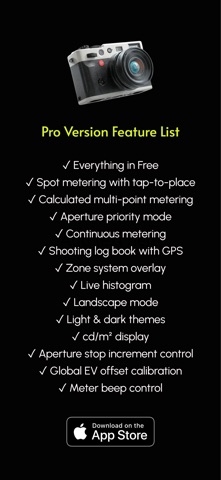
Pro version:
All free version features
Spot metering with adjustable area
Calculated metering
Aperture Priority metering
Shooting profiles with push/pull and filter compensation
Vintage camera shutter speed options
Zone System overlay
Live histogram
Log book with optional GPS location recording
Continuous metering mode
Global EV offset
Exposure settings range limits
Aperture stop increment control
cd/m2 display
Remember settings between sessions
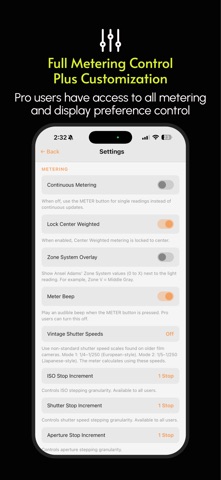
Silent metering (turn off the meter beep)
Experimental features (lens switch)
You can try Pro version at no cost for 14-days. After that, you can access the Pro version in two ways: Pay as you go for only $0.99 USD per month to access all Pro features (cancel any time); or $14.99 USD for lifetime access to all Pro features and future updates.
Privacy Policy:
https://calculight.ocutrain.com/privacy-policy.html
Terms of Service:
https://calculight.ocutrain.com/terms-of-service.html
Safety and technology
Found in the app by AppBrain- Price
- Free
- App size
- 39.6 MB
- Content rating
- Everyone
Technologies used by CalcuLight
Releases
Updates seen on the App Store- Version
- 1.4.0
- Launched
- June 2026
No changelog data
Alternatives
Similar apps and more from Li FanAlternatives to CalcuLight


Rankings
App Store top chartsApp Store Rankings for CalcuLight
About the app and developer
About CalcuLight
CalcuLight is a photo & video app developed by Li Fan.
User Ratings
CalcuLight is rated 5.00 out of 5 stars. The rating is based on 2 ratings.
App Information
CalcuLight is freely available from the App Store. The app size is 39.63 MB. The latest version available is 1.4.0. The last update was on September 25, 2026.
Technical Requirements
The app has a content rating of Everyone. The app has been available on the App Store since June 2026.
Developer information for Li Fan
Address:
Frequently asked questions about CalcuLight
Is CalcuLight free?
Yes. CalcuLight is free on the App Store.
Is CalcuLight still available?
Yes. CalcuLight is on the App Store, and the last update we saw was on September 25, 2026.
How large is CalcuLight?
CalcuLight is 39.63 MB.
Is CalcuLight suitable for children?
App Store rates the content of CalcuLight as suitable for everyone.
How do people rate CalcuLight?
CalcuLight scores 5.00 out of 5 stars, from 2 ratings on the App Store.
Who made CalcuLight?
CalcuLight was developed by Li Fan. It is listed in the photo & video category on the App Store.
What are the best alternatives to CalcuLight?
People looking at CalcuLight also look at these photo & video apps: View Camera Log, Fotio: Film Exposure Meter, Illumi the Lightmeter, Grain Story, Sprokbook.