

CalDown
CalDown is made and published by Valentin Haberling. AppBrain is an independent app data site and isn't affiliated with Valentin Haberling. The app name, icon, screenshots and description belong to Valentin Haberling and are shown as published on the App Store.
AppBrain's verdict
- Rating on App Store
- 5.00
- 1 ratings
- Last updated
- October 11, 2026
It doesn't have enough ratings yet to judge what users think.
Rankings
App Store top chartsApp Store Rankings for CalDown
Competitors
Similar apps and more from Valentin HaberlingAlternatives to CalDown



More from Valentin Haberling

Releases
Updates seen on the App Store- Version
- 1.7
- Launched
- April 2025
No changelog data
User feedback
Ratings and reviews on the App StoreComments on CalDown for iOS
We don't have enough comments to show example comments. Please check back later.
Technology
Found in the app by AppBrain- Price
- Free
- App size
- 8.28 MB
- Content rating
- Everyone
Technologies used by CalDown
About the app and developer
About CalDown
CalDown is a productivity app developed by Valentin Haberling.
User Ratings
CalDown is rated 5.00 out of 5 stars. The rating is based on one rating ratings.
App Information
CalDown is freely available from the App Store. The app size is 8.28 MB. The latest version available is 1.7. The last update was on October 11, 2026.
Technical Requirements
The app has a content rating of Everyone. The app has been available on the App Store since April 2025.
Developer information for Valentin Haberling
Address:
Store listing
By Valentin Haberling, from the App Store

Description by Valentin Haberling Written by the developer, not by AppBrain. Click to read.
What is happening now? What comes next? How much time is left?
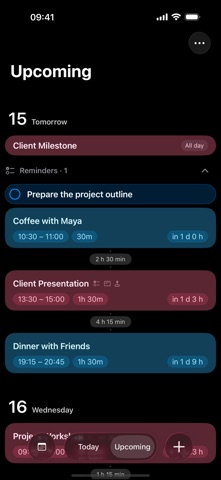
CalDown turns Apple Calendar events into a focused timeline across iPhone, iPad, widgets and Apple Watch. Choose your calendars and see your day without the clutter.
A TIMELINE BUILT AROUND NOW
• Follow your current event with a countdown and progress bar
• Keep all-day, upcoming and recently ended events in view
• Look ahead by 3, 5 or 7 days
• See gaps between events and timed reminders
• Create and edit events with the familiar Apple Calendar editor
• Hide individual event occurrences without changing them in Apple Calendar, and restore them from Hidden Events
WIDGETS THAT MAKE TIME TANGIBLE
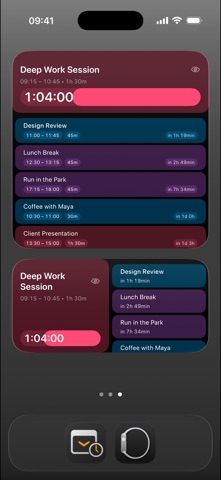
• See your current or next timed event on the Home Screen or Lock Screen
• Choose focused countdowns or overviews combining current and upcoming events
• Follow calendar colors, progress and clear event details
• Show or hide gaps in supported layouts and spot overlaps
• Hide the highlighted event directly from supported widgets
APPLE WATCH — WITH PRO
• View calendar events available on your Watch, even without your iPhone nearby
• Follow the iPhone’s calendar selection or choose separate calendars on Watch
• Choose circular, corner, inline and rectangular complications
• Presentation Dynamic emphasizes the leading time unit with a small event title
• Presentation Fixed keeps hours, minutes and seconds in a consistent layout
• Both presentation complications switch from time until an event to time remaining when it starts
• Event Overview shows two events and highlights the current one
• Expand event and reminder details, with gaps and overlaps in the timeline
Widgets and complications use your selected Upcoming range. Refreshes, countdown updates and Always On behavior are managed by the system.
CALENDAR NOTIFICATIONS
Create calendar groups with their own notification rules. Combine alerts before the start, at the start, partway through, before the end or at the end of each event. Choose sound settings for each group on your iPhone.
CalDown alerts are separate from Apple Calendar alerts, so you may receive both. Delivery depends on notification permissions, Focus settings and system background refresh.
APPLE REMINDERS — BETA, WITH PRO
• Show dated tasks from selected lists alongside your events
• Keep overdue tasks in Today and future timed tasks in the timeline
• Complete tasks and review dated tasks completed today
• Open Apple Reminders to create, edit or reopen tasks
Undated tasks are not shown. Reminders do not occupy time and are not included in widgets or complications. Watch completion uses your paired iPhone; offline requests stay pending until confirmed. Both devices need reminder access and the same reminder account. Some accounts cannot identify tasks reliably across devices.
NOTES AND CHECKLISTS
Keep notes and checklist items with calendar events. Watch additions and checklist changes require the paired iPhone to save and confirm them. Your calendar account manages synchronization.
REMAINING TIME COLORS
Choose start, warning and urgent colors and thresholds on iPhone. Apply them to the timeline, widgets and Watch independently. These are visual cues; notifications are configured separately.
SIRI AND SHORTCUTS
Ask about Current, Next or Today’s schedule. Hide an occurrence, restore the last hidden event, or open Today and Upcoming.
YOUR DATA, YOUR RULES
• No CalDown account, ads, subscriptions or analytics
• On-device processing, with no external CalDown server
• Hidden-event preferences sync only with the paired Watch
• Optional diagnostic reports that you review and choose to share
START SIMPLE. UNLOCK MORE WITH PRO.
Use one calendar at a time and basic widgets for free. A single one-time purchase unlocks multiple calendars, additional widget layouts, Apple Watch and Apple Reminders integration.
Your time. Your focus. CalDown.