


AppBrain's verdict
- Rating on App Store
- 5.00
- 1 ratings
- Last updated
- November 24, 2026
- Size
- 54.8 MB
It doesn't have enough ratings yet to judge what users think.
User feedback
Ratings and reviews on the App StoreComments on Calendar Alarms: Shift & Work for iOS
We don't have enough comments to show example comments. Please check back later.
Store listing
By Tristan Beasley, from the App StoreDescription by Tristan Beasley Written by the developer, not by AppBrain. Click to read.
Calendar Alarms links your alarm to Apple Calendar. It rings on the days you need to be up – office days, early shifts, gym mornings – and stays silent on the days you don't.
Set an alarm time once and pick the calendar event it should follow, such as "Office" or "Early shift". Every morning Calendar Alarms checks today's schedule. If the event is there, it rings. If it isn't, silence.
No more switching alarms off on Friday and back on every Sunday night. No more sleeping through a workday because you forgot.
HOW IT WORKS
• Set your alarm time once
• Pick a calendar event for it to follow
• Calendar Alarms checks your calendar every day
• It rings on matching days and stays silent on the rest
• See the upcoming alarm dates before you save
PERFECT FOR
• Hybrid workers with changing office days
• Shift workers with rotating schedules
• Commuters whose week changes from week to week
• Anyone tired of turning alarms on and off by hand
REAL SYSTEM ALARMS
Built on Apple's AlarmKit, so your alarms ring through Silent mode and Focus.
HANDS-FREE WITH SIRI
• Say "Hey Siri, skip my next alarm in Calendar Alarms", ask what's set, or turn an alarm on or off – without opening the app. The same actions are in Shortcuts.
• Skip a day: sit out one morning without turning the alarm off. It rings as usual on the next matching day.
• Just describe it: type "wake me at 7:30 on gym days" and the alarm fills itself in, on your iPhone. Requires Apple Intelligence.
CALENDAR ALARMS PREMIUM
A one-time purchase, never a subscription, that unlocks:
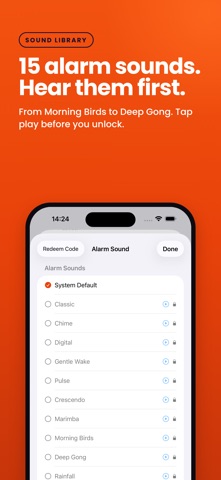
• 15 alarm sounds, from Morning Birds to Deep Gong – tap play to hear any of them first
• Home Screen and Lock Screen widgets showing your next alarm
• An Apple Watch app with watch face complications
• iCloud sync, so your alarms stay the same on every device signed in to your account
Just want the sounds? The Sound Library unlocks all 15 on their own.
Available in English, French, German, Spanish, Simplified Chinese and Arabic.
Safety and technology
Found in the app by AppBrain- Price
- Free
- App size
- 54.8 MB
- Content rating
- Everyone
Technologies used by Calendar Alarms: Shift & Work
Releases
Updates seen on the App Store- Version
- 2.7.3
- Launched
- June 2026
No changelog data
Alternatives
Similar apps and more from Tristan BeasleyMore from Tristan Beasley

Rankings
App Store top chartsApp Store Rankings for Calendar Alarms: Shift & Work
About the app and developer
About Calendar Alarms: Shift & Work
Calendar Alarms: Shift & Work is a productivity app developed by Tristan Beasley.
What is the rating of Calendar Alarms: Shift & Work?
Calendar Alarms: Shift & Work is rated 5.00 out of 5 stars, based on one rating ratings.
Is Calendar Alarms: Shift & Work free?
Calendar Alarms: Shift & Work is free. The app size is 54.83 MB. The latest version available is 2.7.3. The last update was on November 24, 2026.
What are the requirements for Calendar Alarms: Shift & Work?
The app has a content rating of Everyone. The app has been available on the App Store since June 2026.
Calendar Alarms: Shift & Work is made and published by Tristan Beasley. AppBrain is an independent app data site and isn't affiliated with Tristan Beasley. The app name, icon, screenshots and description belong to Tristan Beasley and are shown as published on the App Store.
Developer information for Tristan Beasley
Address:
Frequently asked questions about Calendar Alarms: Shift & Work
Is Calendar Alarms: Shift & Work free?
Yes. Calendar Alarms: Shift & Work is free on the App Store.
Is Calendar Alarms: Shift & Work still available?
Yes. Calendar Alarms: Shift & Work is on the App Store, and the last update we saw was on November 24, 2026.
How large is Calendar Alarms: Shift & Work?
Calendar Alarms: Shift & Work is 54.83 MB.
Is Calendar Alarms: Shift & Work suitable for children?
App Store rates the content of Calendar Alarms: Shift & Work as suitable for everyone.
How do people rate Calendar Alarms: Shift & Work?
Calendar Alarms: Shift & Work has one rating of 5.00 stars on the App Store.
Who made Calendar Alarms: Shift & Work?
Calendar Alarms: Shift & Work was developed by Tristan Beasley. It is listed in the productivity category on the App Store.