

Calendar Clock is made and published by Jelter B.V. AppBrain is an independent app data site and isn't affiliated with Jelter B.V. The app name, icon, screenshots and description belong to Jelter B.V. and are shown as published on the App Store.
AppBrain's verdict
EstablishedWell rated- Rating on App Store
- 4.38
- 111 ratings
- Last updated
- October 5, 2026
- Size
- 53.2 MB
Users rate it well: 4.4 stars from 111 ratings.
User feedback
Ratings and reviews on the App StoreComments on Calendar Clock for iOS
We don't have enough comments to show example comments. Please check back later.
Store listing
By Jelter B.V., from the App Store

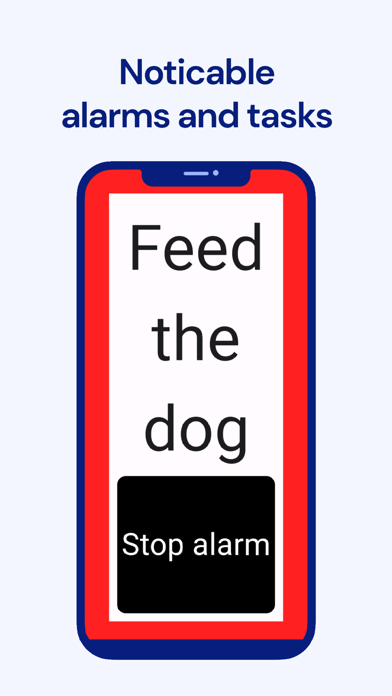


Description by Jelter B.V. Written by the developer, not by AppBrain. Click to read.
· Designed for caretakers and individuals with memory challenges.
Take control of your and your loved ones' daily routine with Calendar Clock, the essential dayclock app for staying organized and connected.
Designed for individuals with memory challenges and caregivers, this shared clock app offers structure, independence, and peace of mind.
From time tracking to personalized reminders, Calendar Clock simplifies everyday tasks while enabling better care.
With 20,000+ daily users, it remains one of the most useful Alzheimer’s & Dementia care assistance apps.
■ HOW TO USE REMOTELY
1. Install this Calendar Clock app on the device on which it should be used;
2. Install the Calendar Clock Administrator app on a device that should be used to control the settings/messages/alarms of this device;
3. Connect the two apps and control this clock app remotely!
■ NOT JUST A LARGE & SIMPLE CLOCK WITH DATE & TIME
Calendar Clock boasts a powerful set of features besides the simple and large clock display with time and date.
■ STRUCTURED TIME MANAGEMENT
View time in analogue or digital formats, set smart alarms/reminders, and receive confirmations to stay on schedule.
■ ENHANCED CONNECTIVITY
Unlike other digital clock apps, here caregivers can initiate video calls, display personal messages, and manage reminders remotely via the Calendar Clock Administrator app.
■ PERSONALIZED EXPERIENCE
Customize themes, enable soothing chimes, display cherished photos, and use full-screen mode for better visibility.
■ OFFLINE & SECURE USE
Our big clock display with time and date is available offline. Access features without an internet connection, with secure data storage that protects user privacy.
■ CALENDAR CLOCK APP FEATURES:
• Large clock with date, time & day that works on most devices, old and new, large and small.
• Choose analogue or digital clock formats.
• Customizable themes for a personalized look.
• Video calls for caregivers to check in.
• Offline access ensures constant availability.
• Simple menu & full-screen mode for easy use.
• Weather updates to stay informed.
• Photo display to keep cherished memories close.
• Smart alarms & confirmations for reminders.
• Soothing chimes to aid time awareness.
• Supports multiple languages for global accessibility.
• Administrator app for remote scheduling and reminders. It can be installed by caretakers, professionals, relatives, or friends.
• Minimalist design with clear, large text that can be used as a nightstand bedside clock.
Whether tracking & managing time, setting reminders, or ensuring accessibility, this clock schedule app provides seamless support for a well-structured life and enables better dementia care.
Download now and help them experience the power of staying independent and connected!
_________________
Privacy and data processing
The app allows you to save calendar items and personal messages, and settings on the Calendar Clock system via a secure connection. This data is only accessible to people with your permission. Calendar Clock stores this data only so that it can be changed by the administrator(s).
We do not process or analyse this data, and it can also be deleted at any time upon request. For more information on this, see our Privacy Policy or contact us.
Safety and technology
Found in the app by AppBrain- Price
- Free
- App size
- 53.2 MB
- Content rating
- Everyone
Technologies used by Calendar Clock
Releases
Updates seen on the App Store- Version
- 2.26.3
- Launched
- August 2021
No changelog data
Alternatives
Similar apps and more from Jelter B.V.


Rankings
App Store top chartsApp Store Rankings for Calendar Clock
About the app and developer
About Calendar Clock
Calendar Clock is a medical app developed by Jelter B.V.
User Ratings
Calendar Clock is rated 4.38 out of 5 stars. The rating is based on 110 ratings.
App Information
Calendar Clock is freely available from the App Store. The app size is 53.24 MB. The latest version available is 2.26.3. The last update was on October 5, 2026.
Technical Requirements
The app has a content rating of Everyone. The app has been available on the App Store since August 2021.
Developer information for Jelter B.V.
Address:
Frequently asked questions about Calendar Clock
Is Calendar Clock free?
Yes. Calendar Clock is free on the App Store.
Is Calendar Clock still available?
Yes. Calendar Clock is on the App Store, and the last update we saw was on October 5, 2026.
How large is Calendar Clock?
Calendar Clock is 53.24 MB.
Is Calendar Clock suitable for children?
App Store rates the content of Calendar Clock as suitable for everyone.
How do people rate Calendar Clock?
Calendar Clock scores 4.38 out of 5 stars, from 111 ratings on the App Store.
Who made Calendar Clock?
Calendar Clock was developed by Jelter B.V. It is listed in the medical category on the App Store.
What are the best alternatives to Calendar Clock?
People looking at Calendar Clock also look at these medical apps: ShowTime Simple Clock Display, DayClocks Agenda, Memory Lane Games, Reach Out - Care Assistance.