

Calendar Mirror
Calendar Mirror is made and published by Matthew Baylor. AppBrain is an independent app data site and isn't affiliated with Matthew Baylor. The app name, icon, screenshots and description belong to Matthew Baylor and are shown as published on the App Store.
AppBrain's verdict
- Last updated
- October 2, 2026
- Size
- 2.52 MB
User feedback
Ratings and reviews on the App StoreComments on Calendar Mirror for iOS
We don't have enough comments to show example comments. Please check back later.
Store listing
By Matthew Baylor, from the App Store




Description by Matthew Baylor Written by the developer, not by AppBrain. Click to read.
Calendar Mirror makes an editable copy of one calendar inside another calendar you own — one direction only, so the original is never touched. Because the copy lives in your own account, it reaches your other devices on its own.
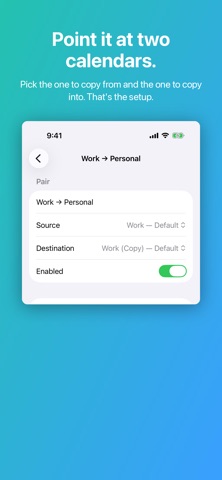
PICK TWO CALENDARS
Choose the calendar to copy from and the one to copy into. Add as many pairs as you like; two can share a destination, and anything you add by hand is left alone. Repeating and all-day events, and moved occurrences, all come across.
CHOOSE HOW MUCH CROSSES OVER
Each pair decides: a full copy; titles and locations only; or "Busy" blocks that show your time and nothing else. Put a label in front of copied titles — "[Work] Standup", or "[Work] Busy" — and carry the meeting link into the copy's notes so a mirrored meeting is one you can join.
CHOOSE WHICH EVENTS
A pair can skip meetings you declined or have not answered, events the organizer canceled, all-day events and anything marked free, anything shorter or longer than you like, titles containing words you choose, and anything outside a window of the day on the weekdays you pick. Or tag one event at a time: #nomirror, #private, #public in its notes.
IT TELLS YOU WHEN SOMETHING BREAKS
A healthy pair is silent. If one stops syncing, an all-day warning appears in the destination calendar itself, and clears the moment the pair recovers.
ON IPHONE AND IPAD
Every pair in one list, with its health and event count. Pull down to sync now. Background refreshes run at the interval you choose, when iOS allows — treat it as the earliest a sync may start, not a guarantee.
SEND TIMES
"When are you free?" One tap gives you your next three free times as a line of text — "Tue 2–2:30pm, Wed 10–10:30am or Thu 3–3:30pm MDT" — worked out on your device from the calendars you chose, ready to paste into Messages, Mail or Slack. Also a Shortcuts action and a Siri phrase. Nothing leaves your device.
ASKWHEN.ME — A SEPARATE PRODUCT YOU CAN TURN ON
Off by default; until you turn it on, the app makes no network request of any kind. AskWhen.me is a subscription with its own server: a page at askwhen.me/yourpage where people can ask you for a time.
A request page, not a booking page. Your device works out which times to offer and sends only those — never your calendar, your events, your address, or your name beyond the label you choose. Someone picks a time and says who they are; the request comes to your device, and nothing lands in your calendar until you accept. Your device re-checks the time against your real calendar first.
Send times can carry a personal link: it opens your page once, for a week, and because you sent it there is no email confirmation — if the time is still clear, your device accepts it for you and they get the calendar file.
Free for 90 days, then $19.99 a year; your own name on askwhen.me, or your own domain, are upgrades. Payment is Apple's. The privacy page says what the server holds, and for how long.
WHAT IT DOES NOT DO
• No scheduling links unless you turn on AskWhen.me, a separate subscription.
• No unified calendar view — it makes copies; your calendar app shows them.
• No team, admin or SSO features. It is a single-person utility.
• Attendees are never copied: Apple's calendar framework cannot set guests.
• It cannot sync a calendar your device cannot already see.
PRIVACY
No account. No analytics, no tracking, no telemetry, no ads. No server, and no network request, until you turn on AskWhen.me — and its server never sees your calendar either. Once a copy lands in iCloud, Google or Exchange, that provider stores it under their policies.
Open source under the MIT licence. One purchase covers iPhone, iPad and Mac. Terms of Use: https://www.apple.com/legal/internet-services/itunes/dev/stdeula/
Safety and technology
Found in the app by AppBrain- Price
- $2.99
- App size
- 2.52 MB
- Content rating
- Everyone
Technologies used by Calendar Mirror
Releases
Updates seen on the App Store- Version
- 2.0.1
- Launched
- July 2026
No changelog data
Rankings
App Store top charts- Highest rank
- #79
- Chart
- Top Paid
- Productivity
- Country
- United Kingdom
App Store Rankings for Calendar Mirror
Top rankings
| Rank | Country | Category | List |
|---|---|---|---|
| 79 | United Kingdom | Productivity | Top Paid |
Ranking history in United Kingdom
About the app and developer
About Calendar Mirror
Calendar Mirror is a productivity app developed by Matthew Baylor.
User Ratings
The app has no ratings yet.
App Information
Calendar Mirror costs $2.99. The app size is 2.52 MB. The latest version available is 2.0.1. The last update was on October 2, 2026.
Technical Requirements
The app has a content rating of Everyone. The app has been available on the App Store since July 2026.
Developer information for Matthew Baylor
Address:
Frequently asked questions about Calendar Mirror
Is Calendar Mirror free?
No. Calendar Mirror costs $2.99 on the App Store.
Is Calendar Mirror still available?
Yes. Calendar Mirror is on the App Store, and the last update we saw was on October 2, 2026.
How large is Calendar Mirror?
Calendar Mirror is 2.52 MB.
Is Calendar Mirror suitable for children?
App Store rates the content of Calendar Mirror as suitable for everyone.
Who made Calendar Mirror?
Calendar Mirror was developed by Matthew Baylor. It is listed in the productivity category on the App Store.