

Calendarly Lockscreen Calendar
Calendarly Lockscreen Calendar is made and published by Dmytro Katyukha. AppBrain is an independent app data site and isn't affiliated with Dmytro Katyukha. The app name, icon, screenshots and description belong to Dmytro Katyukha and are shown as published on the App Store.
AppBrain's verdict
- Rating on App Store
- 4.50
- 46 ratings
- Last updated
- October 24, 2026
It doesn't have enough ratings yet to judge what users think.
Rankings
App Store top chartsApp Store Rankings for Calendarly Lockscreen Calendar
Competitors
Similar apps and more from Dmytro KatyukhaMore from Dmytro Katyukha


Releases
Updates seen on the App Store- Version
- 1.5.2
- Launched
- February 2026
No changelog data
User feedback
Ratings and reviews on the App StoreComments on Calendarly Lockscreen Calendar for iOS
We don't have enough comments to show example comments. Please check back later.
Technology
Found in the app by AppBrain- Price
- Free
- App size
- 140.4 MB
- Content rating
- Everyone
Technologies used by Calendarly Lockscreen Calendar
About the app and developer
About Calendarly Lockscreen Calendar
Calendarly Lockscreen Calendar is a productivity app developed by Dmytro Katyukha.
User Ratings
Calendarly Lockscreen Calendar is rated 4.50 out of 5 stars. The rating is based on 46 ratings.
App Information
Calendarly Lockscreen Calendar is freely available from the App Store. The app size is 140.43 MB. The latest version available is 1.5.2. The last update was on October 24, 2026.
Technical Requirements
The app has a content rating of Everyone. The app has been available on the App Store since February 2026.
Developer information for Dmytro Katyukha
Address:
Frequently asked questions about Calendarly Lockscreen Calendar
Is Calendarly Lockscreen Calendar free?
Yes. Calendarly Lockscreen Calendar is free on the App Store.
Is Calendarly Lockscreen Calendar still available?
Yes. Calendarly Lockscreen Calendar is on the App Store, and the last update we saw was on October 24, 2026.
How large is Calendarly Lockscreen Calendar?
Calendarly Lockscreen Calendar is 140.43 MB.
Is Calendarly Lockscreen Calendar suitable for children?
App Store rates the content of Calendarly Lockscreen Calendar as suitable for everyone.
How do people rate Calendarly Lockscreen Calendar?
Calendarly Lockscreen Calendar scores 4.50 out of 5 stars, from 46 ratings on the App Store.
Who made Calendarly Lockscreen Calendar?
Calendarly Lockscreen Calendar was developed by Dmytro Katyukha. It is listed in the productivity category on the App Store.
Store listing
By Dmytro Katyukha, from the App Store



Description by Dmytro Katyukha Written by the developer, not by AppBrain. Click to read.
Nothing to open, nothing to unlock. Pick up your iPhone and see what is next. Join more than 30,000 people using Calendarly.
SET UP ONCE
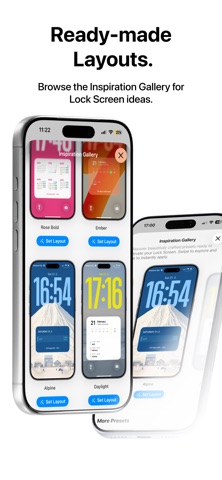
1. Pick a Lock Screen in the Gallery and make it yours in the Studio.
2. Choose the calendars and reminder lists you want to see.
3. Add the morning automation in Shortcuts. Calendarly shows you where to tap.
ON YOUR LOCK SCREEN
• The month, the quarter or the whole year
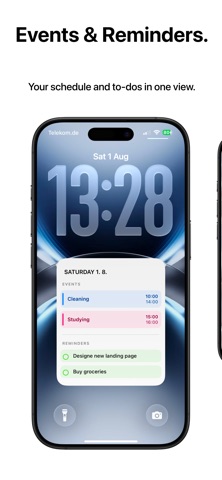
• Today hour by hour, with location, people and notes under each event
• This week or the next seven days, as a grid or a list
• Work shifts and days off
• Apple Reminders, most important first
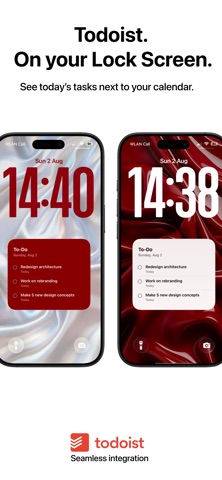
• Your own to-do list, or Todoist if you connect it
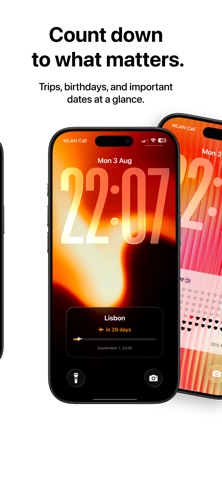
• Countdowns to exams, birthdays and trips, plus days since a date
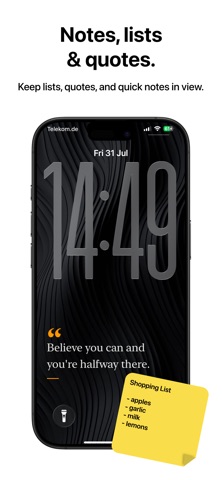
• A note you want to keep in sight
• Tonight's Moon, the year in dots and your life calendar
WIDGETS AND LIVE ACTIVITIES
• Home Screen and Lock Screen widgets for what is coming up, today, the week, the month, the year, countdowns, notes, to-dos and the Moon
• More than a dozen looks, your own colors and fonts
• Tick off tasks right on the widget
• Extra-large widgets for your day, week, month and year on iOS 27
• Live Activities show today, the week, your tasks or a note on the Lock Screen and in the Dynamic Island
152 LAYOUTS TO MAKE YOURS
• Day planners, wall calendars, departure boards, newspapers, menu cards, notes on paper, chalkboards, flip clocks, tickets and more
• Your colors, fonts and photos, 15 textured backgrounds or a plain color
• Create Your Own: put several layouts together on one wallpaper
FREE TO START
96 of the 152 layouts are free, and so are all widgets, Live Activities and automatic updates. Free layouts show your whole day, with every event, reminder and task. Calendarly Pro unlocks all 152 layouts, your own photos and Create Your Own. Choose monthly, yearly or a one-time purchase. Cancel a subscription at any time.
YOUR DATA STAYS ON YOUR IPHONE
Calendarly does not require an account. Calendar and Reminders data is read and drawn on your iPhone and is never uploaded to our servers. Todoist is optional and connects directly.
GOOD TO KNOW
Shortcuts is only needed for automatic updates. You can update the wallpaper by hand at any time.
Calendar wallpapers work offline after setup. Task sync and purchases require internet access.
Calendarly speaks 23 languages.
Privacy Policy: https://getcalendarly.com/privacy
Terms of Use: https://www.apple.com/legal/internet-services/itunes/dev/stdeula/