

Cam Hub: ONVIF NVR Viewer
Cam Hub: ONVIF NVR Viewer is made and published by Yu-Chiao Wang. AppBrain is an independent app data site and isn't affiliated with Yu-Chiao Wang. The app name, icon, screenshots and description belong to Yu-Chiao Wang and are shown as published on the App Store.
AppBrain's verdict
- Last updated
- October 17, 2026
- Size
- 14.3 MB
User feedback
Ratings and reviews on the App StoreComments on Cam Hub: ONVIF NVR Viewer for iOS
We don't have enough comments to show example comments. Please check back later.
Store listing
By Yu-Chiao Wang, from the App Store


Description by Yu-Chiao Wang Written by the developer, not by AppBrain. Click to read.
Cam Hub is a camera viewing app built around direct equipment connections. With compatible equipment, you do not need to create an additional account for the app or sign in to the equipment vendor’s cloud platform. Reducing unnecessary account registration and cloud dependency gives you more control and privacy in your surveillance setup.
Key features:
• Add and view compatible network cameras
• Connect to selected compatible NVR, DVR, and NAS surveillance systems
• Support for open protocols such as ONVIF and RTSP video streaming
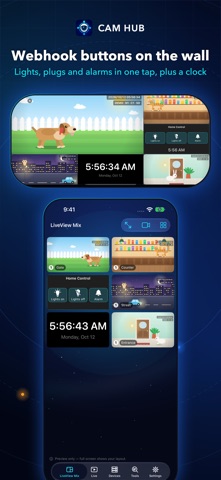
• Use LiveView Mix to put pictures from different cameras, different NVRs, and different locations on one monitoring wall, and connect it to Home Assistant at the same time to control IoT devices
• View live video from different equipment and recorders on a single screen
• Search and play recordings when supported by the equipment
• Optimized for iPhone Duo, with a layout for the outer display and the unfolded inner display
Sharing and backup:
• Export your settings protected with a PIN, so you can share cameras with other people without sharing any account or password
• Sync settings through iCloud to set up your own devices quickly, or to move to a different setup
Compatibility:
Cam Hub currently works with a wide range of ONVIF-compatible IP cameras, NVR/DVR recorders, and NAS surveillance systems.
Available features vary depending on the equipment model, firmware version, supported connection protocols, stream format, account permissions, and network configuration. Your equipment must provide a connection method supported by Cam Hub. Some equipment may require ONVIF, RTSP, or another relevant service to be enabled in its administration settings.
You must still use the address, port, username, and password configured on your equipment. Cam Hub does not bypass existing access controls or security mechanisms.
ONVIF, Home Assistant and other related names are trademarks or identifiers of their respective owners. Cam Hub is independently developed and operates through compatible connection protocols made available by the equipment. A successful connection indicates technical compatibility between the equipment and the protocols or features used by Cam Hub. It does not imply affiliation, partnership, sponsorship, or endorsement by their respective owners.
Apple TV and automation:
• Use LiveView Mix, full-screen video, and supported recording playback on iPhone, iPad, and Apple TV
• Transfer supported settings to Apple TV through an encrypted iCloud backup protected by a six-digit PIN
• Add HTTP or HTTPS webhook buttons to LiveView Mix — fully compatible with Home Assistant, so one tap can drive shutters, water heaters, lights, and any other network service you run
Operation manual: every feature, step by step
https://cam-hub.almx.cc/guide.html
Terms of Use (Apple Standard EULA):
https://www.apple.com/legal/internet-services/itunes/dev/stdeula/
Safety and technology
Found in the app by AppBrain- Price
- Free
- App size
- 14.3 MB
- Content rating
- Everyone
Technologies used by Cam Hub: ONVIF NVR Viewer
Releases
Updates seen on the App Store- Version
- 1.6
- Launched
- August 2026
No changelog data
Alternatives
Similar apps and more from Yu-Chiao WangAlternatives to Cam Hub: ONVIF NVR Viewer




More from Yu-Chiao Wang

Rankings
App Store top chartsApp Store Rankings for Cam Hub: ONVIF NVR Viewer
About the app and developer
About Cam Hub: ONVIF NVR Viewer
Cam Hub: ONVIF NVR Viewer is an utilities app developed by Yu-Chiao Wang.
User Ratings
The app has no ratings yet.
App Information
Cam Hub: ONVIF NVR Viewer is freely available from the App Store. The app size is 14.30 MB. The latest version available is 1.6. The last update was on October 17, 2026.
Technical Requirements
The app has a content rating of Everyone. The app has been available on the App Store since August 2026.
Developer information for Yu-Chiao Wang
Address:
Frequently asked questions about Cam Hub: ONVIF NVR Viewer
Is Cam Hub: ONVIF NVR Viewer free?
Yes. Cam Hub: ONVIF NVR Viewer is free on the App Store.
Is Cam Hub: ONVIF NVR Viewer still available?
Yes. Cam Hub: ONVIF NVR Viewer is on the App Store, and the last update we saw was on October 17, 2026.
How large is Cam Hub: ONVIF NVR Viewer?
Cam Hub: ONVIF NVR Viewer is 14.30 MB.
Is Cam Hub: ONVIF NVR Viewer suitable for children?
App Store rates the content of Cam Hub: ONVIF NVR Viewer as suitable for everyone.
Who made Cam Hub: ONVIF NVR Viewer?
Cam Hub: ONVIF NVR Viewer was developed by Yu-Chiao Wang. It is listed in the utilities category on the App Store.
What are the best alternatives to Cam Hub: ONVIF NVR Viewer?
People looking at Cam Hub: ONVIF NVR Viewer also look at these utilities apps: Home Cameras, WakeDock, Droproom, Cloudless Cam: IP Cam Viewer, HiFiRouter.