

Cam Scanner PDF - Document
Cam Scanner PDF - Document is made and published by Agus Riyanto. AppBrain is an independent app data site and isn't affiliated with Agus Riyanto. The app name, icon, screenshots and description belong to Agus Riyanto and are shown as published on the App Store.
AppBrain's verdict
- Last updated
- October 1, 2025
Rankings
App Store top chartsApp Store Rankings for Cam Scanner PDF - Document
Competitors
Similar apps and more from Agus RiyantoAlternatives to Cam Scanner PDF - Document


More from Agus Riyanto


Releases
Updates seen on the App Store- Version
- 1.1
- Launched
- June 2025
No changelog data
User feedback
Ratings and reviews on the App StoreComments on Cam Scanner PDF - Document for iOS
We don't have enough comments to show example comments. Please check back later.
Technology
Found in the app by AppBrain- Price
- Free
- App size
- 82.8 MB
- Content rating
- Everyone
Technologies used by Cam Scanner PDF - Document
About the app and developer
About Cam Scanner PDF - Document
Cam Scanner PDF - Document is an utilities app developed by Agus Riyanto.
User Ratings
The app has no ratings yet.
App Information
Cam Scanner PDF - Document is freely available from the App Store. The app size is 82.85 MB. The latest version available is 1.1. The last update was on October 1, 2025.
Technical Requirements
The app has a content rating of Everyone. The app has been available on the App Store since June 2025.
Developer information for Agus Riyanto
Address:
Frequently asked questions about Cam Scanner PDF - Document
Is Cam Scanner PDF - Document free?
Yes. Cam Scanner PDF - Document is free on the App Store.
Is Cam Scanner PDF - Document still available?
Yes. Cam Scanner PDF - Document is on the App Store, and the last update we saw was on October 1, 2025.
How large is Cam Scanner PDF - Document?
Cam Scanner PDF - Document is 82.85 MB.
Is Cam Scanner PDF - Document suitable for children?
App Store rates the content of Cam Scanner PDF - Document as suitable for everyone.
Who made Cam Scanner PDF - Document?
Cam Scanner PDF - Document was developed by Agus Riyanto. It is listed in the utilities category on the App Store.
What are the best alternatives to Cam Scanner PDF - Document?
People looking at Cam Scanner PDF - Document also look at these utilities apps: Top Stickers Book, AI Creator, QR Code Generator & Scanner ٭, Timer - The simplest timer, Kitchen Timer ( Alarm ), How Much Is It Worth: Valyze.
Store listing
By Agus Riyanto, from the App Store


Description by Agus Riyanto Written by the developer, not by AppBrain. Click to read.
Key Features:
Image to Text
Convert images into digital text in just seconds! You can select images from your gallery or capture them directly using the camera. The extracted text can be copied, edited, and shared easily. Perfect for digitizing notes, printed documents, or important articles.
PDF to Text
Quickly and accurately convert PDF files into editable text. Extract important information and share the result via email, note apps, or social media.
Compress PDF
Reduce the size of PDF files without compromising quality. This feature is especially useful for saving storage space and speeding up file sharing via email or messaging apps.
Image to PDF
Create PDF files from one or multiple images, either from your gallery or directly using your camera. Supports batch processing, making it easy to generate digital documents quickly.
Scan QR/Barcode
Scan QR codes or barcodes using the camera, or select an image containing the code from your gallery. The app will automatically recognize and display the code's content.
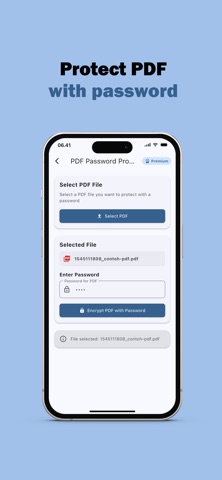
Protect PDF
Secure your important documents by adding a password to your PDF files. Protect your personal or professional data with ease.
PDF Reader
Open and view all types of PDF files within the app. Enjoy a smooth navigation experience and comfortable reading interface.
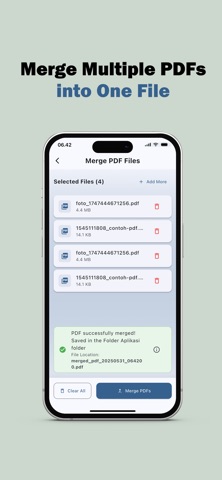
Merge PDF
Combine multiple PDF files into a single, well-organized document. Ideal for merging reports, invoices, or notes into one cohesive file.
International Language Support
The app supports more than 10 languages, making it accessible to users from different countries and backgrounds.
App Advantages:
- Intuitive and easy-to-use interface
- Fast and accurate processing
- Compatible with both iPhone and iPad
- Suitable for students, office workers, and personal use
What You Get with a Premium Subscription:
- Unlimited access to all features without restrictions
- Unlimited PDF conversions, anytime
- Unlimited image-to-text scanning, anytime
- Unlimited PDF-to-text conversions, anytime
- Unlimited PDF compression without reducing quality, anytime
- Unlimited image-to-PDF conversions, anytime
- Unlimited QR code scanning using camera or images, anytime
- Unlimited PDF file protection, anytime
- Unlimited PDF file viewing, anytime
- Unlimited merging of multiple PDF files, anytime
- Enjoy an ad-free experience
– Subscription renews automatically unless auto-renew is turned off at least 24 hours before the end of the current period.
– The renewal will be charged to your account within 24 hours before the end of the current period. The cost depends on the selected plan.
– Subscriptions can be managed by the user, and auto-renewal can be turned off by going to the user’s Account Settings after purchase.
For Terms of Use, please visit:
https://www.apple.com/legal/internet-services/itunes/dev/stdeula/
For Privacy Policy, please visit:
https://sites.google.com/view/softiddeveloper