

Camera M - Pro Manual Camera
Camera M - Pro Manual Camera is made and published by bxb. AppBrain is an independent app data site and isn't affiliated with bxb. The app name, icon, screenshots and description belong to bxb and are shown as published on the App Store.
AppBrain's verdict
EstablishedLoved by users- Rating on App Store
- 4.54
- 1,423 ratings
- Last updated
- October 19, 2026
- Size
- 31.6 MB
Users love it: 4.5 stars from 1,423 ratings. Its best ranking is #12 in Top Paid, Photo & Video in Australia.
User feedback
Ratings and reviews on the App StoreComments on Camera M - Pro Manual Camera for iOS
We don't have enough comments to show example comments. Please check back later.
Store listing
By bxb, from the App Store


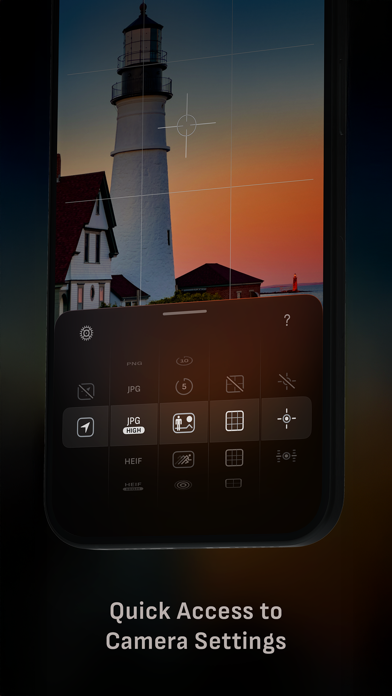
Description by bxb Written by the developer, not by AppBrain. Click to read.
HIGHLIGHTS
• Fluid gesture-based native manual controls with Fine-Tuning feature
• iOS 27 optimization with Liquid Glass design
• Optimized for iPhone 18 Pro, with aperture control
• Zero-process RAW support for the most natural look
• Max Image Processing to ensure the absolute best image quality
• ProRAW*, RAW, HEIF, JPEG, TIFF, and PNG image formats
• Single, Burst, Timer, Live, Depth*, Dual Photo*, and Bracket shooting modes
• Triple Photo mode with simultaneous ultra-wide, wide-angle, and telephoto camera capture*
• Minimum focus distance display for macro photography
• Intelligent Focus Tracking
• Focus Peaking and 4x magnifier loupe with panning function
• Live RGB and RGB luminance histograms
• Manual gray card calibration
• Great widgets for photography
• Darkroom integration
CAMERA CONTROLS
– Manual focus
– Macro and Scene focus presets
– Exposure bias
– Manual ISO & exposure duration adjustments
– ISO & exposure duration semi-priority modes
– Manual white balance temperature and tint
– White balance presets
– Gray card white balance calibration
– Auto, on, and off flash modes
– Manual torch brightness level
– Manual switching between Ultra Wide, Wide, and Telephoto cameras*
– Digital pinch zoom with 10x range
– Camera Control support for all manual controls
– Lock Screen camera capture support
IMAGE FORMATS
– Apple ProRAW*
– RAW with stabilization
– HEIF with optional minimum compression
– JPEG with optional minimum compression
– TIFF
– PNG
– Live Photo
– P3 wide color support*
SHOOTING MODES
– Single
– Burst
– Timer
– Depth*
– Dual/Triple Photo*
– Live Photo*
– Bracket
TOOLS
– Exposure offset gauge
– Intelligent Focus Tracking
– Live focus peaking assistant
– 4x magnifier loupe with panning function
– Minimum focus distance display
– Live RGB and RGB luminance histograms
– Highlight & shadow alert display
– Horizon level with available pitch tracking and flat options
– Rule of Thirds, Golden Ratio, Quadrant, and Square grids
– Siri Shortcuts and App Shortcuts
– Detailed camera specifications display with PDF export
MAX IMAGE PROCESSING
– Deep Fusion and Smart HDR support for iPhone 11 and later.
– Ensures maximum image quality with better noise reduction, image stabilization, and additional processing for all other iPhones and iPads
ZERO-PROCESS RAW
– Capture standard RAW files with no extra processing
PHOTO LIBRARY
– Summarized and full EXIF metadata display
– Location data display with compass and elevation
– RGB and RGB luminance histogram displays
– Access to all photo albums and folders
WIDGETS
– Home Screen: Golden Hour, EXIF, and Cameras
– Lock Screen: Cameras and Golden Hour
– Control Center: Focus, exposure, and white balance
APPLE WATCH SUPPORT
– Shutter button control
– Sunrise, sunset, and Golden Hour display with sun position indicator
ERGONOMICS
– True one-handed control on all iPhones
– An uncompromising approach to user experience in landscape orientation
ACCESSIBILITY
– Dynamic Type support
– Bold Text support
– Increase Contrast support
TECHNOLOGY
Camera M is powered exclusively by native APIs and frameworks. There are absolutely no dependencies on any outside sources. This makes it responsive and efficient — from its small download size to its quick app launch times.
We hope you enjoy taking amazing photos with Camera M!
Website: www.camera-m.com
User manual: www.camera-m.com/manual
Get in touch: contact@camera-m.com
Follow us: @CameraMApp
#CameraM
* These features are available on supported devices only.
* Depth capture for selfies requires an iPhone or an iPad with a TrueDepth camera system.
* Apple ProRAW capture requires iPhone 12 Pro or later.
* For more information on device and feature compatibility: www.camera-m.com/compatibility
Safety and technology
Found in the app by AppBrain- Price
- $8.99
- App size
- 31.6 MB
- Content rating
- Everyone
Technologies used by Camera M - Pro Manual Camera
Releases
Updates seen on the App Store- Version
- 10.0
- Launched
- August 2017
No changelog data
Alternatives
Similar apps and more from bxbAlternatives to Camera M - Pro Manual Camera


Rankings
App Store top charts- Highest rank
- #12
- Chart
- Top Paid
- Photo & Video
- Country
- Australia
App Store Rankings for Camera M - Pro Manual Camera
Top rankings
| Rank | Country | Category | List |
|---|---|---|---|
| 12 | Australia | Photo & Video | Top Paid |
| 14 | Spain | Photo & Video | Top Paid |
| 24 | Norway | Photo & Video | Top Paid |
| 28 | Brazil | Photo & Video | Top Paid |
| 30 | Indonesia | Photo & Video | Top Paid |
| 32 | Poland | Photo & Video | Top Paid |
| 36 | Sweden | Photo & Video | Top Paid |
| 39 | Italy | Photo & Video | Top Paid |
| 81 | France | Photo & Video | Top Paid |
| 49 | United Kingdom | Photo & Video | Top Paid |
Ranking history in Australia
About the app and developer
About Camera M - Pro Manual Camera
Camera M - Pro Manual Camera is a photo & video app developed by bxb.
User Ratings
Camera M - Pro Manual Camera is rated 4.54 out of 5 stars. The rating is based on 1.4 thousand ratings.
App Information
Camera M - Pro Manual Camera costs $8.99. The app size is 31.63 MB. The latest version available is 10.0. The last update was on October 19, 2026.
Technical Requirements
The app has a content rating of Everyone. The app has been available on the App Store since August 2017.
Developer information for bxb
Address:
Frequently asked questions about Camera M - Pro Manual Camera
Is Camera M - Pro Manual Camera free?
No. Camera M - Pro Manual Camera costs $8.99 on the App Store.
Is Camera M - Pro Manual Camera still available?
Yes. Camera M - Pro Manual Camera is on the App Store, and the last update we saw was on October 19, 2026.
How large is Camera M - Pro Manual Camera?
Camera M - Pro Manual Camera is 31.63 MB.
Is Camera M - Pro Manual Camera suitable for children?
App Store rates the content of Camera M - Pro Manual Camera as suitable for everyone.
How do people rate Camera M - Pro Manual Camera?
Camera M - Pro Manual Camera scores 4.54 out of 5 stars, from 1,423 ratings on the App Store.
Who made Camera M - Pro Manual Camera?
Camera M - Pro Manual Camera was developed by bxb. It is listed in the photo & video category on the App Store.
What are the best alternatives to Camera M - Pro Manual Camera?
People looking at Camera M - Pro Manual Camera also look at these photo & video apps: CameraPixels PRO, Even Longer, Fjorden Camera, ReeXpose - RAW Long Exposure, ProCamera. Professional Camera.