

Camera Plan: Photoshoot Tools
Camera Plan: Photoshoot Tools is made and published by Bryan Jeffrey Martin. AppBrain is an independent app data site and isn't affiliated with Bryan Jeffrey Martin. The app name, icon, screenshots and description belong to Bryan Jeffrey Martin and are shown as published on the App Store.
AppBrain's verdict
- Last updated
- August 21, 2026
Rankings
App Store top chartsApp Store Rankings for Camera Plan: Photoshoot Tools
Competitors
Similar apps and more from Bryan Jeffrey MartinAlternatives to Camera Plan: Photoshoot Tools


More from Bryan Jeffrey Martin


Releases
Updates seen on the App Store- Version
- 1.40
- Launched
- November 2025
No changelog data
User feedback
Ratings and reviews on the App StoreComments on Camera Plan: Photoshoot Tools for iOS
We don't have enough comments to show example comments. Please check back later.
Technology
Found in the app by AppBrain- Price
- Free
- App size
- 7.64 MB
- Content rating
- Everyone
Technologies used by Camera Plan: Photoshoot Tools
About the app and developer
About Camera Plan: Photoshoot Tools
Camera Plan: Photoshoot Tools is a photo & video app developed by Bryan Jeffrey Martin.
User Ratings
The app has no ratings yet.
App Information
Camera Plan: Photoshoot Tools is freely available from the App Store. The app size is 7.64 MB. The latest version available is 1.40. The last update was on August 21, 2026.
Technical Requirements
The app has a content rating of Everyone. The app has been available on the App Store since November 2025.
Developer information for Bryan Jeffrey Martin
Address:
Frequently asked questions about Camera Plan: Photoshoot Tools
Is Camera Plan: Photoshoot Tools free?
Yes. Camera Plan: Photoshoot Tools is free on the App Store.
Is Camera Plan: Photoshoot Tools still available?
Yes. Camera Plan: Photoshoot Tools is on the App Store, and the last update we saw was on August 21, 2026.
How large is Camera Plan: Photoshoot Tools?
Camera Plan: Photoshoot Tools is 7.64 MB.
Is Camera Plan: Photoshoot Tools suitable for children?
App Store rates the content of Camera Plan: Photoshoot Tools as suitable for everyone.
Who made Camera Plan: Photoshoot Tools?
Camera Plan: Photoshoot Tools was developed by Bryan Jeffrey Martin. It is listed in the photo & video category on the App Store.
What are the best alternatives to Camera Plan: Photoshoot Tools?
People looking at Camera Plan: Photoshoot Tools also look at these photo & video apps: GearGrove – Photo Gear Manager, Filmatica: Analog 35mm Camera, Video Compressor - Kompresso, Denoise Me, LensAgent Pro.
Store listing
By Bryan Jeffrey Martin, from the App Store


Description by Bryan Jeffrey Martin Written by the developer, not by AppBrain. Click to read.
YOUR FAVORITE SUNLIGHT TRACKER
Never miss the perfect light again. Our advanced light module uses up-to-date weather data to provide precise timing and position:
Golden Hour & Blue Hour: Get exact start and end times for the most desirable light.
Sun Compass: View the sun’s real-time Direction and Elevation for any location.
Dynamic Sky: The background updates based on the current sun angle, giving you a visual cue for lighting conditions.
PLAN AND EXECUTE EVERY PHOTOSHOOT
Organize, schedule, and map out your photoshoots from start to finish.
Photoshoot Scheduler: Plan shoots with a definitive Date, Start Time, and End Time.
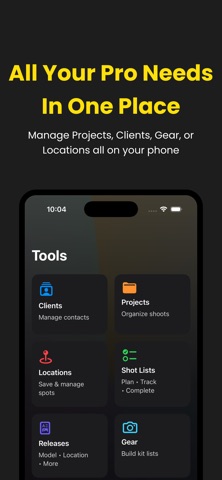
Scheduled Locations: Save your favorite spots or studios with notes and coordinates. Assign multiple locations to a single shoot.
Shot Lists: Create checklists to track compositions and concepts. Mark them as Done and reorder easily.
PROFESSIONAL MANAGEMENT TOOLS
Stay focused on your photography and let Camera Plan augment your business with powerful organizational features.
Projects & Clients: Manage projects by Status (Planned, Ongoing, Completed) and link them to your secure client list.
Gear Lists: Build reusable lists of your equipment (lenses, bodies, lighting) and attach them directly to projects.
Release Forms: Import and manage PDF Model/Location Releases. Sign and annotate documents directly in the app.
EXIF Data Viewer: Instantly view detailed metadata including aperture, shutter speed, ISO, and focal length.
GO PRO (One-Time Purchase)
Unlock your full potential with a single upgrade—no subscriptions, ever!
Unlimited Projects, Clients, Locations, and Gear Lists.
Security Locks (Face ID/Passcode) for sensitive data.
Lifetime access to all future professional tools.
Download Camera Plan today and master your photography workflow.