

Camera Report
Camera Report is made and published by LogFlick s.r.o. AppBrain is an independent app data site and isn't affiliated with LogFlick s.r.o. The app name, icon, screenshots and description belong to LogFlick s.r.o. and are shown as published on the App Store.
AppBrain's verdict
- Rating on App Store
- 3.00
- 1 ratings
- Last updated
- December 2, 2024
It doesn't have enough ratings yet to judge what users think.
Rankings
App Store top chartsApp Store Rankings for Camera Report
Competitors
Similar apps and more from LogFlick s.r.o.Alternatives to Camera Report







Releases
Updates seen on the App Store- Version
- 1.3.4
- Launched
- November 2022
No changelog data
User feedback
Ratings and reviews on the App StoreComments on Camera Report for iOS
We don't have enough comments to show example comments. Please check back later.
Technology
Found in the app by AppBrain- Price
- Free
- App size
- 73.1 MB
- Content rating
- Everyone
Technologies used by Camera Report
About the app and developer
About Camera Report
Camera Report is a photo & video app developed by LogFlick s.r.o.
User Ratings
Camera Report is rated 3.00 out of 5 stars. The rating is based on one rating ratings.
App Information
Camera Report is freely available from the App Store. The app size is 73.06 MB. The latest version available is 1.3.4. The last update was on December 2, 2024.
Technical Requirements
The app has a content rating of Everyone. The app has been available on the App Store since November 2022.
Developer information for LogFlick s.r.o.
Address:
Store listing
By LogFlick s.r.o., from the App Store




Description by LogFlick s.r.o. Written by the developer, not by AppBrain. Click to read.
- No more paper required or heavy silver folders in your set-bag.
- No more complaints about your handwriting or missing information… Bye, bye, hasta la vista, díky čao!
Features and functions:
1. PROJECT MENU
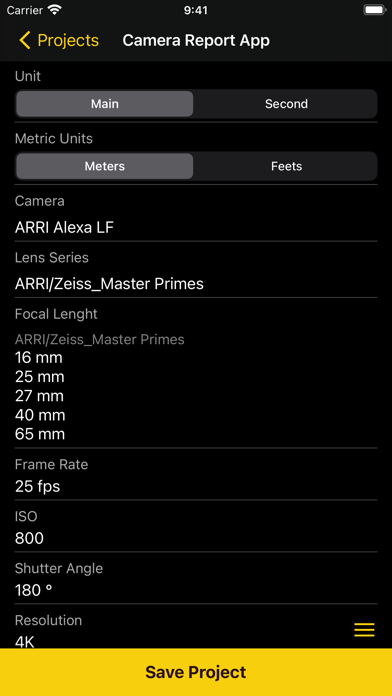
Tap a field to edit the basic set up of the project.
- Production info: Company, Director, Cinematographer, Assistant Camera
- Slate system: European or American slate system, the cells are formatted to use the layouts of each system.
- Camera: built-in database with the most used digital film cameras
- Lens series: built-in lens database with different brands and lens types
- Focal length: precisely choose the focal length available in your lens case. This will save you time when filling in each take.
- Fill in the basics: Frame rate, ISO, Shutter angle, Aspect ratio and project Compression
Once complete press save, and your project will be loaded and ready to use (all the information will be automatically add it to each new take). For further changes slide the project name to the left and: Edit or Erase function will be display.
2. MAIN MENU
2.1 Menu Bar
Switch between Scene, Takes, Camera & Roll and navigate through the filled data.
2.2 ADD Take button:
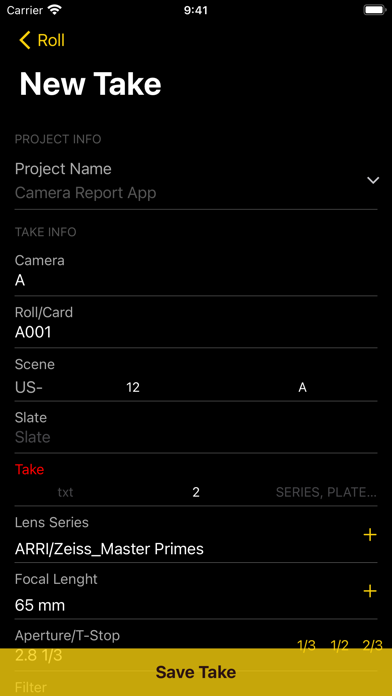
Choose Add Take and you are ready to start! All your information from the project set up will already be displayed, until you decide to change it.
- Camera: name the camera body A, B, C…X, Y, Z
- Roll/Card: will start from the last entered camera roll/camera card
- Scene: fill in the scene code according to the script (this information will be kept if there is more than one take)
- Take: no need to fill in. It will work automatically in increasing numbers. It can also be modified manually.
- Lens series: will show only the selected brands and lens types chosen in the project set up. / + symbol, in case of a special lens need, this + symbol allows you to type in a new brand or lens type.
- Focal length: only the selected focal length from the project set-up will be displayed on the scrolling menu. /+ symbol, allows you to type in a new focal length if it is not available in the database.
- Aperture/T-stop: type in the lens aperture and make it precise by using the thirds functions 1/3,1/2,2/3
- Filter: multiple filter cells for neutral density, colour correction or effect filters.
- Frame rate, ISO & Shutter angle: will be filled in with the information loaded in the project set up. Manual changes are also available if is necessary.
- Colour temperature/White balance: fill in the colour temperature and the Kelvin degree symbol will be automatically displayed.
- Resolution: choose from the scrolling menu the most common resolution or select the + symbol and type it in manually.
- LUT: fill in the name of the Look Up Table
- VFX: summarize form of VFX data for special shots: Height and Tilt, from and to. For your values, choose between metric or imperial system.
- Note: for extra consideration, postproduction messages or any other type of information.
- Location: fill in manually or with the LOC function it will take the current phone GPS place.
- Picture: take a picture for reference or camera rigs for extra help. The image will appear beside the current take.
“All the information loaded in the 1st take will be kept and ready for the next takes.”
2.3 Backend
You can administrate and prepare your projects through the backend features.
Sing in, Fill in, send it and enjoy it.
Terms of Use: https://camerareport.logflick.com/terms