

Camera to Files
Camera to Files is made and published by Chad Pickard. AppBrain is an independent app data site and isn't affiliated with Chad Pickard. The app name, icon, screenshots and description belong to Chad Pickard and are shown as published on the App Store.
AppBrain's verdict
- Rating on App Store
- 3.40
- 5 ratings
- Last updated
- October 15, 2026
- Size
- 15.9 MB
It doesn't have enough ratings yet to judge what users think.
User feedback
Ratings and reviews on the App StoreComments on Camera to Files for iOS
We don't have enough comments to show example comments. Please check back later.
Store listing
By Chad Pickard, from the App Store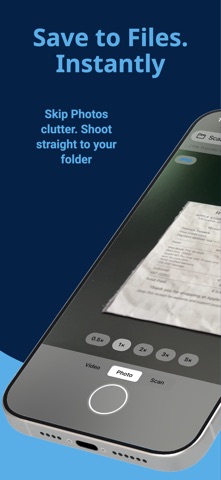




Description by Chad Pickard Written by the developer, not by AppBrain. Click to read.
Choose a folder once, then capture photos, videos, and scans that land exactly where you want them — fast, clean, and organized.
Built for a faster workflow:
- Save directly to Files, iCloud Drive, or OneDrive
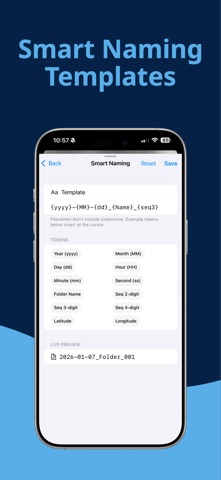
- Smart Naming with 21 tokens — date, time, place, device, EXIF, sequence, and more
- Optional Auto-Sort into Year / Month / Day folders
- Photo, Video, and Scan in one simple camera
- Quick Reveal in Files and easy sharing
- Volume buttons as shutter (optional)
Pro camera control
Tap to focus and meter. Long-press to lock AE/AF and drag the reticle handle to bias exposure exactly where you want it. Lens chips are labeled (Ultra-Wide, Wide, Tele) so you always know which one is active. Self-timer (3s / 10s) and expanded grids — rule of thirds, square, golden spiral, and diagonals — for cleaner framing.
Powerful scanning
Create multi-page PDFs with color, grayscale, or black-and-white modes, plus DPI and margin controls. Pro unlocks on-device OCR with multi-language detection so the text inside scanned pages is searchable in Files, Preview, and Spotlight.
Better capture control
Choose photo format (JPEG/HEIC) and quality. Record video with stabilization. Pro unlocks up to 4K/60 video with full stabilization control.
Smart Naming
Build any filename pattern with tokens for date, time, weekday, place (reverse-geocoded city), device model, image dimensions, ISO, aperture, shutter speed, GPS, sequence numbers, and more. Live preview while you type.
Bulk Rename (Pro)
Rename existing photos, videos, and PDFs in any folder using your current template — with one-tap undo.
OneDrive that just works
Upload to OneDrive Personal or Business. If your network drops mid-upload, Shot2File queues the file and finishes it the moment connectivity returns.
Made for frequent use
Pin favorite folders for one-tap saving. Free includes 1 Favorite. Pro unlocks unlimited Favorites.
Use Siri or the Action Button to launch straight into the camera or scanner — no menus, no app picker. Spotlight indexes each capture action, so you can search "take a photo" and shoot.
Try Pro
Get a 15-minute Pro preview. Additional Favorites require permanent Pro.
Safety and technology
Found in the app by AppBrain- Price
- Free
- App size
- 15.9 MB
- Content rating
- Everyone
Technologies used by Camera to Files
Releases
Updates seen on the App Store- Version
- 2.2.3
- Launched
- January 2026
No changelog data
Alternatives
Similar apps and more from Chad PickardMore from Chad Pickard


Rankings
App Store top chartsApp Store Rankings for Camera to Files
About the app and developer
About Camera to Files
Camera to Files is a photo & video app developed by Chad Pickard.
User Ratings
Camera to Files is rated 3.40 out of 5 stars. The rating is based on 5 ratings.
App Information
Camera to Files is freely available from the App Store. The app size is 15.86 MB. The latest version available is 2.2.3. The last update was on October 15, 2026.
Technical Requirements
The app has a content rating of Everyone. The app has been available on the App Store since January 2026.
Developer information for Chad Pickard
Address: