Camlog: Record. Pause. Resume. is an overall app developed by Daniel Bahl.
How many times has Camlog: Record. Pause. Resume. been downloaded?
What is the rating of Camlog: Record. Pause. Resume.?
Camlog: Record. Pause. Resume. has no ratings yet.
Is Camlog: Record. Pause. Resume. free?
Camlog: Record. Pause. Resume. is free to download. The APK download size is 16.53 MB. The latest version available is 1.2. The last update was on April 2, 2026.
What are the requirements for Camlog: Record. Pause. Resume.?
The app has a content rating of Everyone. The app has been available on Google Play April 2026.
Description
Tired of cluttering your camera roll with a dozen tiny clips, only to spend hours stitching them together later? Meet Camlog.
Camlog is the ultimate friction-free video recorder for creators, vloggers, and anyone who wants to shoot video without the hassle of post-production. Build your video clip by clip, right in the moment. Perfect for all-day VLOGs, Shorts, TikToks, Reels and YouTube Videos.
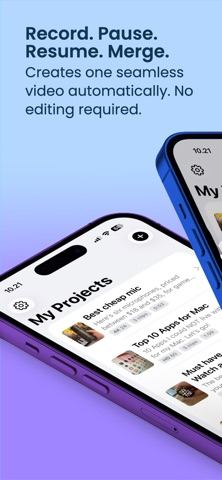
▶ RECORD. PAUSE. RESUME. Creates one seamless video automatically. No editing required. Just hit record, pause for a minute, day or month - and resume when you're ready. All clips are organized in Projects, Sortable, Nameable and gets Exported into One Seamless Video, automatically. It's like the magic camera-assistant you've always wanted.
• AIRDROP OR SAVE A SINGLE FILE Skip the clutter. Export your entire project as one perfectly merged video, ready to share or save to your Camera Roll in seconds.
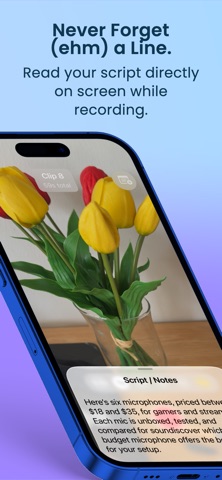
• OVERLAY YOUR SCRIPT. Paste your text, hit record, and go, go, go! Read your notes directly on the screen while keeping your eyes on the camera.
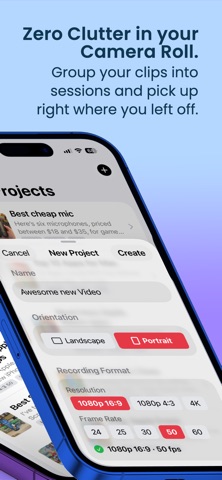
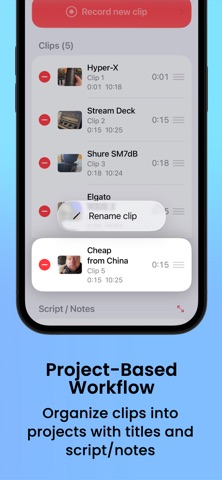
• TOTAL CLIP CONTROL & PROJECTS. Group your clips into projects and pick up right where you left off. Many clips? No problem. Name, sort, and organize every take.
• ZERO CAMERA ROLL CLUTTER. Everything is saved locally in-app. Export only your final masterpiece to your Photos.
• SMART FORMAT LOCK. Your first clip locks the project to portrait or landscape. No more awkward orientation flips mid-video.
• SUPPORT FOR EXTERNAL MICS Pro audio, plug and play. Get crisp, professional sound on every take by connecting your favorite external microphones.
• SUPPORT FOR APPLE WATCH Be your own camera operator. Start and stop recording, check your clip count, and monitor elapsed time right from your wrist.
- FULL FEATURE LIST -
• Seamless Recording: Tap to record clips instantly, no fiddling with settings mid-shoot. • Apple Watch Remote: Start/stop recording from your wrist, check your clip count, and track elapsed time. • Undo Last Clip: Messed up a take? Quickly delete the bad clip right after recording. • Pro Video Specs: Choose between 16:9 or 4:3, shoot in crystal clear 1080p or 4K, and pick your frame rate (24, 25, 30, 50, or 60 fps). • Multi-Lens Zoom: Quickly switch between physical lenses (0.5x, 1x, 2x, 5x) or use smooth pinch-to-zoom. • Front & Back Camera: Flip the camera on the fly. • Torch/Flashlight: Easily toggle the flashlight for low-light shooting. • High-Quality Export: Merges all clips into a single, high-quality QuickTime (.mov) file. • One-Tap Share: Save directly to your Camera Roll, AirDrop to your Mac, or send anywhere via the iOS share sheet. • Private & Secure: All projects and clips are stored locally on your device using SwiftData. No cloud uploads required.
Version 1.1: • Clips Editing (Cut, Split etc.) • Exporting Single Clips • macOS Companion app where you can create scripts to record on the go.
Roadmap (Things on the Whiteboard) • Compressed Exporting Have a great idea? Reach out and I'll add it to the to-do list.
Each subscription will automatically renew 3 days before the expiration date for
the same time period. Subscriptions can be cancelled at any time before the renewal.