

Cans is made and published by Mikhail Akopov. AppBrain is an independent app data site and isn't affiliated with Mikhail Akopov. The app name, icon, screenshots and description belong to Mikhail Akopov and are shown as published on the App Store.
AppBrain's verdict
EstablishedLoved by users- Rating on App Store
- 4.88
- 185 ratings
- Last updated
- May 18, 2026
Users love it: 4.9 stars from 185 ratings.
Rankings
App Store top chartsApp Store Rankings for Cans
Competitors
Similar apps and more from Mikhail AkopovAlternatives to Cans







More from Mikhail Akopov


Releases
Updates seen on the App Store- Version
- 3.2
- Launched
- October 2011
No changelog data
User feedback
Ratings and reviews on the App StoreComments on Cans for iOS
We don't have enough comments to show example comments. Please check back later.
Technology
Found in the app by AppBrain- Price
- Free
- App size
- 6.98 MB
- Content rating
- Everyone
Technologies used by Cans
About the app and developer
About Cans
Cans is a lifestyle app developed by Mikhail Akopov.
User Ratings
Cans is rated 4.88 out of 5 stars. The rating is based on 190 ratings.
App Information
Cans is freely available from the App Store. The app size is 6.98 MB. The latest version available is 3.2. The last update was on May 18, 2026.
Technical Requirements
The app has a content rating of Everyone. The app has been available on the App Store since October 2011.
Developer information for Mikhail Akopov
Address:
Store listing
By Mikhail Akopov, from the App Store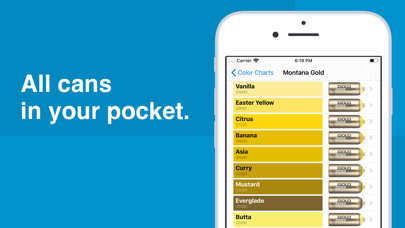
Description by Mikhail Akopov Written by the developer, not by AppBrain. Click to read.
The list of color charts:
- Montana Black
- Montana Gold
- MTN 94
- MTN Hardcore
- Molotow Premium
- Ironlak
- Ironlak Sugar
- Arton
- Kobra High Pressure
- Kobra Low
- Flame Blue
- Flame Orange
- Loop Colors
- NBQ Slow
- NBQ Fast
- OneTake
- Dope Classic
- Dope Supreme
There is a possibility to find similar cans.
For example, you need to replace a can that has ended and is nowhere available.
Find this can in the "Color charts" tab, tap the "Search" button and the app will display a list of the most similar cans.
The search will be made in color charts, which can be changed in settings.
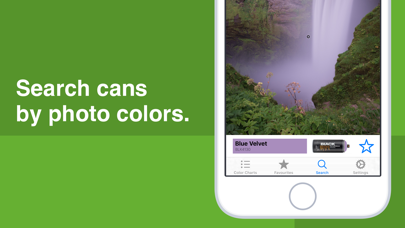
Another useful feature is the search by colors in a photo.
For example, you need to determine which cans are needed to paint a picture on a wall.
On the "Search" tab, select the desired picture from the library or take a new one, tap on a pixel and the application will display the most suitable can.