

CapSnap: AI Video Captions
CapSnap: AI Video Captions is made and published by RICHX. AppBrain is an independent app data site and isn't affiliated with RICHX. The app name, icon, screenshots and description belong to RICHX and are shown as published on the App Store.
AppBrain's verdict
- Last updated
- July 31, 2026
- Size
- 229.0 MB
User feedback
Ratings and reviews on the App StoreComments on CapSnap: AI Video Captions for iOS
We don't have enough comments to show example comments. Please check back later.
Store listing
By RICHX, from the App Store

Description by RICHX Written by the developer, not by AppBrain. Click to read.
Drop in a clip, pick a style, and CapSnap auto-transcribes every word with frame-accurate timing. Tap any word to fix it, recolor it, or give it a bounce. Export a captioned video for TikTok, Instagram Reels, YouTube Shorts, podcasts, vlogs, ads, and lessons — in under a minute.
Auto Subtitles That Just Work
▸ AI Auto-Transcribe — Speech-to-text runs locally, no upload, no waiting on servers.
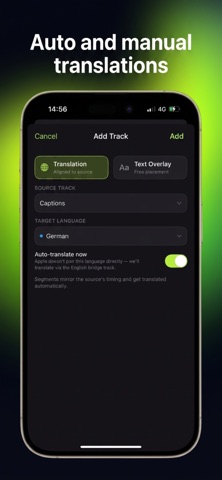
▸ 75+ Languages — English, Spanish, French, German, Japanese, Korean, Arabic, Hindi, and more.
▸ Frame-Accurate Sync — Captions land on the exact word, exactly when it's spoken.
▸ Smart Segmentation — Clean, readable lines that match natural speech rhythms.
▸ Auto-Translate — Add translated caption tracks and reach a global audience.
Caption Styles Inspired by Viral Creators
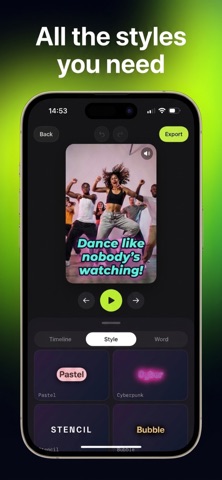
TikTok Bold, Neon Pop, Karaoke, Cyberpunk, Glitch, Gold, Retro 80s, VHS, Comic, Holographic, 3D Drop, Glass — and 70+ more. Every preset is fully tunable: font, color, stroke, shadow, glow, gradient, background, size, position, and animation.
The Fun Part: Per-Word Moments
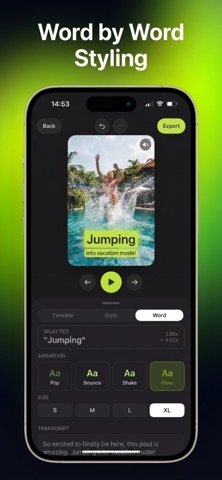
Tap any single word and:
• Change its color, size, or weight.
• Animate it with 13 effects — Pop, Bounce, Shake, Glow, Wave, Spin, and more.
• Make the hook word land perfectly. Build karaoke-style highlights.
Editor Built for Short-Form Video
▸ 9:16 Vertical Canvas — Made for Reels, TikToks, and Shorts.
▸ Multi-Track Timeline — Captions, translations, and text overlays in sync.
▸ Live Preview — Captions update instantly, exactly the way they'll export.
▸ Tap-to-Fix Transcript — Correct typos, merge lines, or split segments.
▸ Reveal Modes & Animations — Word-by-word, whole-line, karaoke, typewriter.
Free to Start, Premium When You're Ready
Start at no cost: transcribe in every language, use most caption styles, edit everything, and export in HD with a small CapSnap watermark and a daily export limit.
CapSnap Premium unlocks the full studio:
▸ No watermark on any export.
▸ Unlimited exports, every day.
▸ Crisp 4K / source-resolution export.
▸ The complete Pro pack of styles and word animations.
Premium is an auto-renewable subscription (weekly or yearly, free trial on select plans). Payment is charged to your Apple Account; it renews automatically unless cancelled at least 24 hours before the period ends. Manage or cancel anytime in your Apple Account settings.
Studio-Quality Export
▸ H.264 or HEVC, smooth at your video's frame rate.
▸ Captions burned in — share anywhere with no re-rendering.
▸ Save to Photos or send straight to TikTok, Instagram, YouTube, or iMessage.
Privacy Built-In
Your videos, speech, and transcripts are processed on-device and never uploaded. Transcription works fully offline. No login, no account — only anonymous diagnostics and App Store subscription validation touch the network, never your content.
Made For
• TikTok, Reels, and Shorts creators • Podcasters clipping for video • Coaches and educators • Marketers • Accessibility-friendly video for deaf and hard-of-hearing audiences • Anyone who hates silent autoplay killing their reach.
Privacy Policy: https://richxstudio.com/capsnap-privacy-policy
Terms of Use: https://richxstudio.com/capsnap-terms-and-conditions
© 2026 RICHX SRL
Safety and technology
Found in the app by AppBrain- Price
- Free
- App size
- 229.0 MB
- Content rating
- Everyone
Technologies used by CapSnap: AI Video Captions
Releases
Updates seen on the App Store- Version
- 1.0
- Launched
- July 2026
No changelog data
Alternatives
Similar apps and more from RICHXAlternatives to CapSnap: AI Video Captions








More from RICHX

Rankings
App Store top chartsApp Store Rankings for CapSnap: AI Video Captions
About the app and developer
About CapSnap: AI Video Captions
CapSnap: AI Video Captions is a photo & video app developed by RICHX.
User Ratings
The app has no ratings yet.
App Information
CapSnap: AI Video Captions is freely available from the App Store. The app size is 228.96 MB. The latest version available is 1.0. The last update was on July 31, 2026.
Technical Requirements
The app has a content rating of Everyone. The app has been available on the App Store since July 2026.
Developer information for RICHX
Address:
Frequently asked questions about CapSnap: AI Video Captions
Is CapSnap: AI Video Captions free?
Yes. CapSnap: AI Video Captions is free on the App Store.
Is CapSnap: AI Video Captions still available?
Yes. CapSnap: AI Video Captions is on the App Store, and the last update we saw was on July 31, 2026.
How large is CapSnap: AI Video Captions?
CapSnap: AI Video Captions is 228.96 MB.
Is CapSnap: AI Video Captions suitable for children?
App Store rates the content of CapSnap: AI Video Captions as suitable for everyone.
Who made CapSnap: AI Video Captions?
CapSnap: AI Video Captions was developed by RICHX. It is listed in the photo & video category on the App Store.
What are the best alternatives to CapSnap: AI Video Captions?
People looking at CapSnap: AI Video Captions also look at these photo & video apps: Teleprompter Kit, LUTs-Color creative by you, Video To Photo - Frame Capture, Headshot - AI Photo Generator, Kataly - Fit Any Size For SNS.