

Captioner: Quick Add Captions
Captioner: Quick Add Captions is made and published by Stephen Robles. AppBrain is an independent app data site and isn't affiliated with Stephen Robles. The app name, icon, screenshots and description belong to Stephen Robles and are shown as published on the App Store.
AppBrain's verdict
New- Rating on App Store
- 5.00
- 1 ratings
- Last updated
- October 21, 2026
- Size
- 2.95 MB
Captioner: Quick Add Captions came out 21 days ago. It doesn't have enough ratings yet to judge what users think.
User feedback
Ratings and reviews on the App StoreComments on Captioner: Quick Add Captions for iOS
We don't have enough comments to show example comments. Please check back later.
Store listing
By Stephen Robles, from the App Store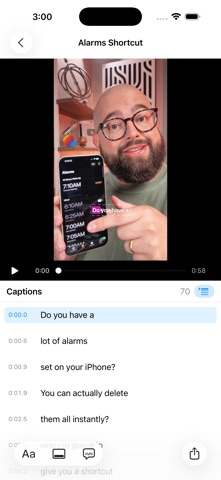


Description by Stephen Robles Written by the developer, not by AppBrain. Click to read.
WORD BY WORD
Captioner listens to your video with Apple's on-device speech engine and keeps the moment every word is spoken, so the word being said lights up as it's said. Perfect for Reels, Shorts, TikTok and any video watched with the sound off.
FIFTEEN STYLES, ALL YOURS TO CHANGE
Highlight boxes, outlines, karaoke colors, pops, typewriter reveals, boxed subtitles, and single-word styles that show only the spoken word. Every style's font, weight, size, case, colors, outline, shadow and animation can be changed. Use San Francisco in sans serif, rounded, serif or monospaced designs, any font on your device, or a font file you add. Save your own styles and make one the default for every new video.
PUT THEM WHERE YOU WANT
Drag the caption in the preview, or set a vertical position and left, center or right alignment. Vertical 9:16 and widescreen 16:9 videos each remember their own spot.
FIX THE WORDS
Every caption is editable next to the preview. Split a line before any word, merge two, delete one, or rebuild from the original recognition. Punctuation, title case and curse words are simple toggles.
TRANSLATE
Turn the captions into Spanish, French, German, Portuguese, Japanese, Chinese and dozens more with Apple's on-device translation, keeping them timed to the original speech.
YOUR VIDEO, UNTOUCHED
Exports keep the original resolution and frame rate, and the audio is copied exactly as it was. H.264 by default, HEVC if you prefer. Already have an SRT or WebVTT file? Use it instead of transcribing.
PRIVATE BY DESIGN
Speech recognition, translation and rendering all happen on your device. Captioner has no account, no analytics and no tracking.
The first time you caption a language, the system downloads Apple's speech model for it; after that it works offline. Captioner for Mac adds batch queues and watched folders that caption and export videos automatically.
Safety and technology
Found in the app by AppBrain- Price
- Free
- App size
- 2.95 MB
- Content rating
- Everyone
Technologies used by Captioner: Quick Add Captions
Releases
Updates seen on the App Store- Version
- 1.1
- Launched
- October 2026
No changelog data
Alternatives
Similar apps and more from Stephen RoblesMore from Stephen Robles


Rankings
App Store top chartsApp Store Rankings for Captioner: Quick Add Captions
About the app and developer
About Captioner: Quick Add Captions
Captioner: Quick Add Captions is a photo & video app developed by Stephen Robles.
User Ratings
Captioner: Quick Add Captions is rated 5.00 out of 5 stars. The rating is based on one rating ratings.
App Information
Captioner: Quick Add Captions is freely available from the App Store. The app size is 2.95 MB. The latest version available is 1.1. The last update was on October 21, 2026.
Technical Requirements
The app has a content rating of Everyone. The app has been available on the App Store since October 2026.
Developer information for Stephen Robles
Address: