

Captions: Auto Video Subtitles
Captions: Auto Video Subtitles is made and published by Pocket Grove Ltd. AppBrain is an independent app data site and isn't affiliated with Pocket Grove Ltd. The app name, icon, screenshots and description belong to Pocket Grove Ltd and are shown as published on the App Store.
AppBrain's verdict
- Rating on App Store
- 5.00
- 3 ratings
- Last updated
- September 7, 2026
It doesn't have enough ratings yet to judge what users think.
Rankings
App Store top chartsApp Store Rankings for Captions: Auto Video Subtitles
Competitors
Similar apps and more from Pocket Grove LtdAlternatives to Captions: Auto Video Subtitles


More from Pocket Grove Ltd


Releases
Updates seen on the App Store- Version
- 1.7.1
- Launched
- May 2026
No changelog data
User feedback
Ratings and reviews on the App StoreComments on Captions: Auto Video Subtitles for iOS
We don't have enough comments to show example comments. Please check back later.
Technology
Found in the app by AppBrain- Price
- Free
- App size
- 16.2 MB
- Content rating
- Everyone
Technologies used by Captions: Auto Video Subtitles
About the app and developer
About Captions: Auto Video Subtitles
Captions: Auto Video Subtitles is a photo & video app developed by Pocket Grove Ltd.
What is the rating of Captions: Auto Video Subtitles?
Captions: Auto Video Subtitles is rated 5.00 out of 5 stars, based on 3 ratings.
Is Captions: Auto Video Subtitles free?
Captions: Auto Video Subtitles is free. The app size is 16.23 MB. The latest version available is 1.7.1. The last update was on September 7, 2026.
What are the requirements for Captions: Auto Video Subtitles?
The app has a content rating of Everyone. The app has been available on the App Store since May 2026.
Developer information for Pocket Grove Ltd
Address:
Frequently asked questions about Captions: Auto Video Subtitles
Is Captions: Auto Video Subtitles free?
Yes. Captions: Auto Video Subtitles is free on the App Store.
Is Captions: Auto Video Subtitles still available?
Yes. Captions: Auto Video Subtitles is on the App Store, and the last update we saw was on September 7, 2026.
How large is Captions: Auto Video Subtitles?
Captions: Auto Video Subtitles is 16.23 MB.
Is Captions: Auto Video Subtitles suitable for children?
App Store rates the content of Captions: Auto Video Subtitles as suitable for everyone.
How do people rate Captions: Auto Video Subtitles?
Captions: Auto Video Subtitles scores 5.00 out of 5 stars, from 3 ratings on the App Store.
Who made Captions: Auto Video Subtitles?
Captions: Auto Video Subtitles was developed by Pocket Grove Ltd. It is listed in the photo & video category on the App Store.
What are the best alternatives to Captions: Auto Video Subtitles?
People looking at Captions: Auto Video Subtitles also look at these photo & video apps: AI Proposal & Wedding Studio, Viter: AI Captions, CaptionEdge: Smart Captions, AI Captions - Subtitle Maker, Tello: AI Captions for Video.
Store listing
By Pocket Grove Ltd, from the App Store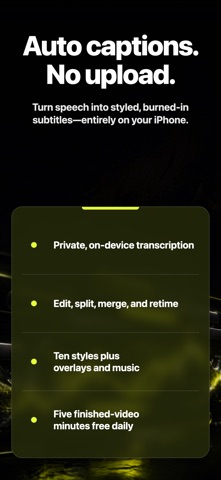



Description by Pocket Grove Ltd Written by the developer, not by AppBrain. Click to read.
Choose a video from Photos. Caption Creator transcribes it on your iPhone, lets you correct and style every segment, then burns the subtitles into a finished MP4.
CREATE CAPTIONS ON-DEVICE
• Automatic transcription powered by Apple’s on-device speech recognition
• No account and no source-video upload
• Works without a cloud transcription service
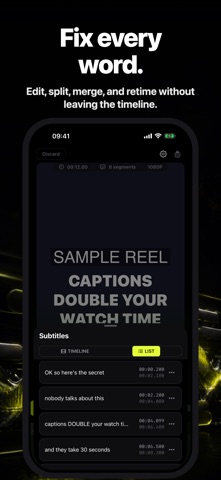
FIX EVERY WORD
• Edit the full transcript as a clean list
• Split and merge caption segments
• Drag timing handles against the audio waveform
• Preview word-by-word highlighting while the video plays
MAKE THE LOOK YOURS
• Ten caption styles, including Classic, TikTok, Hype, Karaoke, Neon, Minimal, Highlight, Cinema, and Code
• Adjust font, text color, stroke, highlight, and vertical position
• Add free-text overlays and background music
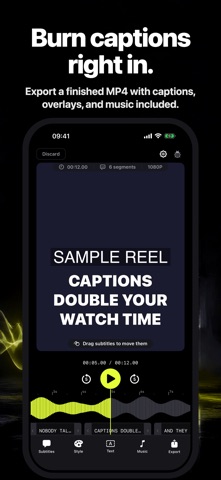
EXPORT A FINISHED VIDEO
Captions, text overlays, and your music mix are burned directly into the exported MP4, ready to save to Photos and share wherever you choose.
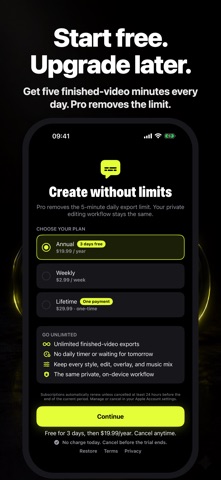
START FREE
Export up to five minutes of finished video each day for free. Caption Creator Pro removes the daily export limit. Choose weekly, annual, or one-time lifetime access in the app. Any eligible introductory offer is shown before purchase.
SUBSCRIPTION TERMS
Payment is charged to your Apple Account at confirmation. Weekly and annual subscriptions automatically renew unless cancelled at least 24 hours before the end of the current period. Manage or cancel subscriptions in your Apple Account settings. Lifetime access is a one-time purchase.
Terms of Use (EULA): https://www.apple.com/legal/internet-services/itunes/dev/stdeula/
Privacy Policy: https://pocketgrove.com/privacy/