

Car Screen Mirror & Cast
Car Screen Mirror & Cast is made and published by LEAN ASIA CO., LTD. AppBrain is an independent app data site and isn't affiliated with LEAN ASIA CO., LTD. The app name, icon, screenshots and description belong to LEAN ASIA CO., LTD and are shown as published on the App Store.
AppBrain's verdict
- Rating on App Store
- 5.00
- 1 ratings
- Last updated
- October 5, 2026
It doesn't have enough ratings yet to judge what users think.
Rankings
App Store top chartsApp Store Rankings for Car Screen Mirror & Cast
Competitors
Similar apps and more from LEAN ASIA CO., LTDAlternatives to Car Screen Mirror & Cast



More from LEAN ASIA CO., LTD


Releases
Updates seen on the App Store- Version
- 2.0.4
- Launched
- September 2025
No changelog data
User feedback
Ratings and reviews on the App StoreComments on Car Screen Mirror & Cast for iOS
We don't have enough comments to show example comments. Please check back later.
Technology
Found in the app by AppBrain- Price
- Free
- App size
- 110.1 MB
- Content rating
- Everyone
Technologies used by Car Screen Mirror & Cast
About the app and developer
About Car Screen Mirror & Cast
Car Screen Mirror & Cast is an utilities app developed by LEAN ASIA CO., LTD.
User Ratings
Car Screen Mirror & Cast is rated 5.00 out of 5 stars. The rating is based on one rating ratings.
App Information
Car Screen Mirror & Cast is freely available from the App Store. The app size is 110.05 MB. The latest version available is 2.0.4. The last update was on October 5, 2026.
Technical Requirements
The app has a content rating of Everyone. The app has been available on the App Store since September 2025.
Developer information for LEAN ASIA CO., LTD
Address:
Frequently asked questions about Car Screen Mirror & Cast
Is Car Screen Mirror & Cast free?
Yes. Car Screen Mirror & Cast is free on the App Store.
Is Car Screen Mirror & Cast still available?
Yes. Car Screen Mirror & Cast is on the App Store, and the last update we saw was on October 5, 2026.
How large is Car Screen Mirror & Cast?
Car Screen Mirror & Cast is 110.05 MB.
Is Car Screen Mirror & Cast suitable for children?
App Store rates the content of Car Screen Mirror & Cast as suitable for everyone.
How do people rate Car Screen Mirror & Cast?
Car Screen Mirror & Cast has one rating of 5.00 stars on the App Store.
Who made Car Screen Mirror & Cast?
Car Screen Mirror & Cast was developed by LEAN ASIA CO., LTD. It is listed in the utilities category on the App Store.
What are the best alternatives to Car Screen Mirror & Cast?
People looking at Car Screen Mirror & Cast also look at these utilities apps: CarSync app: Connect & Sync, Car Remote Connect & Sync Play, Screencast • mirroring for car, Car Play Sync: AI Connect App, AGRICOVA.
Store listing
By LEAN ASIA CO., LTD, from the App Store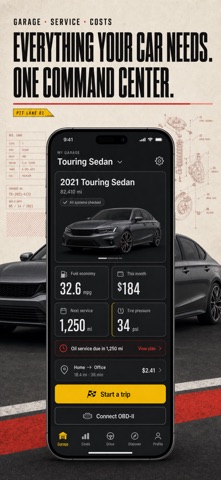


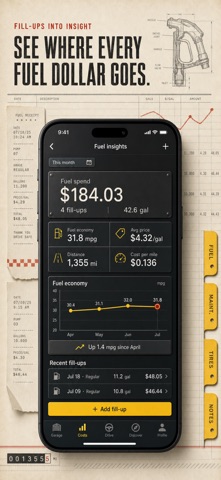
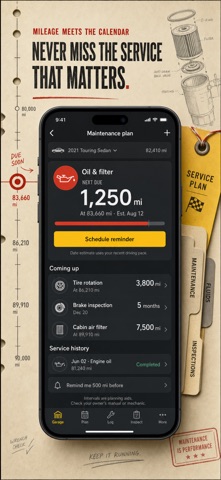

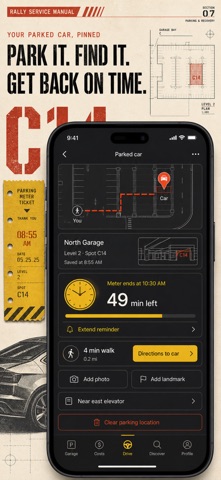

Description by LEAN ASIA CO., LTD Written by the developer, not by AppBrain. Click to read.
WHAT YOU GET
Garage
Build a record for each car: make, body, year, fuel type, plate, odometer, tank size and tyre pressures. Store insurance and registration documents and photos against the car they belong to.
Service and reminders
Log what was done, when, and at what mileage. Set reminders by date or by odometer reading, and get a notification before the next oil change or inspection is due.
Fuel and costs
Record fill-ups and running costs, set a monthly budget, and see where the money actually goes. Monthly reports break the total down by category, and the whole history exports to PDF or CSV.
OBD-II diagnostics
Pair a Bluetooth ELM327 adapter to read live engine values and stored trouble codes, with a plain-language explanation of what each code means and what usually causes it. An adapter is required for real readings. Without one, the cluster and the scanner run in a clearly labelled demonstration mode.
Drive
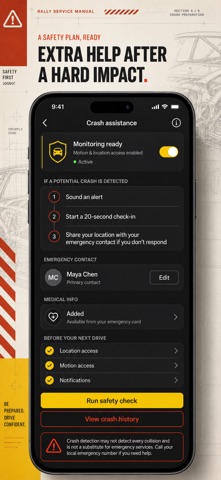
Track trips with distance, duration and average speed on a map. A speedometer with an optional over-speed alert, a safety score from your own driving, and impact detection that offers to call your emergency contact after a hard knock.
Parking
Save where you parked, add a photo and a note, run a meter timer, and walk back to the spot on the map.
Cast to car
The Cast screen opens the standard iOS output picker, so the audio and video this app is playing can be sent to a chosen playback device. Please read this plainly: it moves this app's own playback. It is not iPhone screen mirroring onto a car head unit, and no third-party app on iOS can do that.
Reference and extras
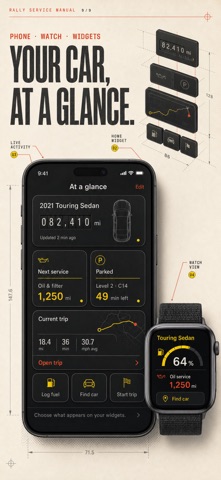
A warning-light library, a maintenance glossary, driving guides, home-screen widgets, an Apple Watch companion, an internet radio player and a player for your own music library.
YOUR DATA STAYS ON THE DEVICE
Records, photos and documents are stored on your iPhone. There is no account and no sign-in. Weather and internet-radio listings are fetched from public services when you open those screens; nothing else leaves the phone.
SUPPORT
Email: support@leanstudio.asia
---
By downloading Car Link, you agree to our Terms of Service (https://leanstudio.asia/terms-of-use) and Privacy Policy (https://leanstudio.asia/privacy-policy).
Full access requires an in-app purchase: an auto-renewing Weekly or Yearly subscription, or a one-time Lifetime purchase. Prices may vary by location. Subscriptions automatically renew unless canceled at least 24 hours before the end of the current period.