

Caranba Proverbs Commentary
Caranba Proverbs Commentary is made and published by Adelaja Oyebanjo. AppBrain is an independent app data site and isn't affiliated with Adelaja Oyebanjo. The app name, icon, screenshots and description belong to Adelaja Oyebanjo and are shown as published on the App Store.
AppBrain's verdict
Established- Rating on App Store
- 5.00
- 2 ratings
- Last updated
- March 17, 2024
It doesn't have enough ratings yet to judge what users think.
Rankings
App Store top chartsApp Store Rankings for Caranba Proverbs Commentary
Competitors
Similar apps and more from Adelaja OyebanjoAlternatives to Caranba Proverbs Commentary




More from Adelaja Oyebanjo

Also available on Google Play

Releases
Updates seen on the App Store- Version
- 1.2.0
- Launched
- February 2021
No changelog data
User feedback
Ratings and reviews on the App StoreComments on Caranba Proverbs Commentary for iOS
We don't have enough comments to show example comments. Please check back later.
Technology
Found in the app by AppBrain- Price
- Free
- App size
- 47.2 MB
- Content rating
- Everyone
Technologies used by Caranba Proverbs Commentary
About the app and developer
About Caranba Proverbs Commentary
Caranba Proverbs Commentary is a books app developed by Adelaja Oyebanjo.
User Ratings
Caranba Proverbs Commentary is rated 5.00 out of 5 stars. The rating is based on 2 ratings.
App Information
Caranba Proverbs Commentary is freely available from the App Store. The app size is 47.23 MB. The latest version available is 1.2.0. The last update was on March 17, 2024.
Technical Requirements
The app has a content rating of Everyone. The app has been available on the App Store since February 2021.
Developer information for Adelaja Oyebanjo
Address:
Store listing
By Adelaja Oyebanjo, from the App Store




Description by Adelaja Oyebanjo Written by the developer, not by AppBrain. Click to read.
The features include:
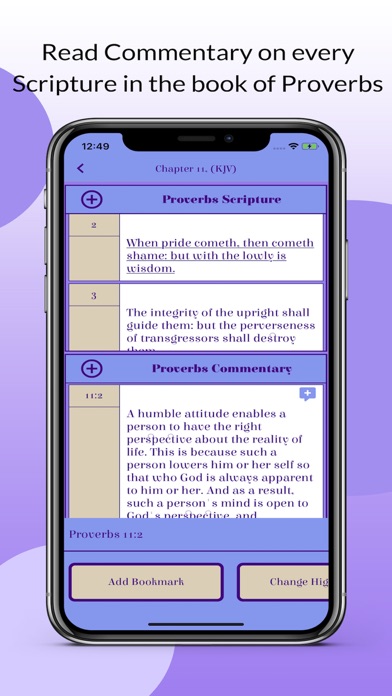
-Commentary on every scripture verse in the book of Proverbs.
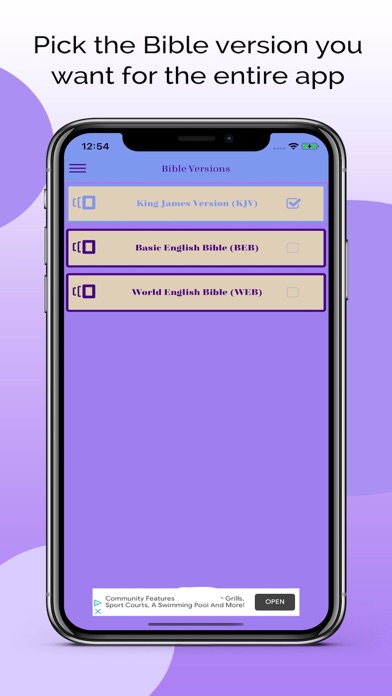
-The book of Proverbs is available in the following versions: King James Version (KJV), Basic English Bible (BEB), and World English Bible (WEB).
-The scriptures in the book of Proverbs are classified into specific categories such as Anger & Patience, Fear of God, Financial Security, Friendship & Relationships, Pride & Humility, Wisdom & Foolishness, and more.
-Scripture texts can be bookmarked.
-Resource supplements to the book of Proverbs include “Who is Solomon?”, “Who is Agur & Lemuel?”, “Hebrew Poetry”, and “Proverbs Summary”.
-Text highlight to make it easier to locate scripture text or commentary text when you need it.
-Scripture and Commentary text-press interaction by the user.
-Contains the Hebrew Strong’s Dictionary.
-Notes section to add your personalized study notes.
-Customize the color, text size, text color, and text font.
The following provides specific details about each section of the app:
1) Proverbs Selections
This is the main screen of the app where the user accesses the Proverbs Chapters, Proverbs Categories, Proverbs Resources, and Proverbs Verse picker.
2) Bible Versions
This is the list of bible versions in this app. The user selects the bible version of interests for the entire app. The default is the King James Version.
3) Category Filters
This is the list of categories discussed in the book of Proverbs. The user selects the categories to focus on. These selections filter the categories in the Proverbs Categories screen.
4) Theme Preferences
This app comes with seven themes which include Proverbs, Solomon, David, Bathsheba, Agur, Lemuel, and Lemuel’s Mother. The default theme is Proverbs. A user is able to create and add a custom theme by pressing the plus icon on the top-right corner of the screen.
5) Notes List
This is the list of study notes the user adds from the Proverbs Chapters or Proverbs Categories screen. The user can also add notes from the notes list screen by pressing the plus icon on the top-right corner of the screen.
6) Comments List
This is a list of comments added by the user. Each comment has a list of comment items with respect to the scripture reference. A user adds a comment to a verse in the Proverbs Commentary section by pressing the add-comment icon on the top-right corner of each commentary text. After the user is done entering the comment, a view-comment icon appears on the left of the add-comment icon.
7) Bookmarks
A bookmark icon is placed to the left of the scripture text when the user presses the “Add Bookmark” button. When a bookmark is added the bookmark list is updated in the Bookmarks List. And the same happens when the bookmark is removed. NOTE: ONLY SCRIPTURE TEXTS CAN BE BOOKMARKED AND NOT COMMENTARY TEXTS.
8) Text Highlight
Scripture and commentary texts can be highlighted. The highlight can be brightened or darkened using a slider control with respect to the user’s preference. The selected highlight is applied to the selected texts. The highlight applied to the text can be updated. The already selected color will have a white ring around it. The user can select a different color or retain the original selected color.
9) Proverbs Picker List
This is a list of selected scripture references picked by the user using a specific bible version. The user presses the plus icon on the top-right corner of the screen. The user selects the bible version, and then picks the proverbs scripture reference. Then the proverbs picker list is updated with the newly picked scripture reference.