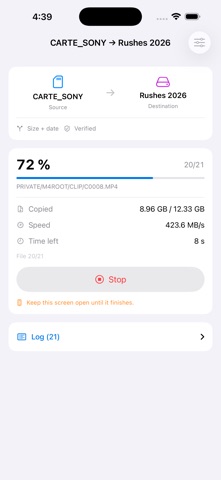
CardSync copies one folder to another and verifies every file it writes.
Memory card, SSD or USB-C stick, iCloud Drive and the services you have installed, the iPhone itself: anything the Files app exposes works, in both directions. The source can also be an album from your photo library.
The Files app can already move files. It cannot tell you whether the copy is faithful, what is still missing, or resume where it stopped. That is what CardSync does.
VERIFICATION
After each write, CardSync reads the file back from the drive — bypassing the system cache — and compares its SHA-256 digest. For a folder, the comparison is made against the original, itself read a second time: if the two reads differ, the card reader is at fault, and the app tells you instead of copying corrupted data. For a photo, the comparison is made against the digest computed during the export.
ONLY WHAT IS MISSING
Both sides are analysed before anything is written. You see what would be copied and then you decide. For a folder, three criteria to choose from: size, size and
date, or full digest. For an album, an item counts as backed up when the file exists and carries its date.
LARGE VOLUMES AND LONG COPIES
Files are read and written in successive blocks, never loaded whole into memory: a 4 GB video uses no more memory than a photo. File size is not a limit, and
neither is file count — analysing several tens of thousands of files remains a matter of seconds.
For copies that take a while, what matters is resuming. Running it again after an interruption — screen left, drive unplugged, battery dead — copies only what is genuinely missing: what has already been verified is never redone.
NOTHING IS EVER LOST
Every file is written under a temporary name, then put in place in one move, once complete and verified. A file already present at the destination is never deleted before its replacement is ready. An interrupted copy leaves no truncated file behind, and the next sync picks up where it stopped.
PHOTO LIBRARY
Pick an album, a smart album, or the whole library, with a "from a date" filter.
CardSync exports the original file and, if you want, the Live Photo video, the edited version, and a readable metadata sidecar (date, location, dimensions, favourite, album). Items no longer stored on the device are fetched from iCloud — an option you can turn off.
MIRROR MODE WITHOUT DELETION
For a folder source, if you want the destination to mirror the card, extra files are moved into a dated folder — never deleted. And if part of the source could not be read, mirror mode disables itself: a temperamental drive must never make a valid backup look like an obsolete file.
WHAT YOU SEE
Progress by file and by byte, real throughput, time left, a detailed log, and a history. An honest summary at the end: what was copied, verified, set aside, and what failed.
WHAT DOES NOT LEAVE YOUR DEVICE
No account, no tracking, no advertising, no data collected, no server of ours.
Traffic happens only when you ask for it, and always between your device and your own accounts: fetching your photos from iCloud, which can be turned off, and transfers performed by an online service if you pick one of its folders as source or destination.
GOOD TO KNOW
iOS does not allow copying to an external volume in the background: keep CardSync on screen during the transfer. The app prevents the screen from locking, and if you leave, the sync resumes next time. For large volumes a powered USB-C hub is strongly recommended.
Show more
Show less