CaringCharge is an overall app developed by Yuji Nagata.
How many times has CaringCharge been downloaded?
What is the rating of CaringCharge?
CaringCharge is rated 1.00 out of 5 stars, based on one rating ratings.
Is CaringCharge free?
CaringCharge is free to download. The APK download size is 20.83 MB. The latest version available is 1.1. The last update was on August 9, 2021.
What are the requirements for CaringCharge?
The app has a content rating of Everyone. The app has been available on Google Play May 2020.
Description
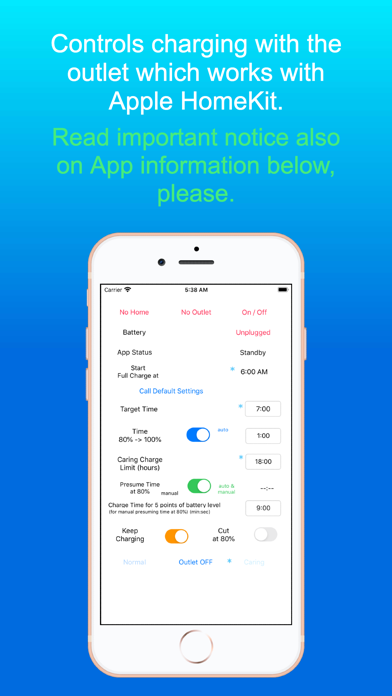
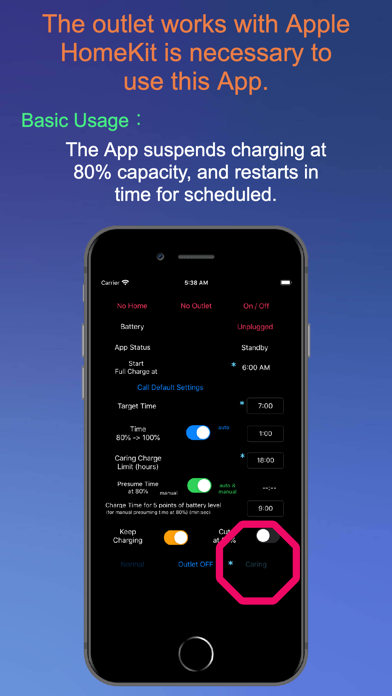
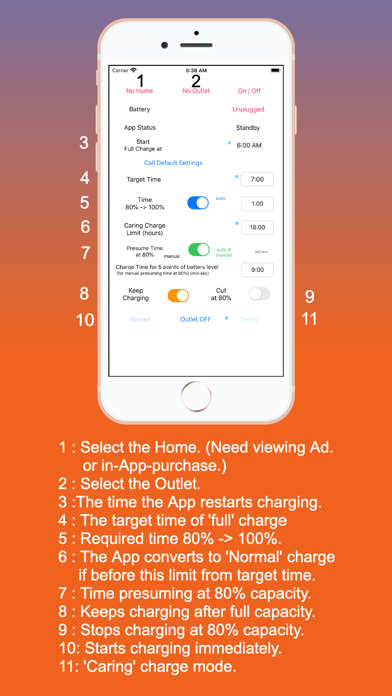
Will improve battery life with 'Optimized Battery Charging'. You can optimize battery charging on iPad (Of course on iPhone) which have no 'Optimized Battery Charging' ! The outlet works with Apple HomeKit is necessary to use this App. Available the auto launch with automation of the Shortcuts App. (https://apps.apple.com/us/app/shortcuts/id915249334) Set the Auto launch when connected to power is as following ... (Shortcuts App -> Automation -> '+' on upper right edge -> Create Personal Automation -> Charger -> Is Connected-> Next->Add Action -> Apps -> CaringCharge -> Next-> Turn off 'Ask Before Running' -> Done). Then Long tap 'Caring' or 'Normal' button on the CaringCharge App (Yellow line will be drawn around it). Need user confirmation when the device is locked (the specification of the iOS). In a word, this App is semi- automatic version of iOS standard function 'Optimized Battery Charging'. You can set as you like because of 'non full auto' settings (e.g. In 'Normal' and 'Cut at 80%' mode, the App stops charging at 80% without restarting to 100%). The App is developed because 'Optimized Battery Charging' on iOS 13 is not work appropriately in the circumstance on the developer.
'Caring' mode suspend charging when reached to about 80% capacity, afterwards restart at the time set. 'Normal' mode simply charge until reaching the capacity set. Difference is if the App restart charging.
In-App-Purchase supports multiple devices in home and multiple homes. At first glance, the App works without In- App- Purchase in those condition, but doesn't. In-App-Purchase also includes removing Ad. , so it's suitable for devices which have more smaller display (e.g. iPhone 5s, SE ...).
While the activity indicator beside the 'App Status' red colored, the App is updating the Homekit settings. Keep the App foreground during activity indicator colored.
'80% cut-off Normal Charge Mode' is very suitable for storing the devices, because batteries are damaged depending on the duration of full capacity and nevertheless damaged seriously if empty. (The latest version of the Shortcuts App is superior about this function.)
Connect charger to the outlet work with HomeKit, please. Lower current (not faster) charger is better in terms of battery damage. The App is not tested with wireless charger. The battery is burdened more. But if request, will develop correspondence to wireless charger.
The App can't work on background due to restriction of iOS. So this App can't control charging completely, but execute as ideal as possible.
It's almost impossible to stop charging at 100% or 80% (on 'Caring' mode) capacity finally due to restriction of iOS, so the App send notification especially with sound on the situation. (Works well with the Shortcuts App set to turn off the outlet at the level of the capacity each.)
'Optimized Battery Charging' is recommended to 'Off' not to conflict with this App. (Settings -> Battery -> Battery Health -> )
Tips for 2 'Auto' mode is in the notice which appear when manipulate the switch.
To resister smart plug, please use Apple genuine 'Home' App. https://support.apple.com/en-us/HT208724
(For the user who uses the device supported until iOS 9) On iOS 9, please use appropriate App which works with Apple HomeKit, because of not available 'Home' App.
Each subscription will automatically renew 3 days before the expiration date for
the same time period. Subscriptions can be cancelled at any time before the renewal.