




AppBrain's verdict
- Last updated
- November 8, 2026
- Size
- 82.2 MB
User feedback
Ratings and reviews on the App StoreComments on CarTV - Media Hub Player for iOS
We don't have enough comments to show example comments. Please check back later.
Store listing
By Phan Minh Quan, from the App StoreDescription by Phan Minh Quan Written by the developer, not by AppBrain. Click to read.
YOUR SOURCES, YOUR DEVICE
Paste an M3U or M3U8 link, or import video from Files and Photos. Everything is parsed and stored on your iPhone. Nothing about your playlists, files or links ever leaves the device.
LIVE, WITH A GUIDE
Your channels appear in one list with the current programme and its progress, read from the EPG your playlist advertises. Filter by group, bookmark the ones you return to, and search by name. Channel numbers and the progress bar can each be switched off.
A PLAYER BUILT FOR REAL PLAYLISTS
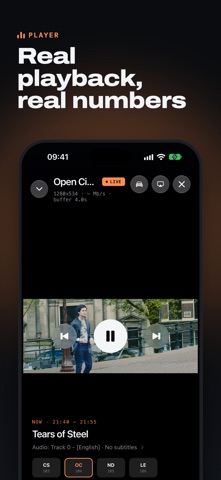
Powered by VLC, so the codecs and containers found in the wild play instead of failing. Pick the audio track and subtitles, read the live resolution and buffer, and set a quality ceiling and buffer size for mobile data. Playback resumes where you left off.
KEEP BROWSING WHILE IT PLAYS
Shrink the player to a card above the tab bar and carry on through Live, Library or Discover. Expand it whenever you like — the stream never reopens.
LIBRARY AND PLAYLISTS
Imported video lives in a Library with its own storage overview. Build playlists that mix channels and files, reorder them, and mark one to start on its own when the car connects.
DISCOVER, AND THE CHANNEL LINK
Browse trending movies and shows, read details and cast, and watch trailers in the official YouTube player. Then link a title to a channel in your own playlist: the next time it is on, one tap jumps from the title straight to that channel. Links are yours alone and stay on the device.
CARPLAY
Browse Live, Favorites and Library from the car's own display, pick a channel or a playlist, and control playback from Now Playing. Audio carries on with the phone locked and while the car is moving.
CAR MODE AND THE CAR DISPLAY
Turn the phone sideways for Car Mode, a landscape layout sized for a dashboard mount, with large controls and a channel rail. Mirror the whole phone to a car display over AirPlay or a wired adapter and Car Mode shows there too.
IPHONE DUO
Use CarTV closed or open. Folded, the whole app fits the outer display and keeps clear of its side status bar. Unfold it and the same screen carries on across the larger inner display, and a channel that is playing keeps playing through the fold.
CARTV PRO
Everything above is free, including linking titles to channels — that is your work and it stays yours. Pro lifts the limits on how much of your own library CarTV will hold: unlimited M3U sources instead of one, automatic refresh every 24 hours so channels and the guide stay current, unlimited custom playlists instead of three, and the shortcut that opens a linked channel straight from its title. Links made on the free plan persist and light up the moment you upgrade.
MULTI-LANGUAGE
Available in English, French, German and Portuguese.
PERFECT FOR
Anyone with an M3U playlist or a folder of their own video who wants one clean player on the phone and in the car — and who wants that player to stay out of the way of what they chose to watch.
Pro is available as an auto-renewable subscription, weekly or yearly, or as a one-time lifetime purchase, for CarTV's own features. Subscriptions renew automatically and can be cancelled any time in your App Store account settings. CarTV hosts no channels and provides no content of its own.
Movie and show metadata from TMDB. This product uses the TMDB API but is not endorsed or certified by TMDB.
Privacy Policy: http://cartvhub.pages.dev/policy
Terms of Use (EULA): https://www.apple.com/legal/internet-services/itunes/dev/stdeula/
Safety and technology
Found in the app by AppBrain- Price
- Free
- App size
- 82.2 MB
- Content rating
- Everyone
Technologies used by CarTV - Media Hub Player
Releases
Updates seen on the App Store- Version
- 2.4
- Launched
- October 2026
No changelog data
Alternatives
Similar apps and more from Phan Minh QuanAlternatives to CarTV - Media Hub Player


More from Phan Minh Quan


Rankings
App Store top chartsApp Store Rankings for CarTV - Media Hub Player
About the app and developer
About CarTV - Media Hub Player
CarTV - Media Hub Player is an entertainment app developed by Phan Minh Quan.
User Ratings
The app has no ratings yet.
App Information
CarTV - Media Hub Player is freely available from the App Store. The app size is 82.17 MB. The latest version available is 2.4. The last update was on November 8, 2026.
Technical Requirements
The app has a content rating of Everyone. The app has been available on the App Store since October 2026.
CarTV - Media Hub Player is made and published by Phan Minh Quan. AppBrain is an independent app data site and isn't affiliated with Phan Minh Quan. The app name, icon, screenshots and description belong to Phan Minh Quan and are shown as published on the App Store.
Developer information for Phan Minh Quan
Address:
Frequently asked questions about CarTV - Media Hub Player
Is CarTV - Media Hub Player free?
Yes. CarTV - Media Hub Player is free on the App Store.
Is CarTV - Media Hub Player still available?
Yes. CarTV - Media Hub Player is on the App Store, and the last update we saw was on November 8, 2026.
How large is CarTV - Media Hub Player?
CarTV - Media Hub Player is 82.17 MB.
Is CarTV - Media Hub Player suitable for children?
App Store rates the content of CarTV - Media Hub Player as suitable for everyone.
Who made CarTV - Media Hub Player?
CarTV - Media Hub Player was developed by Phan Minh Quan. It is listed in the entertainment category on the App Store.
What are the best alternatives to CarTV - Media Hub Player?
People looking at CarTV - Media Hub Player also look at these entertainment apps: Hamster Soup, ShantiKunj Video - AWGP, Sehaj Path Kirtan, Remote for Samsung TV's.