



AppBrain's verdict
New- Rating on App Store
- 5.00
- 1 ratings
- Last updated
- November 5, 2026
- Size
- 11.6 MB
Casement: Desktop Apps to Go came out 22 days ago. It doesn't have enough ratings yet to judge what users think. Its best ranking is #26 in Top Grossing, Business in Japan.
User feedback
Ratings and reviews on the App StoreComments on Casement: Desktop Apps to Go for iOS
We don't have enough comments to show example comments. Please check back later.
Store listing
By Shinnosuke Iwaki, from the App StoreDescription by Shinnosuke Iwaki Written by the developer, not by AppBrain. Click to read.
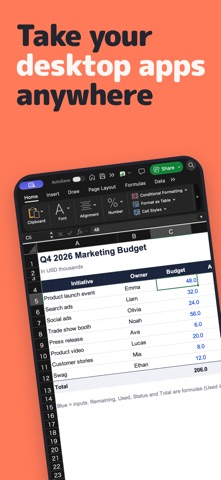
This isn't a remote desktop that shrinks your whole screen. Casement opens each desktop app window as its own app on your device. Spreadsheets, editors, even the AI agents running on your computer — pick up where you left off, away from your desk.
■ Features
• Launch any desktop app from the Dock in one tap
• Use the menu bar of your desktop apps, just as it is
• On iPhone and iPad, type with your device's own keyboard, plus a row of Esc, Tab, Command and arrow keys
• Software keyboard and trackpad on iPhone and iPad, and support for hardware keyboards and mice
• On iPhone and iPad, open desktop apps straight from Home Screen widgets, a long press on the icon, or Spotlight
• On iPad, each window becomes its own app you can arrange side by side. On Apple Vision Pro, place windows anywhere around you
• Open your computer's entire screen as a single window, with pinch to zoom
• Unlock a locked computer by typing its password from your device
• A purpose-built protocol keeps things smooth, even on cellular
• Play the sound of your desktop apps on your device, with an option to delay video to sync with sound
■ Security and privacy
• Casement only talks between your computer and your devices. No relay servers, no accounts
• Connections are encrypted with DTLS 1.2 or later
• The first time you connect, you check a 6-digit number, and only devices you allow on your computer can connect
• No ads, analytics or tracking
Learn more: https://casement.win/en/security
■ Getting started
1. Install Casement Home (for Mac, free) on your computer: https://casement.win/en/download
2. Install this app and choose your computer
3. Make sure both screens show the same number, then click Allow on your computer
■ Requirements
• Mac: macOS 26 or later on a Mac with Apple silicon (Intel Macs aren't supported)
• Device: iOS 26, iPadOS 26, visionOS 26 or macOS 26 or later
• On Apple Vision Pro, the software keyboard is off by default. For comfortable typing and navigation, please connect an external keyboard and mouse (or trackpad) to your Apple Vision Pro
• Connection: Put your computer and your device on the same Wi-Fi network. Install Tailscale on both and join the same tailnet, and from the second time on you can connect from outside your home too
■ Pricing
Try it free for 7 days. After that, keep using it with a one-time in-app purchase. One purchase works on iPhone, iPad, Apple Vision Pro and Mac. No subscription.
■ Please note
• The computer's speakers stay silent while sound plays on your device. Silent mode mutes sound on iPhone and iPad. Your device's microphone is not sent to the computer
• Casement can't wake a sleeping computer
• One device can connect to a computer at a time
Support: https://casement.win/en/support
Safety and technology
Found in the app by AppBrain- Price
- Free
- App size
- 11.6 MB
- Content rating
- Everyone
Technologies used by Casement: Desktop Apps to Go
Releases
Updates seen on the App Store- Version
- 1.0.4
- Launched
- October 2026
No changelog data
Rankings
App Store top charts- Highest rank
- #26
- Chart
- Top Grossing
- Business
- Country
- Japan
App Store Rankings for Casement: Desktop Apps to Go
Top rankings
| Rank | Country | Category | List |
|---|---|---|---|
| 26 | Japan | Business | Top Grossing |
Ranking history in Japan
About the app and developer
About Casement: Desktop Apps to Go
Casement: Desktop Apps to Go is a business app developed by Shinnosuke Iwaki.
User Ratings
Casement: Desktop Apps to Go is rated 5.00 out of 5 stars. The rating is based on one rating ratings.
App Information
Casement: Desktop Apps to Go is freely available from the App Store. The app size is 11.56 MB. The latest version available is 1.0.4. The last update was on November 5, 2026.
Technical Requirements
The app has a content rating of Everyone. The app has been available on the App Store since October 2026.
Casement: Desktop Apps to Go is made and published by Shinnosuke Iwaki. AppBrain is an independent app data site and isn't affiliated with Shinnosuke Iwaki. The app name, icon, screenshots and description belong to Shinnosuke Iwaki and are shown as published on the App Store.
Developer information for Shinnosuke Iwaki
Address:
Frequently asked questions about Casement: Desktop Apps to Go
Is Casement: Desktop Apps to Go free?
Yes. Casement: Desktop Apps to Go is free on the App Store.
Is Casement: Desktop Apps to Go still available?
Yes. Casement: Desktop Apps to Go is on the App Store, and the last update we saw was on November 5, 2026.
How large is Casement: Desktop Apps to Go?
Casement: Desktop Apps to Go is 11.56 MB.
Is Casement: Desktop Apps to Go suitable for children?
App Store rates the content of Casement: Desktop Apps to Go as suitable for everyone.
How do people rate Casement: Desktop Apps to Go?
Casement: Desktop Apps to Go has one rating of 5.00 stars on the App Store.
Who made Casement: Desktop Apps to Go?
Casement: Desktop Apps to Go was developed by Shinnosuke Iwaki. It is listed in the business category on the App Store.
Share Casement: Desktop Apps to Go
Subscribe now to get full and unlimited access to AppBrain Intelligence. You'll have access to:
- App Intelligence dashboard (performance timeline, competitor comparison, country rankings, insight cards)
- Detailed ranking data per app
- Full timeline per developer
- Device market shares data per country
- Unlimited keyword tracking
- AI assistant access via MCP (Claude, Cursor or any MCP client)
AppBrain is an app data site, we track rankings, ratings, installs for all apps and games on Google Play and the App Store. AppBrain doesn't host app files or APKs, all install links go directly to the official store. All trademarks are owned by their respective owners.
More apps
App statistics
About AppBrain