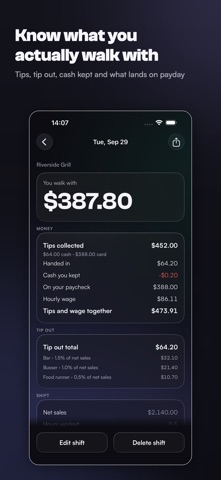
Three numbers at the end of the shift: net sales, cash tips, card tips.
Cashout applies your house's tip out rules and shows what you walk with.
The arithmetic is the easy part. Having it in March is not. The slip goes in
an apron pocket, the pocket goes through the wash, and by the time anyone
asks what last month looked like, there is nothing left but a guess.
YOUR HOUSE'S RULES, ENTERED ONCE
Bar 1.5% of net sales, busser 1%, runner 0.5%. Or 8% to the bar off your
tips. Or a flat $20 to the host. Six rule types cover percent of net sales,
bar or food sales, percent of all tips or card tips, and fixed dollars. Add
as many roles as your house has. Set it once and most people never open that
screen again.
CASH AND CARD KEPT APART
Tip out usually comes out of the cash in your pocket while card tips arrive
on payday. Cashout tracks both and tells you when the cash on hand will not
cover what you owe the bar tonight.
A SHIFT LOG YOU CAN HAND TO ANYONE
Every saved shift keeps a frozen snapshot of the split: the roles, the
percentages and the dollars as they were that night. Changing your rules
later never rewrites a shift you already saved. Any shift can be corrected
without leaving a duplicate behind.
FOR THE NIGHTS THAT GO SIDEWAYS
Half a shift behind the bar, no runner at lunch, the manager rounded it off.
Type what you actually handed over and the shift records that instead of the
calculated figure, marked as entered by hand.
ADDED UP THE WAY IT GETS ASKED FOR
Cash tips, card tips, tip out paid to others, tips after tip out, service
charges kept separate, hours, and a breakdown by job, by week, month and
year. Cashout adds up your own numbers and stops there. It does not work out
taxes and gives no advice.
BACKUPS ARE NOT A PAID FEATURE
Automatic backup to your own iCloud Drive, a manual backup file you can move
yourself, and restore. All free. Data loss after an update or a new phone is
the most common one-star story in this category, and keeping your own records
safe is not a product.
FREE FOREVER
The tip out calculation on any number of shifts. All six rule types and as
many roles as you need. Saving shifts with no cap. This week and last week in
full, with the chart and the stats. Backup, restore and delete. Manual
override, service charges, hourly wage, and receiving a tip out.
CASHOUT PRO — $19.99 a year, after a 7-day free trial
History past the last two weeks: month, year, and every past year. The tip
summary by year, month and job. Export to CSV. A second and third job, each
with its own rules.
When a subscription lapses nothing is deleted. Your records stay on the phone
and stay exportable.
NO ACCOUNT, NO SERVER, NO ADS
There is no sign-up and no password. Everything is computed and stored on
your iPhone. No banners, no interstitials, in the free version or the paid
one.
EIGHT LANGUAGES
English, Spanish, French, Italian, Chinese, Hindi, Ukrainian and Russian.
Pick yours on the first screen or in Settings, whatever language your phone
is set to. Switching relabels the app and nothing else: every number you
have logged stays exactly as you entered it.
SUBSCRIPTION AND TERMS
Cashout Pro is a subscription: $19.99 per year after a 7-day free trial, or
$3.99 per month. A one-time Lifetime purchase is $34.99. Payment is charged to
your Apple Account at confirmation of purchase. A subscription renews
automatically unless it is cancelled at least 24 hours before the end of the
current period, and it can be managed or cancelled in your Apple Account
settings at any time.
Privacy Policy: https://dmapps.app/cashout/privacy
Terms of Use (EULA): https://www.apple.com/legal/internet-services/itunes/dev/stdeula/
Show more
Show less