

CATQR Class Attendance Tracker
CATQR Class Attendance Tracker is made and published by Shinetech Europe Ltd. AppBrain is an independent app data site and isn't affiliated with Shinetech Europe Ltd. The app name, icon, screenshots and description belong to Shinetech Europe Ltd. and are shown as published on the App Store.
AppBrain's verdict
Established- Rating on App Store
- 4.67
- 15 ratings
- Last updated
- August 3, 2026
It doesn't have enough ratings yet to judge what users think.
Rankings
App Store top chartsApp Store Rankings for CATQR Class Attendance Tracker
Competitors
Similar apps and more from Shinetech Europe Ltd.Alternatives to CATQR Class Attendance Tracker






Also available on Google Play

Releases
Updates seen on the App Store- Version
- 1.0.17
- Launched
- September 2019
No changelog data
User feedback
Ratings and reviews on the App StoreComments on CATQR Class Attendance Tracker for iOS
We don't have enough comments to show example comments. Please check back later.
Technology
Found in the app by AppBrain- Price
- Free
- App size
- 42.8 MB
- Content rating
- Everyone
Technologies used by CATQR Class Attendance Tracker
About the app and developer
About CATQR Class Attendance Tracker
CATQR Class Attendance Tracker is an utilities app developed by Shinetech Europe Ltd.
User Ratings
CATQR Class Attendance Tracker is rated 4.67 out of 5 stars. The rating is based on 15 ratings.
App Information
CATQR Class Attendance Tracker is freely available from the App Store. The app size is 42.80 MB. The latest version available is 1.0.17. The last update was on August 3, 2026.
Technical Requirements
The app has a content rating of Everyone. The app has been available on the App Store since September 2019.
Developer information for Shinetech Europe Ltd.
Address:
Store listing
By Shinetech Europe Ltd., from the App Store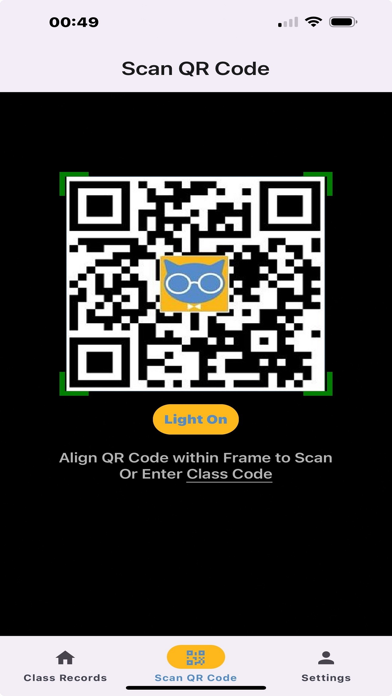


Description by Shinetech Europe Ltd. Written by the developer, not by AppBrain. Click to read.
• Free app.
• No ads.
• Fast, secure and easy to use.
• Simply point the app camera at any QR Code to see the decoded results instantly!
• CATQR app conveniently stores your QR Code scan history and class attendance in the app calendar.
• Click on the Year or Month to see your scan history records for that period.
• Click on the Date to toggle on/off your scan history records on that day.
• Search by keyword and get an e-mail of your scan history.
• Swipe Right on your scan history record to reveal the QR Code.
• Swipe Left on your scan history record to delete the record.
• If you scanned an internet link you will see an icon on the scan history record, click on the icon to go to the internet link.
ORGANISER ANALYTICS
Organisers using the CATQR website can create a CATQR Code for a specific class and track attendance in real-time!!
1. Students using their own CATQR app in the classroom can scan the Organiser’s CATQR Code for that specific class. The Student will see the Organiser’s CATQR Code Class Title, Date/Time and the Organiser’s name in their CATQR app scan history.
2. The Organiser can see the students that have attended their specific class in real-time.
3. The Organiser can also export the student attendance to an Excel spreadsheet.
Find out more by visiting https://www.catqr.com