

CC Peek is made and published by 法葳 李. AppBrain is an independent app data site and isn't affiliated with 法葳 李. The app name, icon, screenshots and description belong to 法葳 李 and are shown as published on the App Store.
AppBrain's verdict
- Last updated
- May 8, 2026
Rankings
App Store top chartsApp Store Rankings for CC Peek
Releases
Updates seen on the App Store- Version
- 1.1
- Launched
- May 2026
No changelog data
User feedback
Ratings and reviews on the App StoreComments on CC Peek for iOS
We don't have enough comments to show example comments. Please check back later.
Technology
Found in the app by AppBrain- Price
- Free
- App size
- 7.50 MB
- Content rating
- Everyone
Technologies used by CC Peek
About the app and developer
About CC Peek
CC Peek is an overall app developed by 法葳 李.
User Ratings
The app has no ratings yet.
App Information
CC Peek is freely available from the App Store. The app size is 7.50 MB. The latest version available is 1.1. The last update was on May 8, 2026.
Technical Requirements
The app has a content rating of Everyone. The app has been available on the App Store since May 2026.
Developer information for 法葳 李
Address:
Frequently asked questions about CC Peek
Is CC Peek free?
Yes. CC Peek is free on the App Store.
Is CC Peek still available?
Yes. CC Peek is on the App Store, and the last update we saw was on May 8, 2026.
How large is CC Peek?
CC Peek is 7.50 MB.
Is CC Peek suitable for children?
App Store rates the content of CC Peek as suitable for everyone.
Who made CC Peek?
CC Peek was developed by 法葳 李. It is listed in the overall category on the App Store.
Store listing
By 法葳 李, from the App Store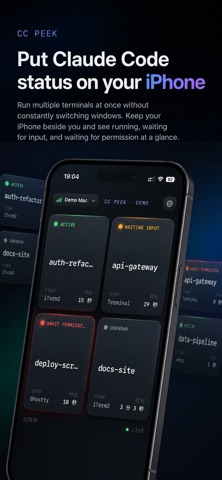


Description by 法葳 李 Written by the developer, not by AppBrain. Click to read.
Tired of losing track of multiple active Claude Code sessions? When you have several terminals open, it’s easy to forget which one is still processing, which is waiting for user input, and which is stuck on a tool permission prompt. CC Peek solves this by syncing your session states to your iPhone, turning it into a dedicated, real-time status dashboard right next to your Mac.
Key Features:
- Multi-Process Monitoring: View the status of all active Claude Code processes on your Mac directly from your iPhone.
- Smart Status Indicators: Instantly distinguish between Running, Waiting for Input, Pending Permissions, and Completed states.
- Focus at a Tap: Tap any process card on your iPhone to automatically bring the corresponding terminal window or tab to the front on your Mac.
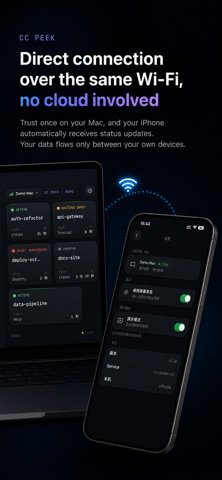
- Local Pairing: Seamlessly connect your Mac and iPhone over your local network.
- Built-in Demo Mode: Experience the interface and status transitions immediately, even without a Mac nearby.
Privacy & Connectivity:
CC Peek utilizes local network discovery to connect your devices. No accounts required, no cloud services, and no data is ever uploaded to a server. Your Claude Code content remains private and stays on your local machines. It is designed to be the perfect companion for multi-tasking developers and long-running agentic tasks.
Setup Requirements:
To use CC Peek, you must install the desktop companion app on your Mac and follow the setup guide to configure the Claude Code Hook.
Download the Mac app at: ccpeek.com
Disclaimer:
CC Peek is an independently developed tool and is not affiliated with, sponsored by, or endorsed by Anthropic. Claude and Claude Code are trademarks of their respective holders.