

Cellica Database WiFi
Cellica Database WiFi is made and published by Cellica Corporation. AppBrain is an independent app data site and isn't affiliated with Cellica Corporation. The app name, icon, screenshots and description belong to Cellica Corporation and are shown as published on the App Store.
AppBrain's verdict
Established- Rating on App Store
- 5.00
- 4 ratings
- Last updated
- April 21, 2023
It doesn't have enough ratings yet to judge what users think.
Rankings
App Store top chartsApp Store Rankings for Cellica Database WiFi
Competitors
Similar apps and more from Cellica CorporationAlternatives to Cellica Database WiFi







More from Cellica Corporation

Releases
Updates seen on the App Store- Version
- 7.7.1
- Launched
- May 2011
No changelog data
User feedback
Ratings and reviews on the App StoreComments on Cellica Database WiFi for iOS
We don't have enough comments to show example comments. Please check back later.
Technology
Found in the app by AppBrain- Price
- Free
- App size
- 16.4 MB
- Content rating
- Everyone
Technologies used by Cellica Database WiFi
About the app and developer
About Cellica Database WiFi
Cellica Database WiFi is a business app developed by Cellica Corporation.
User Ratings
Cellica Database WiFi is rated 5.00 out of 5 stars. The rating is based on 4 ratings.
App Information
Cellica Database WiFi is freely available from the App Store. The app size is 16.36 MB. The latest version available is 7.7.1. The last update was on April 21, 2023.
Technical Requirements
The app has a content rating of Everyone. The app has been available on the App Store since May 2011.
Developer information for Cellica Corporation
Address:
Frequently asked questions about Cellica Database WiFi
Is Cellica Database WiFi free?
Yes. Cellica Database WiFi is free on the App Store.
Is Cellica Database WiFi still available?
Yes. Cellica Database WiFi is on the App Store, and the last update we saw was on April 21, 2023.
How large is Cellica Database WiFi?
Cellica Database WiFi is 16.36 MB.
Is Cellica Database WiFi suitable for children?
App Store rates the content of Cellica Database WiFi as suitable for everyone.
How do people rate Cellica Database WiFi?
Cellica Database WiFi scores 5.00 out of 5 stars, from 4 ratings on the App Store.
Who made Cellica Database WiFi?
Cellica Database WiFi was developed by Cellica Corporation. It is listed in the business category on the App Store.
What are the best alternatives to Cellica Database WiFi?
People looking at Cellica Database WiFi also look at these business apps: Sangoma SmartOffice, Logmedo Database, Form Builder, iData Mobile Plus, Database Manager for MS Access, Database Pro..
Store listing
By Cellica Corporation, from the App Store
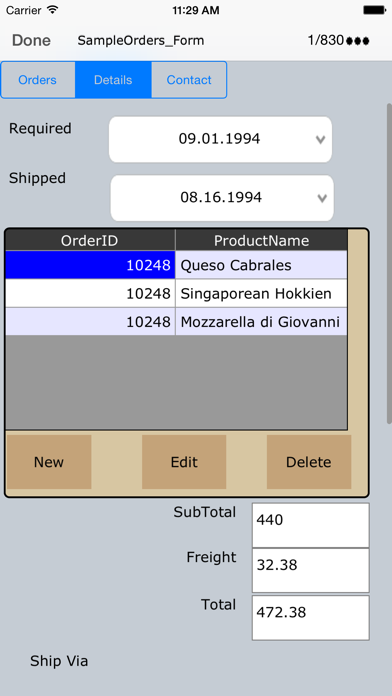
Description by Cellica Corporation Written by the developer, not by AppBrain. Click to read.
Sync MS Access, MS SQL Server, My SQL, Oracle, MS Excel databases on iPhone.
Cellica Database for iPhone allows to synchronize any MS Access, Excel, My SQL, SQL Server database (Available on Windows) wirelessly (Local Wi-Fi network) with iPhone.
See Cellica Database in action at: http://tinyurl.com/CellicaDB (YouTube link)
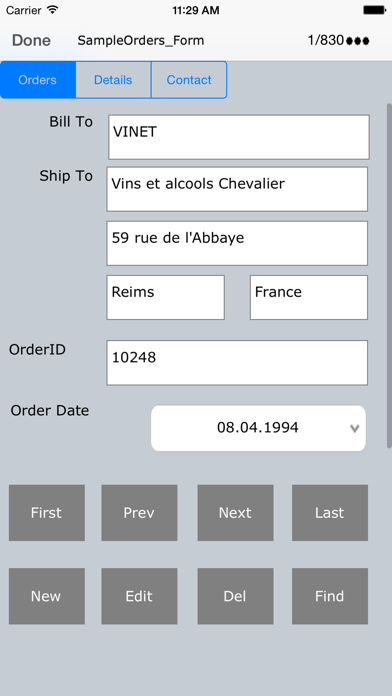
Cellica Database is the powerful and easy app so you can select your windows based database Tables, Views, Queries, Stored Procedure and added feature is that you can design the forms for it and sync from iPhone.
Design form on desktop with Label, Text Field, Buttons, Checkbox, Combo box, Tab control.
Changes on iPhone can synchronize wirelessly and instantly to MS Access, Excel, My SQL, SQL Server database. Also, any modifications to the desktop database can send wirelessly and instantly to iPhone, so you will always have the most current information on your iPhone.
You will just need our Desktop software. The Desktop can be connected to internet via your Wi-Fi router in another room and your iPhone is connected to your home or any other Wi-Fi router.
Desktop and iPhone must be on same network(LAN). Use IP of desktop, in iPad side Cellica Database application. Desktop does not need Wi-Fi connection, it can be wired.
Features:
•Supported Databases: Microsoft Access 97/2000/2003/2007/2010,Microsoft Excel 97/2000/2003/2007/2010, Oracle, SQL Server, DB2, MySQL, Quickbook,PostgreSQL, FoxPro, dBase, R:BASE, Sybase and any ODBC Compliant Database.
•Work Offline when network is not available and synchronize data when Wi-Fi network will be available.
•Write data on the iPhone, which will reflect to database on your PC or Server.
•Data is secured as 128 bit AES used for encryption.
•Unicode support for the database to synchronize data in Japanese, Chinese, Korean, German, Russian etc.
•Supported Forms on iPhone.
•Design form on desktop with Label, Text Field, Buttons, Checkbox, Combo box, Page, control.
•Supports Sub forms, Design a master/detail form, or a parent/child form using sub form.
•Send single record data on form as a .PDF by Email.
• Support Image control on form, Allows to synchronize .bmp, .jpg and .png format.
•Create form in Portrait/ Landscape mode.
•Import/Export form design.
•Use Ready made forms provided in desktop application for various purposes such Business, Personal, Education.
To transfer your desktop side database to iPhone, you need to install Desktop software on your Windows PC.
Download and install Desktop component on your Windows based PC from the product page.
Quick steps for initial synchronization setting between desktop and device
http://www.cellica.com/CellicaDatabase_Desktop_iPhone_SyncSettings.pdf
If you have any problem with the software, please contact us on support@cellica.com.
Note: Desktop component of this software needs Internet on computer. Software needs it for authorizing your copy.