




AppBrain's verdict
- Last updated
- November 18, 2026
- Size
- 13.1 MB
User feedback
Ratings and reviews on the App StoreComments on Censor & Blur Faces: Pixero for iOS
We don't have enough comments to show example comments. Please check back later.
Store listing
By Leonid Resenchuk, from the App StoreDescription by Leonid Resenchuk Written by the developer, not by AppBrain. Click to read.
Photos
• Detect faces and text, or mark any area by hand, such as a license plate, an address or a screen.
• Hide it with blur, pixelation (mosaic) or a solid black bar.
• Pick a photo from your library or take one with the built-in camera.
Videos
• Redact faces, text and marked regions in video clips from your Photo Library with blur, pixelation or black bars.
• Preview the result and export with the sound kept. Pro is required to export redacted videos.
More tools
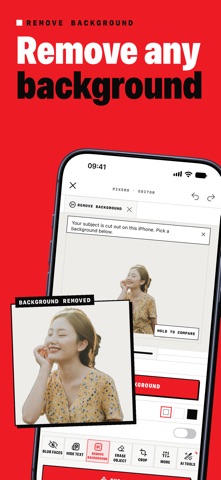
• Remove a background, erase an object, crop, resize, rotate, enhance and add a text watermark.
• Save your steps as a preset and apply it to several photos at once.
• Export as JPEG, PNG, HEIC or PDF.
• Scan documents to multi-page PDF and copy recognized text with OCR.
• Read QR codes and barcodes with a scan history.
Pro unlocks video export, more than three presets and unlimited daily use of the label reader and photo questions.
On compatible devices with Apple Intelligence and iOS 27 or later, read printed labels, ask a question about a photo and get suggested redactions. These AI tools run locally; availability depends on the device and model readiness. Label explanations are not medical advice.
Review every redaction before sharing: automatic detection can miss faces or sensitive details.
Icons8: https://icons8.com
Some features require a premium subscription, which automatically renews through the App Store and is billed to your iTunes account unless auto-renewal is turned off at least 24 hours before the end of the current period.
Pixero offers two auto-renewing subscriptions:
- Pro Monthly (puk.pixero.pro.monthly), $4.99/month
- Pro Yearly (puk.pixero.pro.yearly), $24.99/year, with a 3-day free trial for new subscribers
Apple Standard EULA: https://www.apple.com/legal/internet-services/itunes/dev/stdeula/
Manage subscriptions: https://apps.apple.com/account/subscriptions
Terms of Use: https://resrom.com/projects/pixero/terms — Privacy Policy: https://resrom.com/projects/pixero/privacy
Safety and technology
Found in the app by AppBrain- Price
- Free
- App size
- 13.1 MB
- Content rating
- Everyone
Technologies used by Censor & Blur Faces: Pixero
Releases
Updates seen on the App Store- Version
- 1.6.2
- Launched
- May 2026
No changelog data
Alternatives
Similar apps and more from Leonid ResenchukAlternatives to Censor & Blur Faces: Pixero




More from Leonid Resenchuk


Rankings
App Store top chartsApp Store Rankings for Censor & Blur Faces: Pixero
About the app and developer
About Censor & Blur Faces: Pixero
Censor & Blur Faces: Pixero is a photo & video app developed by Leonid Resenchuk.
What is the rating of Censor & Blur Faces: Pixero?
Censor & Blur Faces: Pixero has no ratings yet.
Is Censor & Blur Faces: Pixero free?
Censor & Blur Faces: Pixero is free. The app size is 13.07 MB. The latest version available is 1.6.2. The last update was on November 18, 2026.
What are the requirements for Censor & Blur Faces: Pixero?
The app has a content rating of Everyone. The app has been available on the App Store since May 2026.
Censor & Blur Faces: Pixero is made and published by Leonid Resenchuk. AppBrain is an independent app data site and isn't affiliated with Leonid Resenchuk. The app name, icon, screenshots and description belong to Leonid Resenchuk and are shown as published on the App Store.
Developer information for Leonid Resenchuk
Address:
Frequently asked questions about Censor & Blur Faces: Pixero
Is Censor & Blur Faces: Pixero free?
Yes. Censor & Blur Faces: Pixero is free on the App Store.
Is Censor & Blur Faces: Pixero still available?
Yes. Censor & Blur Faces: Pixero is on the App Store, and the last update we saw was on November 18, 2026.
How large is Censor & Blur Faces: Pixero?
Censor & Blur Faces: Pixero is 13.07 MB.
Is Censor & Blur Faces: Pixero suitable for children?
App Store rates the content of Censor & Blur Faces: Pixero as suitable for everyone.
Who made Censor & Blur Faces: Pixero?
Censor & Blur Faces: Pixero was developed by Leonid Resenchuk. It is listed in the photo & video category on the App Store.
What are the best alternatives to Censor & Blur Faces: Pixero?
People looking at Censor & Blur Faces: Pixero also look at these photo & video apps: AI Photo & Video - Pixelite, Video Blur & Face Censor, Blur photo effect editor app, Kiano - All photos at once, VideoShot - Screen Recorder.