

CenterMint: Card Centering
CenterMint: Card Centering is made and published by JIAPENG Zhao. AppBrain is an independent app data site and isn't affiliated with JIAPENG Zhao. The app name, icon, screenshots and description belong to JIAPENG Zhao and are shown as published on the App Store.
AppBrain's verdict
- Rating on App Store
- 5.00
- 1 ratings
- Last updated
- October 14, 2026
- Size
- 51.7 MB
It doesn't have enough ratings yet to judge what users think.
User feedback
Ratings and reviews on the App StoreComments on CenterMint: Card Centering for iOS
We don't have enough comments to show example comments. Please check back later.
Store listing
By JIAPENG Zhao, from the App Store


Description by JIAPENG Zhao Written by the developer, not by AppBrain. Click to read.
CenterMint measures the centering of raw trading cards and sports cards from a single photo. It finds the card's cut edge and printed border on all four sides, shows the left/right and top/bottom ratios, and tells you the best centering grade those ratios allow under common published standards (PSA, BGS, CGC and more). Works with raw standard-size cards such as Pokémon, One Piece, Magic: The Gathering and sports cards; smaller cards like Yu-Gi-Oh! can be measured too, but check the lines.
NEW IN 1.11
• Border widths in mm or inches under every ratio (or off). The card size is detected from the photo, sports cards and the smaller Yu-Gi-Oh! size included. Free for everyone.
• Corner & edge close-ups now sit right under your result, with thumbnails of all four corners. Free on 3 cards every week.
• Free users get a batch of up to 5 photos every week.
• A sharper, redrawn app icon.
KEY TOOLS
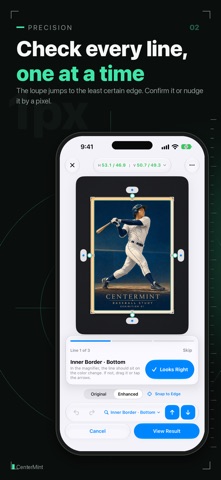
• Line-by-line check: when a photo needs a second look, CenterMint takes you to the line it's least sure about first, with the magnifier already in place. Tap "Looks Right" to move to the next one.
• Know why: glare, blur, low light, low resolution, a mat that matches the card edge, or no printed border found. If a retake will fix it, it says so.
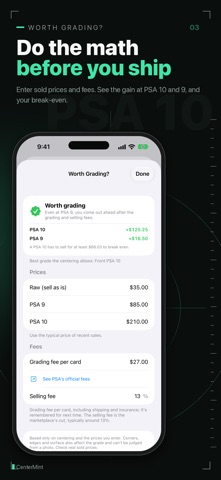
• Worth Grading? (Pro): enter recent sold prices for the raw card, a 9 and a 10, plus the grading fee. See whether grading makes or loses money, and what a 10 has to sell for to break even. Grades the centering can't reach are left out.
• Submission log (Pro): note what you sent and what it cost, add the grades when they come back, and see your top-grade rate and how the grades compare with the centering.
FREE
• Automatic centering for raw cards, a 1x–50x magnifier and manual line adjustment
• Line-by-line check and retake tips
• Front and back pairing, saved history with search, and share images
• Border widths in mm or inches, close-ups on 3 cards every week, a batch of up to 5 photos every week, and Worth Grading? on one card
The free version shows ads.
CENTERMINT PRO
No ads, Worth Grading?, corner & edge close-ups, submission log, a decision assistant that sorts your cards into submit / fix first / below target, batch scanning of up to 50 photos, submission checklist PDF, report images, 4K enhanced view and export, CSV export and saved presets. Choose a monthly or yearly subscription (yearly starts with a 1-week free trial); prices are shown in the app. Subscriptions renew automatically unless canceled at least 24 hours before the end of the current period. Manage them in your Apple Account settings.
WHAT IT DOESN'T DO
• Automatic measurement is for raw cards only. For a card in a sleeve, top loader or graded slab, you line up the four edges yourself. When CenterMint detects a sleeve, it tells you and switches to manual alignment.
• It measures centering only. It doesn't grade corners, edges or surface (the close-ups are for your own eyes), and it can't promise any grade.
• Full-art and borderless cards may have no printed border, so their results are a reference.
• Centering standards are references based on each company's published guidelines. CenterMint is an independent app and is not affiliated with PSA, Beckett (BGS), CGC or any grading company. It is not affiliated with any card publisher either; Pokémon, One Piece, Yu-Gi-Oh! and Magic: The Gathering are trademarks of their respective owners.
Measurement runs on your device and needs no account. Sharing samples to improve detection is off by default.
App languages: English, Japanese, Korean, Vietnamese, Simplified Chinese and Traditional Chinese.
Terms of Use: https://www.apple.com/legal/internet-services/itunes/dev/stdeula/
Privacy Policy: https://centermint.app/privacy
Safety and technology
Found in the app by AppBrain- Price
- Free
- App size
- 51.7 MB
- Content rating
- Everyone
Technologies used by CenterMint: Card Centering
Releases
Updates seen on the App Store- Version
- 1.11.0
- Launched
- April 2026
No changelog data
Alternatives
Similar apps and more from JIAPENG ZhaoAlternatives to CenterMint: Card Centering


More from JIAPENG Zhao


Rankings
App Store top chartsApp Store Rankings for CenterMint: Card Centering
About the app and developer
About CenterMint: Card Centering
CenterMint: Card Centering is an utilities app developed by JIAPENG Zhao.
User Ratings
CenterMint: Card Centering is rated 5.00 out of 5 stars. The rating is based on one rating ratings.
App Information
CenterMint: Card Centering is freely available from the App Store. The app size is 51.69 MB. The latest version available is 1.11.0. The last update was on October 14, 2026.
Technical Requirements
The app has a content rating of Everyone. The app has been available on the App Store since April 2026.
Developer information for JIAPENG Zhao
Address: