

Video Speed • Slow Mo Editor
Video Speed • Slow Mo Editor is made and published by Muhammad Mujahid Khan. AppBrain is an independent app data site and isn't affiliated with Muhammad Mujahid Khan. The app name, icon, screenshots and description belong to Muhammad Mujahid Khan and are shown as published on the App Store.
AppBrain's verdict
- Last updated
- August 26, 2026
Rankings
App Store top chartsApp Store Rankings for Video Speed • Slow Mo Editor
Competitors
Similar apps and more from Muhammad Mujahid KhanMore from Muhammad Mujahid Khan




Releases
Updates seen on the App Store- Version
- 1.5
- Launched
- December 2025
No changelog data
User feedback
Ratings and reviews on the App StoreComments on Video Speed • Slow Mo Editor for iOS
We don't have enough comments to show example comments. Please check back later.
Technology
Found in the app by AppBrain- Price
- Free
- App size
- 10.4 MB
- Content rating
- Everyone
Technologies used by Video Speed • Slow Mo Editor
About the app and developer
About Video Speed • Slow Mo Editor
Video Speed • Slow Mo Editor is a photo & video app developed by Muhammad Mujahid Khan.
What is the rating of Video Speed • Slow Mo Editor?
Video Speed • Slow Mo Editor has no ratings yet.
Is Video Speed • Slow Mo Editor free?
Video Speed • Slow Mo Editor is free. The app size is 10.43 MB. The latest version available is 1.5. The last update was on August 26, 2026.
What are the requirements for Video Speed • Slow Mo Editor?
The app has a content rating of Everyone. The app has been available on the App Store since December 2025.
Developer information for Muhammad Mujahid Khan
Address:
Store listing
By Muhammad Mujahid Khan, from the App Store



Description by Muhammad Mujahid Khan Written by the developer, not by AppBrain. Click to read.
SIMPLE VIDEO SPEED EDITOR
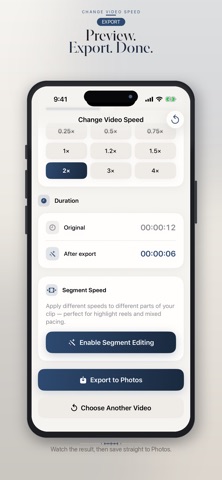
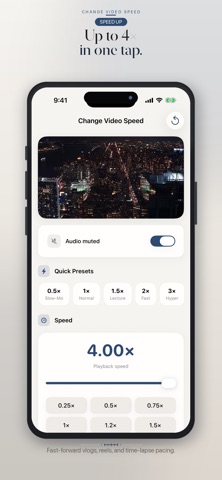
Adjust playback from 0.25× to 4×, mute or keep audio, and export in a tap. Built for iPhone and iPad.
BATCH EXPORT (PRO)
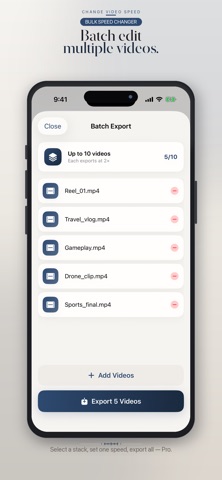
Change the speed of up to 10 videos in one tap. Ideal for reels, sports series, and drone footage.
SLOW MOTION & FAST FORWARD
• Slow down to 0.25× for sports, action, and detail
• Speed up to 4× for vlogs, reels, and time-lapse style pacing
• Segment speed — apply different speeds to different parts of a clip (Pro)
REAL-TIME PREVIEW
See the new duration before you export. Keep original audio or mute it.
IMPORT FROM PHOTOS OR FILES
Choose videos from Photos or the Files app (Downloads, iCloud Drive, and other locations available in Files). Save finished videos to Photos.
HOW IT WORKS
1. Choose a video from Photos or Files — or open Batch Export
2. Set speed with presets or the slider
3. Preview
4. Export one clip, or export the whole batch to Photos
FREE
• Speeds from 0.25× to 1.25×, one export per day, 720p
PRO
Weekly, Monthly, and Yearly subscriptions unlock the same Pro features:
• Batch export up to 10 videos at the same speed
• Every speed unlocked (including above 1.25×)
• 1080p export and no ads
• Segment speed in one clip
• Unlimited exports
Payment is charged to your Apple ID. Subscriptions auto-renew unless canceled at least 24 hours before the end of the current period. Manage or cancel in Settings > Apple ID > Subscriptions. Terms apply.
Support: contacttomujahid@gmail.com
Privacy Policy: https://justclack.blogspot.com/p/privacy-policy.html
Terms of Use: https://www.apple.com/legal/internet-services/itunes/dev/stdeula/