

Charty for Shortcuts
Charty for Shortcuts is made and published by Rapptor Desenvolvimento de Softwares LTDA. AppBrain is an independent app data site and isn't affiliated with Rapptor Desenvolvimento de Softwares LTDA. The app name, icon, screenshots and description belong to Rapptor Desenvolvimento de Softwares LTDA and are shown as published on the App Store.
AppBrain's verdict
EstablishedLoved by users- Rating on App Store
- 4.67
- 342 ratings
- Last updated
- June 23, 2026
Users love it: 4.7 stars from 342 ratings.
Rankings
App Store top chartsApp Store Rankings for Charty for Shortcuts
Competitors
Similar apps and more from Rapptor Desenvolvimento de Softwares LTDAAlternatives to Charty for Shortcuts






Releases
Updates seen on the App Store- Version
- 2.0
- Launched
- May 2020
No changelog data
User feedback
Ratings and reviews on the App StoreComments on Charty for Shortcuts for iOS
We don't have enough comments to show example comments. Please check back later.
Technology
Found in the app by AppBrain- Price
- Free
- App size
- 63.8 MB
- Content rating
- Everyone
Technologies used by Charty for Shortcuts
About the app and developer
About Charty for Shortcuts
Charty for Shortcuts is a productivity app developed by Rapptor Desenvolvimento de Softwares LTDA.
What is the rating of Charty for Shortcuts?
Charty for Shortcuts is rated 4.67 out of 5 stars, based on 340 ratings.
Is Charty for Shortcuts free?
Charty for Shortcuts is free. The app size is 63.81 MB. The latest version available is 2.0. The last update was on June 23, 2026.
What are the requirements for Charty for Shortcuts?
The app has a content rating of Everyone. The app has been available on the App Store since May 2020.
Developer information for Rapptor Desenvolvimento de Softwares LTDA
Store listing
By Rapptor Desenvolvimento de Softwares LTDA, from the App Store





Description by Rapptor Desenvolvimento de Softwares LTDA Written by the developer, not by AppBrain. Click to read.
CREATE CHARTS YOUR WAY
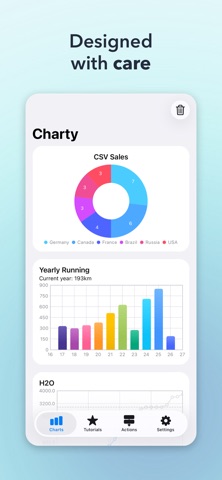
Build bar charts, line graphs, scatter plots, area charts, pie charts, donut charts, and ring charts — all from Shortcuts automations you already use. Combine multiple data series, customize every detail, and see your data come to life.
STUNNING WIDGETS ON YOUR HOME SCREEN
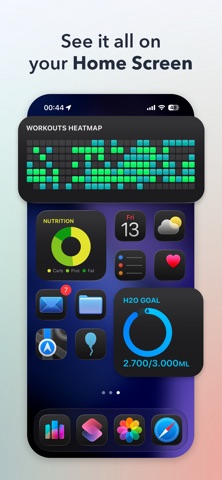
Display your charts as widgets that update automatically. Track your goals, habits, fitness progress, or anything else — right from your Home Screen.
POWERFUL DATA TOOLS
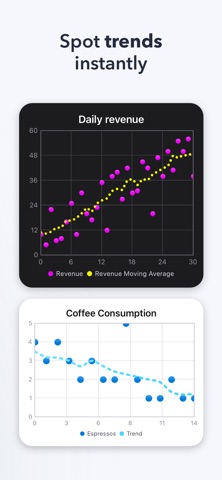
Go beyond simple plotting. Group, filter, and accumulate values. Add moving averages and trend lines. Import data from CSV files. Export charts as high-resolution images to share or save.
STYLE EVERYTHING
Fine-tune colors, markers, axis labels, date formats, floating-point precision, and more. Apply custom themes to keep your charts consistent and polished. Stack bars, customize line thickness, and highlight the data that matters most.
LEARN AS YOU GO Access 16 built-in tutorials that walk you through creating your own Shortcuts — from simple charts to advanced data workflows. No coding required.
FREE TO START Create unlimited charts with up to 2 series per chart — completely free. Unlock Charty Premium to access all 25 Shortcuts actions, unlimited series, full styling controls, area charts, CSV import, image export, widgets, and more.
Terms of Use (EULA): https://www.apple.com/legal/internet-services/itunes/dev/stdeula/