

Chests is made and published by STEVE GOUPIL. AppBrain is an independent app data site and isn't affiliated with STEVE GOUPIL. The app name, icon, screenshots and description belong to STEVE GOUPIL and are shown as published on the App Store.
AppBrain's verdict
- Last updated
- November 5, 2026
- Size
- 44.2 MB
User feedback
Ratings and reviews on the App StoreComments on Chests for iOS
We don't have enough comments to show example comments. Please check back later.
Store listing
By STEVE GOUPIL, from the App Store




Description by STEVE GOUPIL Written by the developer, not by AppBrain. Click to read.
Bookmarks in Safari, saved posts on Instagram, Watch Later on YouTube: with Chests, everything you save from any app lands in one place with your own notes, sorted into chests and made to be enjoyed.
SHARE FROM ANY APP
Tap Share in Safari, YouTube, Facebook, Instagram or any other app, then Chests. It reads the page's title and picture, and it's saved.
YOUR OWN FEED, CURATED BY YOU
All day long, new things come at you, and you rarely have time for them right then. Save them to Chests and come back when you do. My Feed is the stream you built yourself: instead of scrolling endlessly through social media, you scroll through things you already chose and know you'll enjoy. Swipe right to keep something in its chest's Vault, left to toss it once you've read or watched it. Filter it by chest or by tag.
A READER FOR CLEAN ARTICLES
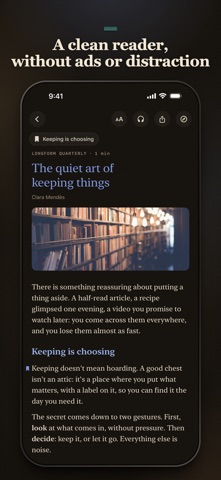
Articles open in a built-in reader: a clean copy without ads or distraction, readable offline, at the text size you like, in a light or dark theme. Bookmark the passages you want to find again, and translate an article on your device in a tap.
LISTEN TO YOUR ARTICLES
An article waiting, but you're driving or doing the housework? Listen to it instead. In English and French, a natural voice reads it, made by advanced Kokoro voice models right on your device; in other languages, your device's own voices take over. Pick the speed, follow the words as they're read, keep listening with the screen locked, and pick up right where you left off.
NOTES
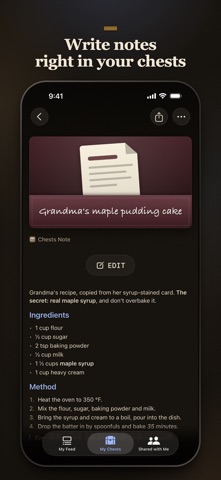
Write your own notes right in a chest: grandma's recipe copied from her card, a packing list, the week's menu. Chests Notes are written in Markdown, formatted on their own page, and kept with everything else you save, on all your devices.
OPTIMIZED WITH APPLE INTELLIGENCE
• Titles written for you from what you save, even when it's a picture
• The right chest picked for you when you save something new
• A cover illustration drawn with Image Playground for things saved without a picture
It all runs on your device: nothing leaves it. Requires a device that supports Apple Intelligence.
REAL CHESTS
Each collection is a leather chest with its own icon, colour and counter. Cards, table or list, tags, and a search across every chest. Add your own fields to any chest: text, number, choice, date, link or checkbox. Deleted items wait 30 days, ready to restore.
SHARED CHESTS
Share a chest with your partner, your friends or your family through iCloud: a recipe box for the household, a trip being planned, gift ideas. Everyone sees the same chest, with full access or read only, and what one person adds shows up for the others.
WORKS WITH CLAUDE (MCP)
On your Mac, Chests includes an MCP server, so Claude can open your chests too. Turn it on in Settings › Claude, add it to Claude Desktop in one click or to Claude Code in one line, then ask in plain words: "What's new in my Feed?", a summary of an article you saved, or "Find me the latest tech news and add it to my Tech chest." The server runs only on your Mac, and Claude reads only what you ask it to.
ON ALL YOUR DEVICES
Instant iCloud sync between your iPhone, iPad and Mac.
MAKE IT YOURS
Dark and light themes with paper textures, English or French.
PRIVATE BY DESIGN
No account beyond your iCloud, no ads, no tracking. Your chests live on your devices and in your own iCloud.
The one place for everything you save.
Safety and technology
Found in the app by AppBrain- Price
- Free
- App size
- 44.2 MB
- Content rating
- Everyone
Technologies used by Chests
Releases
Updates seen on the App Store- Version
- 1.0
- Launched
- November 2026
No changelog data
Rankings
App Store top chartsApp Store Rankings for Chests
About the app and developer
About Chests
Chests is a productivity app developed by STEVE GOUPIL.
User Ratings
The app has no ratings yet.
App Information
Chests is freely available from the App Store. The app size is 44.18 MB. The latest version available is 1.0. The last update was on November 5, 2026.
Technical Requirements
The app has a content rating of Everyone. The app has been available on the App Store since November 2026.
Developer information for STEVE GOUPIL
Address:
Frequently asked questions about Chests
Is Chests free?
Yes. Chests is free on the App Store.
Is Chests still available?
Yes. Chests is on the App Store, and the last update we saw was on November 5, 2026.
How large is Chests?
Chests is 44.18 MB.
Is Chests suitable for children?
App Store rates the content of Chests as suitable for everyone.
Who made Chests?
Chests was developed by STEVE GOUPIL. It is listed in the productivity category on the App Store.