AppBrain
AppBrain
  • Apps
  • Apps being viewed right now Trending apps today Most popular apps All-time most installed apps Top rated apps iPhone and iPad apps
  • Intelligence ▾
    Intelligence overview → Track any Android app or your whole market
    Track & analyze
    Keyword Tracker & OptimizerTrack & improve Play rankings App Performance ReportOne-off PDF for any app StatisticsFree Android & Play market stats
    Promote your app
    Featured Apps App Links
  • Intelligence
  • Pricing
  • Dashboard
  • Sign up
  • Log in
App Store Apps > Productivity > Cho Memo Pad - Sync Notes + AI
Cho Memo Pad - Sync Notes + AI icon

Cho Memo Pad - Sync Notes + AI

1.0.1
NAOKI TAKAHASHI
0.00
0 reviews
Free

Cho Memo Pad - Sync Notes + AI Screenshot 1 of 8
Cho Memo Pad - Sync Notes + AI Screenshot 2 of 8
Cho Memo Pad - Sync Notes + AI Screenshot 3 of 8
Cho Memo Pad - Sync Notes + AI Screenshot 4 of 8
Cho Memo Pad - Sync Notes + AI Screenshot 5 of 8
Cho Memo Pad - Sync Notes + AI Screenshot 6 of 8
Cho Memo Pad - Sync Notes + AI Screenshot 7 of 8
Cho Memo Pad - Sync Notes + AI Screenshot 8 of 8
Screenshots by NAOKI TAKAHASHI, from the the App Store listing
View on the App Store

About Cho Memo Pad - Sync Notes + AI

Cho Memo Pad - Sync Notes + AI is a productivity app developed by NAOKI TAKAHASHI.

User Ratings

The app has no ratings yet.

App Information

Cho Memo Pad - Sync Notes + AI is freely available from the App Store. The app size is 21.54 MB. The latest version available is 1.0.1. The last update was on November 24, 2026.

Technical Requirements

The app has a content rating of Everyone. The app has been available on the App Store since November 2026.

Cho Memo Pad - Sync Notes + AI is made and published by NAOKI TAKAHASHI. AppBrain is an independent app data site and isn't affiliated with NAOKI TAKAHASHI. The app name, icon, screenshots and description belong to NAOKI TAKAHASHI and are shown as published on the App Store.

Description by NAOKI TAKAHASHI (from the App Store)
The same notes on iPhone, iPad, Mac and Windows, always at hand.
A memo pad extended with transcription, OCR and vertical writing.
Easy transfer of photos and files between your own devices.
And your notes become a memory (context) you can share with several AIs.

Cho (超) means "super" in Japanese: a super memo pad for all your devices.

THE SAME NOTES ON IPHONE, IPAD, MAC AND WINDOWS
Sign in with Apple to sync notes across your devices. Notes from another device appear right away; notes written offline are sent when you reconnect. The free Windows version signs in when you scan its QR code with Cho Memo Pad on your iPhone; see the support page to get it.

AN EXTENDED MEMO PAD: TRANSCRIPTION, OCR, VERTICAL TEXT
Record and transcribe: record meetings or lectures for up to 2 hours; supported devices transcribe on the device. The audio stays attached to the note.
Quick Scan: photograph paper or a whiteboard and the text is recognized on your device, with no network use. Vertical Japanese pages are saved as vertical notes.
AI Scan, cleanup and summaries (optional) use your own Gemini API key.
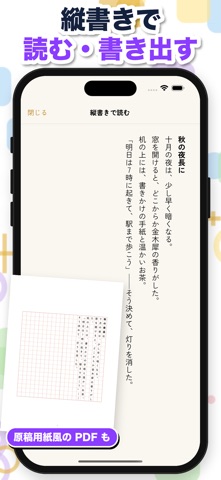
Vertical writing: "Show vertically" sets any note top to bottom, right to left, like a Japanese book, with vertical punctuation and two-digit numbers side by side. On iPhone, iPad and Mac you see it as you type, and "Read vertically" goes full screen; on Windows you edit in vertical text. Export vertical PDF or PNG: A4 or B5, three sizes, plain or a manuscript grid (20 x 20).

EASY FILE TRANSFER BETWEEN DEVICES
Attach photos, videos and files to a note and pass them to your other devices: directly over the same Wi-Fi (with a passphrase; use a trusted network), or through Dropbox or OneDrive so another device can receive them later. A folder synced on your computer also works (advanced).

YOUR NOTES AS MEMORY FOR AI
Mark a note "Share with AI" to make it context. An "About Me" note (your role, preferences, writing style) goes first every time you ask. Both sync too.
Supported AI providers: Google (Gemini), OpenAI and Anthropic, plus Ollama on your own Mac or Windows PC.
In "Ask AI", the most relevant marked notes are attached; review them and leave any out. Ask several AIs at once and compare the answers side by side.
"Save as Note" or "Add to Existing Note" keeps an answer, marked automatically as context for next time.
On Mac and Windows, turn on "Connect AI Apps (MCP)" and AI apps that support MCP can search and add your notes. It listens only inside that computer, is off by default, needs a passphrase, and shows only marked notes and About Me unless you choose otherwise.

MORE
Cards with colors, pins, search, archive, edit history and neat Markdown; move cards freely. Screenshots and screen recordings on Apple silicon Macs. Optional Face ID lock. In Japanese, English, Spanish, Korean, Thai and Traditional Chinese.

PRIVACY
Only notes marked "Share with AI" and About Me are sent, directly to the provider you registered, never through the developer's server. A consent screen appears before the first send to each AI. API keys and the send log stay on your device.
Notes sync through a server in Tokyo, Japan. The developer does not look at your notes. No analytics, ads or tracking. "Delete account" in Settings erases your server data.

PRICE
Free, no ads, no in-app purchases. API fees, if any, are between you and the AI provider.

iOS / iPadOS 16.0+, macOS 13+, Windows 10 / 11 (64-bit).
Show more Show less

Alternatives to Cho Memo Pad - Sync Notes + AI

MindRoot icon MindRoot
koji yanagida
0.0
Free
HyoMemo: Table Checklist icon HyoMemo: Table Checklist
TERUHA
0.0
Free
Tally Lite – Hand Counter icon Tally Lite – Hand Counter
Marcus Jaatinen
0.0
Free
TreeNotes - Tree Outliner icon TreeNotes - Tree Outliner
Seiya.k
0.0
Free
Simple Stock List icon Simple Stock List
YUKI TANAIKE
0.0
Free
Tiny Planner - Daily Organizer icon Tiny Planner - Daily Organizer
TinyWork Apps
4.7
Free
197 ratings
Logseq icon Logseq
Logseq, Inc.
4.4
Free
265 ratings

More from NAOKI TAKAHASHI

The本棚 〜マンガ・書籍・雑誌 読書アプリ〜 icon The本棚 〜マンガ・書籍・雑誌 読書アプリ〜
NAOKI TAKAHASHI
0.0
$4.99
Footrip Album icon Footrip Album
NAOKI TAKAHASHI
0.0
Free

Changelog of Cho Memo Pad - Sync Notes + AI

No changelog data

Developer information for NAOKI TAKAHASHI

NAOKI TAKAHASHI

Address:

Share Cho Memo Pad - Sync Notes + AI

Comments on Cho Memo Pad - Sync Notes + AI for iOS

We don't have enough comments to show example comments. Please check back later.

App Store Rankings for Cho Memo Pad - Sync Notes + AI

This app is not ranked

Technologies used by Cho Memo Pad - Sync Notes + AI

Top new apps Price drops on Google Play Today's trending apps Apps other people are watching Popular Productivity Apps
MindRoot icon MindRoot
HyoMemo: Table Checklist icon HyoMemo: Table Checklist
Tally Lite – Hand Counter icon Tally Lite – Hand Counter
TreeNotes - Tree Outliner icon TreeNotes - Tree Outliner
Simple Stock List icon Simple Stock List
Tiny Planner - Daily Organizer icon Tiny Planner - Daily Organizer
Logseq icon Logseq
AppBrain Intelligence premium content

Subscribe now to get full and unlimited access to AppBrain Intelligence. You'll have access to:

  • App Intelligence dashboard (performance timeline, competitor comparison, country rankings, insight cards)
  • Detailed ranking data per app
  • Full timeline per developer
  • Device market shares data per country
  • Unlimited keyword tracking
  • AI assistant access via MCP (Claude, Cursor or any MCP client)
1 Month

$75/mo
(billed every month)

SAVE 0%
Subscribe
3 Months

$65/mo
($195 billed every 3 months)

SAVE 13%
Subscribe
1 Year

$57.50/mo
($690 billed every year)

SAVE 23%
Subscribe
Each subscription will automatically renew 3 days before the expiration date for the same time period. Subscriptions can be cancelled at any time before the renewal.

AppBrain is an app data site, we track rankings, ratings, installs for all apps and games on Google Play and the App Store. AppBrain doesn't host app files or APKs, all install links go directly to the official store. All trademarks are owned by their respective owners.

More apps

  • Top Android apps being viewed
  • SMART Mirror
  • View Splittr - Expense Splitting
  • Bouncing Squares

App statistics

  • Android statistics
  • Google Play Developer stats
  • Trending Android Apps
  • Trending iOS apps
  • Top popular Apps
  • Buy the best Android phone
  • Buy & sell app businesses

About AppBrain

  • Contact
  • Privacy
  • Documentation
  • DMCA takedowns
  • Blog
  • Discover trending web games
© 2010-2026 - AppBrain