

Choiceworks
Choiceworks is made and published by Bee Visual, LLC. AppBrain is an independent app data site and isn't affiliated with Bee Visual, LLC. The app name, icon, screenshots and description belong to Bee Visual, LLC and are shown as published on the App Store.
AppBrain's verdict
EstablishedLoved by usersTop 10- Best rank
- #9
- Top Paid, Canada
- Rating on App Store
- 4.66
- 302 ratings
- Last updated
- September 29, 2026
Users love it: 4.7 stars from 302 ratings. Its best ranking is #9 in Top Paid, Education in Canada.
Rankings
App Store top charts- Highest rank
- #9
- Chart
- Top Paid
- Education
- Country
- Canada
App Store Rankings for Choiceworks
Top rankings
| Rank | Country | Category | List |
|---|---|---|---|
| 9 | Canada | Education | Top Paid |
Ranking history in Canada
Competitors
Similar apps and more from Bee Visual, LLCAlternatives to Choiceworks






More from Bee Visual, LLC


Releases
Updates seen on the App Store- Version
- 19.10
- Launched
- December 2011
No changelog data
User feedback
Ratings and reviews on the App StoreComments on Choiceworks for iOS
We don't have enough comments to show example comments. Please check back later.
Technology
Found in the app by AppBrain- Price
- $29.99
- App size
- 394.4 MB
- Content rating
- Everyone
Technologies used by Choiceworks
About the app and developer
About Choiceworks
Choiceworks is an education app developed by Bee Visual, LLC.
User Ratings
Choiceworks is rated 4.66 out of 5 stars. The rating is based on 300 ratings.
App Information
Choiceworks costs $29.99. The app size is 394.40 MB. The latest version available is 19.10. The last update was on September 29, 2026.
Technical Requirements
The app has a content rating of Everyone. The app has been available on the App Store since December 2011.
Developer information for Bee Visual, LLC
Address:
Frequently asked questions about Choiceworks
Is Choiceworks free?
No. Choiceworks costs $29.99 on the App Store.
Is Choiceworks still available?
Yes. Choiceworks is on the App Store, and the last update we saw was on September 29, 2026.
How large is Choiceworks?
Choiceworks is 394.40 MB.
Is Choiceworks suitable for children?
App Store rates the content of Choiceworks as suitable for everyone.
How do people rate Choiceworks?
Choiceworks scores 4.66 out of 5 stars, from 302 ratings on the App Store.
Who made Choiceworks?
Choiceworks was developed by Bee Visual, LLC. It is listed in the education category on the App Store.
What are the best alternatives to Choiceworks?
People looking at Choiceworks also look at these education apps: TouchChat HD- AAC w/ WordPower, Proloquo2Go AAC, LAMP Words For Life, Pictello Visual Stories, TD Snap® AAC.
Store listing
By Bee Visual, LLC, from the App Store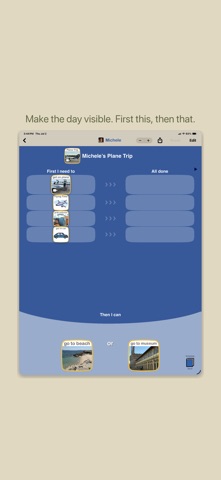


Description by Bee Visual, LLC Written by the developer, not by AppBrain. Click to read.
Families, caregivers, educators, and therapists can create customized visual boards using pictures, text, video, and recorded audio. Boards can be used at home, in therapy, during appointments, while traveling, or anywhere a visual plan helps.
Choiceworks includes four board types:
• Schedule boards show what is happening now and what comes next
• Waiting boards make waiting more concrete with a visual timer and activity choices
• Feelings boards support communication about emotions, choices, and next steps
• Feelings Scale boards help show how big a feeling is and what can help at each level
Features include:
• Visual schedule, waiting, feelings, and Feelings Scale boards
• Visual timers for schedules and waiting
• Custom pictures, video, text, and recorded audio
• Multiple profiles
• Import and export of Choiceworks board files
• Send a copy of a board by AirDrop, Files, or email
• Optional iCloud Sync & Backup across your own devices signed into the same Apple ID
• App menus, included board labels, included card text, and spoken card words in English, Spanish, Italian, Dutch, German, French, and Portuguese
• VoiceOver support
Choiceworks has no ads, no tracking, and no accounts to create. Your boards, photos, videos, and recordings stay on your device and in your own iCloud.
One purchase includes everything. No subscriptions.