

ChordFlow: Piano Chord Trainer
ChordFlow: Piano Chord Trainer is made and published by 泽 眭. AppBrain is an independent app data site and isn't affiliated with 泽 眭. The app name, icon, screenshots and description belong to 泽 眭 and are shown as published on the App Store.
AppBrain's verdict
- Rating on App Store
- 5.00
- 3 ratings
- Last updated
- September 2, 2026
It doesn't have enough ratings yet to judge what users think.
Rankings
App Store top chartsApp Store Rankings for ChordFlow: Piano Chord Trainer
Competitors
Similar apps and more from 泽 眭Alternatives to ChordFlow: Piano Chord Trainer


Releases
Updates seen on the App Store- Version
- 1.1.11
- Launched
- March 2026
No changelog data
User feedback
Ratings and reviews on the App StoreComments on ChordFlow: Piano Chord Trainer for iOS
We don't have enough comments to show example comments. Please check back later.
Technology
Found in the app by AppBrain- Price
- Free
- App size
- 60.1 MB
- Content rating
- Everyone
Technologies used by ChordFlow: Piano Chord Trainer
About the app and developer
About ChordFlow: Piano Chord Trainer
ChordFlow: Piano Chord Trainer is a music app developed by 泽 眭.
User Ratings
ChordFlow: Piano Chord Trainer is rated 5.00 out of 5 stars. The rating is based on 3 ratings.
App Information
ChordFlow: Piano Chord Trainer is freely available from the App Store. The app size is 60.12 MB. The latest version available is 1.1.11. The last update was on September 2, 2026.
Technical Requirements
The app has a content rating of Everyone. The app has been available on the App Store since March 2026.
Developer information for 泽 眭
Address:
Store listing
By 泽 眭, from the App Store


Description by 泽 眭 Written by the developer, not by AppBrain. Click to read.
REAL-TIME CHORD RECOGNITION
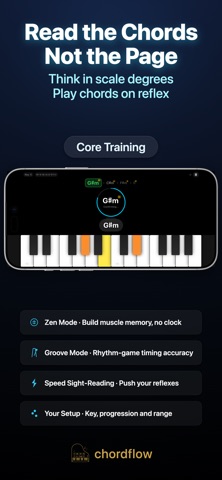
• Recognizes 45+ chord types: triads, 6ths, 7ths, 9ths, 11ths, 13ths, sus and added-tone chords
• Correctly names inversions and slash chords like Dm/G
• A rising waterfall visualizes every note you hold
• The sustain pedal (CC 64) is handled separately for sound and for analysis, so holding the pedal never blurs one chord into the next
PRACTICE MODES
• Zen: no timer. Optional chord-tone hints, plus a grace window for pedal legato
• Groove: play on the beat. The metronome keeps time and scores the timing of your first note
• Fast: pure reaction. Nail a chord and the next one appears — chase your best BPM
• Cross-Key Practice: Transpose and Mixed Keys drills
OPTIONAL MIDI KEYBOARD
• Every feature works on the on-screen keyboard, which adapts to your device
• Plug in a MIDI keyboard and the view expands to all 88 keys — connect or disconnect anytime
• Velocity and sustain pedal supported
• Prefer the sound of your own instrument? Mute the in-app piano
ACCOMPANIMENT MACHINE (PRO)
• Preset progressions: 1-6-4-5, classic pop (4-5-3-6-2-5-1), Canon, pop-rock (6-4-1-5) and more
• Create and save your own progressions, or have it draw random chords from qualities you pick
• Block or arpeggiated playback, with adjustable tempo, chord duration, bass root, sustain, metronome and loop count
• Play along, and colors show which target tones you actually hit
TRACK YOUR PROGRESS
• Practice calendar with streaks, personal bests for every key, and full session history
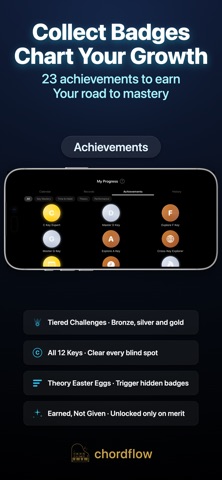
• 25 achievements covering key mastery, habits, theory and performance
• Export and import your data anytime — everything is stored on your own device
PRACTICE YOUR WAY
• All 12 keys, with 29 chord qualities and inversions configurable per position — major, minor, diminished, augmented, sus, and 7ths through 13ths
• Keep drills diatonic, or lift the restriction and combine chords freely
• Flexible matching (correct chord tones) or exact matching (bass note included)
• Roman or Arabic numerals for scale degrees
• 10 languages, with chord and theory terms following each language's own conventions
FREE VERSION INCLUDES
Chord recognition, free play, all three sight-reading modes, Cross-Key Practice, and the built-in progressions, plus the practice calendar, personal bests and every achievement.
PRO UNLOCKS
All 12 keys, custom progressions, and the accompaniment machine. Choose a monthly subscription with a free trial, or buy once and keep it for good.
GOOD TO KNOW
• Works fully offline — no account, no ads, and no practice data ever leaves your device
• Landscape orientation, designed for both iPhone and iPad
• Made by an indie developer who uses it for his own improv practice. Questions or ideas? Email me — I usually reply the same day
Terms of Use: https://www.apple.com/legal/internet-services/itunes/dev/stdeula/
Privacy Policy: https://flash-artichoke-9fd.notion.site/Privacy-Policy-31a51c4c1e3a800fb537cf8dd494979c