

Chordpeek is made and published by Robert Corbin. AppBrain is an independent app data site and isn't affiliated with Robert Corbin. The app name, icon, screenshots and description belong to Robert Corbin and are shown as published on the App Store.
AppBrain's verdict
- Last updated
- September 14, 2026
Rankings
App Store top chartsApp Store Rankings for Chordpeek
Competitors
Similar apps and more from Robert CorbinAlternatives to Chordpeek


More from Robert Corbin


Releases
Updates seen on the App Store- Version
- 3.0
- Launched
- June 2026
No changelog data
User feedback
Ratings and reviews on the App StoreComments on Chordpeek for iOS
We don't have enough comments to show example comments. Please check back later.
Technology
Found in the app by AppBrain- Price
- $2.99
- App size
- 5.25 MB
- Content rating
- Everyone
Technologies used by Chordpeek
About the app and developer
About Chordpeek
Chordpeek is a music app developed by Robert Corbin.
User Ratings
The app has no ratings yet.
App Information
Chordpeek costs $2.99. The app size is 5.25 MB. The latest version available is 3.0. The last update was on September 14, 2026.
Technical Requirements
The app has a content rating of Everyone. The app has been available on the App Store since June 2026.
Developer information for Robert Corbin
Address:
Frequently asked questions about Chordpeek
Is Chordpeek free?
No. Chordpeek costs $2.99 on the App Store.
Is Chordpeek still available?
Yes. Chordpeek is on the App Store, and the last update we saw was on September 14, 2026.
How large is Chordpeek?
Chordpeek is 5.25 MB.
Is Chordpeek suitable for children?
App Store rates the content of Chordpeek as suitable for everyone.
Who made Chordpeek?
Chordpeek was developed by Robert Corbin. It is listed in the music category on the App Store.
What are the best alternatives to Chordpeek?
People looking at Chordpeek also look at these music apps: MIDI Memos: Recorder + Player, Tonic Synths, Callback Freeverb, Loopeme, Metronome Tempo BPM - BA2.
Store listing
By Robert Corbin, from the App Store

Description by Robert Corbin Written by the developer, not by AppBrain. Click to read.
HOW IT WORKS
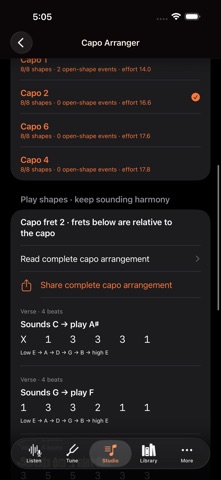
1. Open Studio and choose or create a Songboard. Use Arrange whole song with capo in the toolbar.
2. Compare capo frets 0–7 by default, or adjust the range up to fret 9.
3. Select an option and read the sounding chord, played shape and six-string fingering for every event. Frets are relative to the capo.
4. Share the complete arrangement as text with the original section and beat context. Your saved Songboard is not edited.
Use the existing guitar listening, tuning, chord-library and Songboard tools to build and rehearse your ideas locally.
WHAT TO KNOW
Standard EADGBE tuning only. Shapes are checked against each sounding chord pitch class and the supported fret range. Ranking uses a beat-weighted effort heuristic, not a guarantee of comfort. Try the shapes on your instrument and check tuning after fitting a capo. An unavailable shape is disclosed rather than substituted.
Built for iPhone and iPad. No account required for this workflow.