Chordzilla is a music app developed by Katsuhiko Tamura.
User Ratings
The app has no ratings yet.
App Information
Chordzilla is freely available from the App Store. The app size is 137.46 MB. The latest version available is 1.4. The last update was on October 13, 2026.
Technical Requirements
The app has a content rating of Everyone. The app has been available on the App Store since June 2026.
Description by Katsuhiko Tamura(from the App Store)
# Chordzilla — A Compact App for Creating Chord Progressions and Melodies
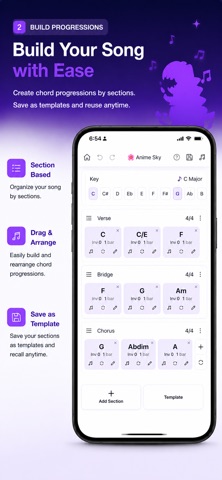
Chordzilla is a compact songwriting app that lets you create chord progressions and melodies directly on your smartphone.
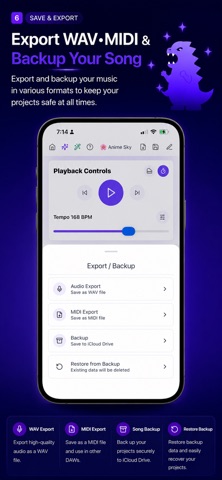
Build chord progressions, compose melodies with Piano Roll editing, and export your work as WAV or MIDI. Capture musical ideas quickly with a simple and intuitive workflow.
## Chord Progression Editor
Simply choose a key and scale to receive suggestions for the next chord.
Explore diatonic chords, substitute chords, borrowed chords, tritone substitutions, subdominant minor chords, and more. Even without extensive music theory knowledge, you can build natural-sounding chord progressions with ease.
Save your progressions as sections to build your own reusable chord library.
## Piano Roll Melody Editor
Create melodies by tapping directly on the Piano Roll.
Premium users can also enter notes using the on-screen piano keyboard.
Melody examples matched to your chord progression are available to help inspire new musical ideas.
## Genre Presets
Start with ready-made templates instead of creating everything from scratch.
Includes over 18 presets, with more planned in future updates.
## Song Information Export
Convert your song information into organized text, including key, scale, BPM, section structure, chord progression, and other production details.
The generated text can be copied and used with compatible music production tools and external services.
## MIDI & WAV Export
Export your chord progressions and melodies as MIDI files.
You can also export WAV audio for further editing in your DAW or other music production software.
## Perfect For
• Songwriters looking for an easy way to build chord progressions
• Musicians who want to sketch melody ideas quickly
• Beginners learning harmony and songwriting
• Anyone who wants to compose music on a smartphone
• Creators who use additional music production tools in their workflow
## Premium Plan
The free version includes all essential features for creating, playing back, and reviewing chord progressions.
Upgrade to Premium (monthly subscription) to unlock:
• MIDI export
• Piano keyboard input
• Song Information Export
• Preset templates
• Unlimited sections
...and all future Premium features.
We are committed to continuously improving Chordzilla with new features and ongoing enhancements.
Terms of Use: https://www.apple.com/legal/internet-services/itunes/dev/stdeula/
Each subscription will automatically renew 3 days before the expiration date for
the same time period. Subscriptions can be cancelled at any time before the renewal.