Chores Tracker: ChoreNest is an overall app developed by Abel Szanto.
Download Statistics
User Ratings
The app has no ratings yet.
App Information
Chores Tracker: ChoreNest is FREE to download. The APK download size is 22.94 MB. The latest version available is 1.0. The last update was on June 10, 2026.
Technical Requirements
The app has a content rating of Everyone. The app has been available on Google Play 4 weeks ago.
Description
ChoreNest helps families manage chores, kids allowance, rewards, and parent approvals in one simple household app.
Create a household, add children, assign chores, approve completed work, and keep every balance clear. Parents stay in control while kids get a simple companion view showing what is due, what they have earned, and what is waiting for approval.
CHORES FOR THE WHOLE FAMILY
Assign chores to one child or the whole household. Use presets like dishes, trash, pet care, making the bed, laundry, and vacuuming, or create custom chores with rewards, schedules, approvals, and photo proof.
ALLOWANCE AND REWARDS
Track daily, weekly, or monthly allowance with virtual balances. Choose money or points, record spending or redemptions, and review each child's transaction history.
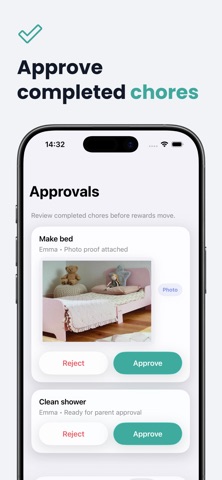
PARENT APPROVALS
Kids mark chores complete when they are ready. Parents review completed chores, approve rewards, reject tasks when needed, and keep balances accurate.
EASY FAMILY JOINING
Children can join a household with a QR code or invite code. No separate child email or password is required for the kid view.
PHOTO PROOF
For chores that need extra confirmation, children can attach photo proof before sending the chore for approval.
CHORENEST PRO
ChoreNest Pro includes whole-family access, child profiles, chore tracking, allowance and reward tracking, QR code invites, automatic allowance schedules, photo proof, and the kid companion app.
Choose monthly access, or start yearly access with a 7-day free trial.
Subscription Details
- Payment is charged to your Apple ID at confirmation or after any eligible free trial, unless canceled at least 24 hours before the trial ends. - Subscriptions renew automatically unless canceled at least 24 hours before the end of the current period. - Your account is charged for renewal within 24 hours before the end of the current period. - You can manage or cancel your subscription in Settings > Apple ID > Subscriptions.
Each subscription will automatically renew 3 days before the expiration date for
the same time period. Subscriptions can be cancelled at any time before the renewal.