ChronaFrame: Timelapse Creator is made and published by
Tigran Avetisov.
AppBrain is an independent app data site and isn't affiliated with Tigran Avetisov.
The app name, icon, screenshots and description belong to Tigran Avetisov and are shown as
published on the App Store.
About ChronaFrame: Timelapse Creator
ChronaFrame: Timelapse Creator is a photo & video app developed by Tigran Avetisov.
User Ratings
The app has no ratings yet.
App Information
ChronaFrame: Timelapse Creator is freely available from the App Store. The app size is 94.30 MB. The latest version available is 1.0.2. The last update was on February 18, 2026.
Technical Requirements
The app has a content rating of Everyone. The app has been available on the App Store since February 2026.
Description by Tigran Avetisov(from the App Store)
Stop cluttering your camera roll with random progress photos.
ChronaFrame is a dedicated workspace for tracking change over time, helping you turn daily photos into perfectly aligned, shareable timelapses.
Whether you’re tracking a fitness transformation, a home renovation, a growing plant, or a pregnancy, ChronaFrame ensures every shot lines up consistently from day one.
WHY CHRONAFRAME?
Your normal camera app wasn’t built for progress tracking. It’s messy, hard to organize, and impossible to align consistently. ChronaFrame solves this with "Folder-First" organization and ghost overlay technology.
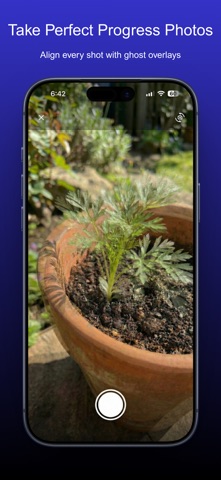
KEY FEATURES: Perfect Alignment (Ghost Mode) Never take a shaky progress photo again. ChronaFrame overlays your previous photo on the camera viewfinder, allowing you to align your eyes, walls, or objects perfectly. • Adjustable transparency slider for precise alignment • Designed for consistent framing across days, weeks, or months
Organized Tracks Create dedicated tracks for every project and keep everything neatly separated. • Folder-first workflow with individual tracks for each journey • Looping thumbnail previews on the dashboard to visualize progress at a glance • Smart reminders with daily, weekly, or custom schedules • Mark tracks as complete to pause reminders and freeze the day counter without losing data
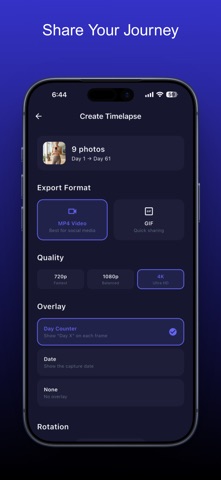
Studio-Quality Export Turn your photos into high-quality, shareable videos in seconds. • Export resolutions: 720p, 1080p, or full 4K • Export formats: MP4 video or looping GIF • Speed control with adjustable frame timing • Optional hold on the first and/or last frame to highlight before-and-after results • Optional overlays showing day count, date stamps, or no overlay at all • Rotation controls for perfect orientation
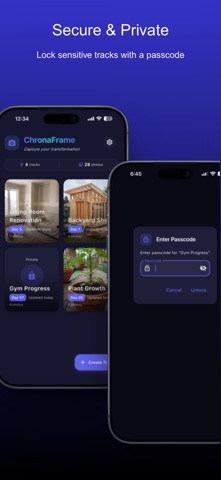
Secure & Private Some progress is personal. Keep sensitive tracks protected. • Lock tracks behind a passcode • Locked tracks display a lock icon instead of a preview on the dashboard • Content is only visible after passcode entry
Make It Yours Customize ChronaFrame to match your style and workflow. • Multiple color themes including Indigo, Teal, Violet, and more • Full light mode and dark mode support • 24-hour time format option • GIF preview thumbnails for quick visual scanning • Built-in feature requests and bug reporting via email
PERFECT FOR: • Fitness transformations, bulking, cutting, and weight loss • Pregnancy progress tracking • Plant growth and gardening logs • DIY projects and home renovations • Face & skin progress, including beard growth or skincare routines
Start your timeline today. Download ChronaFrame and capture change with clarity.
Terms of Use (EULA): https://www.apple.com/legal/internet-services/itunes/dev/stdeula/
Each subscription will automatically renew 3 days before the expiration date for
the same time period. Subscriptions can be cancelled at any time before the renewal.