

CIMcloud is made and published by Cimcon Digital. AppBrain is an independent app data site and isn't affiliated with Cimcon Digital. The app name, icon, screenshots and description belong to Cimcon Digital and are shown as published on the App Store.
AppBrain's verdict
- Last updated
- August 7, 2025
Rankings
App Store top chartsApp Store Rankings for CIMcloud
Competitors
Similar apps and more from Cimcon DigitalMore from Cimcon Digital

Also available on Google Play

Releases
Updates seen on the App Store- Version
- 1.0.2
- Launched
- October 2024
No changelog data
User feedback
Ratings and reviews on the App StoreComments on CIMcloud for iOS
We don't have enough comments to show example comments. Please check back later.
Technology
Found in the app by AppBrain- Price
- Free
- App size
- 30.7 MB
- Content rating
- Everyone
Technologies used by CIMcloud
About the app and developer
About CIMcloud
CIMcloud is an utilities app developed by Cimcon Digital.
User Ratings
The app has no ratings yet.
App Information
CIMcloud is freely available from the App Store. The app size is 30.70 MB. The latest version available is 1.0.2. The last update was on August 7, 2025.
Technical Requirements
The app has a content rating of Everyone. The app has been available on the App Store since October 2024.
Developer information for Cimcon Digital
Address:
Frequently asked questions about CIMcloud
Is CIMcloud free?
Yes. CIMcloud is free on the App Store.
Is CIMcloud still available?
Yes. CIMcloud is on the App Store, and the last update we saw was on August 7, 2025.
How large is CIMcloud?
CIMcloud is 30.70 MB.
Is CIMcloud suitable for children?
App Store rates the content of CIMcloud as suitable for everyone.
Who made CIMcloud?
CIMcloud was developed by Cimcon Digital. It is listed in the utilities category on the App Store.
Store listing
By Cimcon Digital, from the App Store


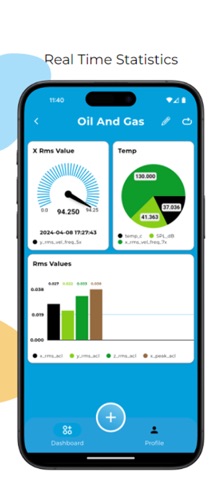


Description by Cimcon Digital Written by the developer, not by AppBrain. Click to read.
Key Features:
1. Login Screen: Secure your account with username and password authentication.
2. Biometric Security: Enable or skip biometric security for quick and safe login.
3. Customizable Dashboard: Create personalized dashboards by adding widgets such as tables, gauges, pie charts, and line charts. Use drag-and-drop functionality to configure your dashboard to suit your needs.
4. Widget Configuration: Customize individual widgets to display data the way you prefer. Choose from different types like tables, charts, and more.
5. User Profile Screen: Access all settings easily and view your user ID from the profile screen.
With its simple and flexible design, CIMcloud gives you full control over how you visualize your data.