

CineBudget Pro Mobile
CineBudget Pro Mobile is made and published by Jonathan Judelson. AppBrain is an independent app data site and isn't affiliated with Jonathan Judelson. The app name, icon, screenshots and description belong to Jonathan Judelson and are shown as published on the App Store.
AppBrain's verdict
- Rating on App Store
- 4.00
- 2 ratings
- Last updated
- September 23, 2026
- Size
- 5.33 MB
It doesn't have enough ratings yet to judge what users think.
User feedback
Ratings and reviews on the App StoreComments on CineBudget Pro Mobile for iOS
We don't have enough comments to show example comments. Please check back later.
Store listing
By Jonathan Judelson, from the App Store




Description by Jonathan Judelson Written by the developer, not by AppBrain. Click to read.
CineBudget Pro Mobile puts your production budgets on iPhone and iPad. Build estimates, record actual expenses, and share budgets with your team, from the office to the next location.
BUILD YOUR BUDGET
Start with a blank budget or choose Film or AICP templates. Organize categories, subcategories, section headers, and line items. Drag to reorder your budget and move categories between sections. Keep projects organized in folders and duplicate budgets for your next production.
WORK THROUGH THE DETAILS
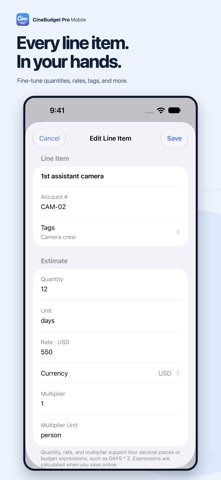
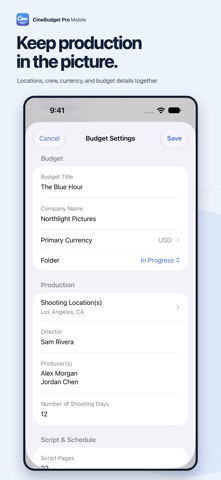
Edit quantities, rates, units, multipliers, and currencies. Include overtime and available fringes, and add account numbers, tags, and notes. Capture production details, shooting dates, locations, and assumptions alongside the numbers.
TRACK ESTIMATES AND ACTUALS
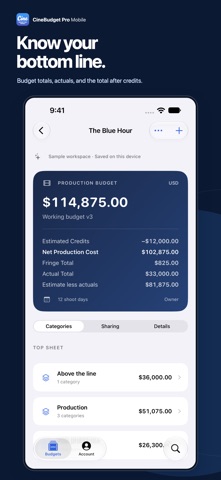
Record actual expenses directly on each line item. Review budget totals and actual expenses, edit contractual charges and tax credits, and see your total after credits.
BRING YOUR TEAM IN
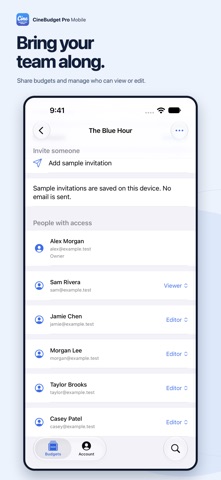
Share budgets with collaborators and choose viewer or editor access. See who's included, change access levels, and remove access when your team changes.
TAKE YOUR BUDGET TO THE NEXT MEETING
Export and share a complete budget as a PDF. Choose the paper size, fields, and production information to include, then save it to Files or share it using your device's share sheet.
ONE ACCOUNT, ON MOBILE AND WEB
Sign in to access the same CineBudget Pro account and online budgets you use on the web. The native iPhone and iPad design includes Liquid Glass navigation, layouts that adapt to your screen, and light and dark appearances.
GET STARTED
Sign in or create an account with email, Google, Apple, or Facebook. You can also explore a sample project before signing in.
Safety and technology
Found in the app by AppBrain- Price
- Free
- App size
- 5.33 MB
- Content rating
- Everyone
Technologies used by CineBudget Pro Mobile
Releases
Updates seen on the App Store- Version
- 2.0
- Launched
- April 2026
No changelog data
Alternatives
Similar apps and more from Jonathan JudelsonMore from Jonathan Judelson


Rankings
App Store top chartsApp Store Rankings for CineBudget Pro Mobile
About the app and developer
About CineBudget Pro Mobile
CineBudget Pro Mobile is a business app developed by Jonathan Judelson.
User Ratings
CineBudget Pro Mobile is rated 4.00 out of 5 stars. The rating is based on 2 ratings.
App Information
CineBudget Pro Mobile is freely available from the App Store. The app size is 5.33 MB. The latest version available is 2.0. The last update was on September 23, 2026.
Technical Requirements
The app has a content rating of Everyone. The app has been available on the App Store since April 2026.
Developer information for Jonathan Judelson
Address: