





AppBrain's verdict
New- Rating on App Store
- 5.00
- 1 ratings
- Last updated
- November 6, 2026
- Size
- 8.54 MB
Cinetone: Video Color Grading came out 62 days ago. It doesn't have enough ratings yet to judge what users think.
User feedback
Ratings and reviews on the App StoreComments on Cinetone: Video Color Grading for iOS
We don't have enough comments to show example comments. Please check back later.
Store listing
By Andrii Cheberiako, from the App StoreDescription by Andrii Cheberiako Written by the developer, not by AppBrain. Click to read.
Cinetone is an iPhone video editor and cinematic color studio. Arrange multiple clips, refine each shot, build a soundtrack, add captions, and export a finished video—or create a color-only LUT for another editing workflow.
EDIT ON A MULTI-CLIP TIMELINE
Trim, split, move, and reorder clips. Reframe, rotate, or flip footage. See waveforms, trim added audio clips, adjust their volume individually, and keep original sound separate from added music. Editing is nondestructive: Cinetone works with its own local copies, leaving source files untouched.
ADD CAPTIONS
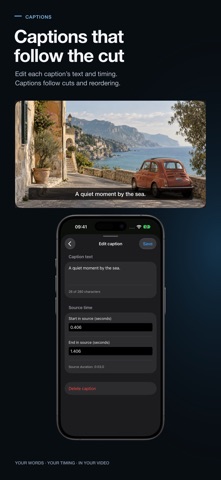
Create and edit captions for individual source clips, set their text and timing, and control whether they appear. Captions stay attached to their original clip as you trim, split, or reorder the timeline. Add them manually or generate them from speech in a selected original clip when the device, language, and Apple speech model support it. Model downloads may be required; transcription runs on device. Review captions before export. Enabled captions are burned into the video, never included in a LUT.
MAKE THE COLOR YOURS
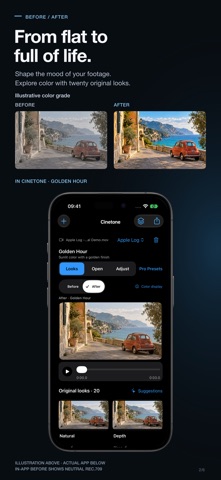
Start with 20 original cinematic looks, including Golden Hour, Soft Portrait, Teal Shadow, and Rich Mono, plus three open community looks. Compare your grade with neutral Rec.709 and adjust exposure, warmth, tint, contrast, saturation, intensity, and fade. Import your own .cube LUTs from Files after choosing the matching input profile; imported LUTs output SDR Rec.709.
HANDLE LOG AND HDR SOURCES
Import supported Rec.709, Apple Log, Apple Log 2, and color-tagged HLG or PQ footage. HLG and PQ are converted to SDR Rec.709 for preview and video export. Cinetone does not export HDR video.
EXPORT FOR YOUR NEXT STEP
Export an H.264 MP4 or HEVC MP4 when supported, with SDR Rec.709 color and supported mono or stereo audio. Choose up to 1080p or 4K and up to 30 fps or the source frame cadence. Smaller sources are never upscaled. Export a 33-point or 65-point .cube LUT to carry color into a compatible workflow. Save videos to Photos with add-only access, share them, or save them in Files.
SUGGESTIONS WITH YOU IN CONTROL
Explore 20 looks and get on-device scene suggestions with a deterministic fallback. Where available, optional Apple Private Cloud Compute requires explicit opt-in on iOS 27 or later. Only disclosed scene metrics and look-catalog text are sent; your video, frames, and audio stay on device. Suggestions never apply a look or change your export automatically.
USE SHORTCUTS, NO ACCOUNT
Use Siri and Shortcuts to apply or recommend looks, explore cinematic looks, and export graded video. Find looks and imported presets with iOS Spotlight. No Cinetone account is required.
Requires iOS 26 or later. iPhone only.
Safety and technology
Found in the app by AppBrain- Price
- Free
- App size
- 8.54 MB
- Content rating
- Everyone
Technologies used by Cinetone: Video Color Grading
Releases
Updates seen on the App Store- Version
- 1.3.1
- Launched
- September 2026
No changelog data
Alternatives
Similar apps and more from Andrii CheberiakoAlternatives to Cinetone: Video Color Grading


More from Andrii Cheberiako

Rankings
App Store top chartsApp Store Rankings for Cinetone: Video Color Grading
About the app and developer
About Cinetone: Video Color Grading
Cinetone: Video Color Grading is a photo & video app developed by Andrii Cheberiako.
What is the rating of Cinetone: Video Color Grading?
Cinetone: Video Color Grading is rated 5.00 out of 5 stars, based on one rating ratings.
Is Cinetone: Video Color Grading free?
Cinetone: Video Color Grading is free. The app size is 8.54 MB. The latest version available is 1.3.1. The last update was on November 6, 2026.
What are the requirements for Cinetone: Video Color Grading?
The app has a content rating of Everyone. The app has been available on the App Store since September 2026.
Cinetone: Video Color Grading is made and published by Andrii Cheberiako. AppBrain is an independent app data site and isn't affiliated with Andrii Cheberiako. The app name, icon, screenshots and description belong to Andrii Cheberiako and are shown as published on the App Store.
Developer information for Andrii Cheberiako
Address:
Frequently asked questions about Cinetone: Video Color Grading
Is Cinetone: Video Color Grading free?
Yes. Cinetone: Video Color Grading is free on the App Store.
Is Cinetone: Video Color Grading still available?
Yes. Cinetone: Video Color Grading is on the App Store, and the last update we saw was on November 6, 2026.
How large is Cinetone: Video Color Grading?
Cinetone: Video Color Grading is 8.54 MB.
Is Cinetone: Video Color Grading suitable for children?
App Store rates the content of Cinetone: Video Color Grading as suitable for everyone.
How do people rate Cinetone: Video Color Grading?
Cinetone: Video Color Grading has one rating of 5.00 stars on the App Store.
Who made Cinetone: Video Color Grading?
Cinetone: Video Color Grading was developed by Andrii Cheberiako. It is listed in the photo & video category on the App Store.
What are the best alternatives to Cinetone: Video Color Grading?
People looking at Cinetone: Video Color Grading also look at these photo & video apps: LutKit, Develop Log: Color Grading, OCTAGON GRADE: Video Color, Aki Studio: Photo Editor, IRO MATCH : LUT photo editor.